Did you try turning or secure boot? or try temporarily disable UEFI and use legacy BIOS boot?
No
Let me check the UEFI setting
 Anonymous

 Jackie
hold on, is moused_enable default to YES? I didn't see mouse point when booting memdtick
Anonymous
hold on, is moused_enable default to YES? I didn't see mouse point when booting memdtick
When booting no
When it was stuck at that screen yes 😑
 kub-kun
When booting no
When it was stuck at that screen yes 😑
try running bsdconfig it helps a lot with system admining
kub-kun
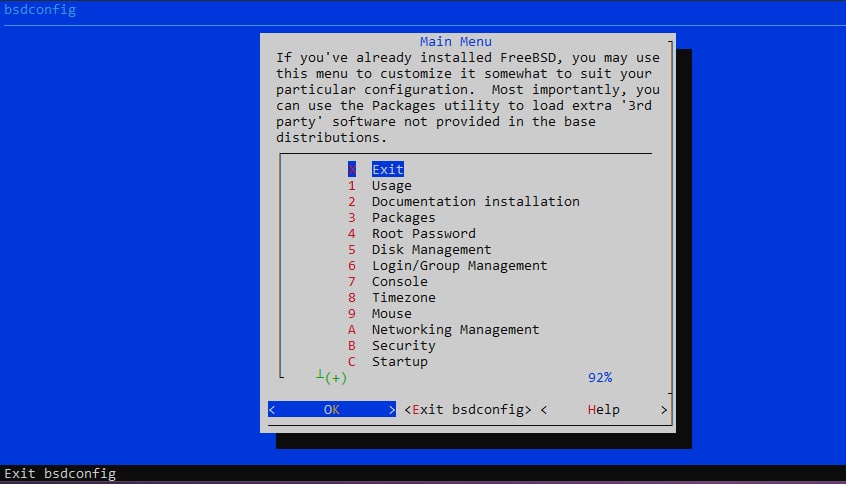 kub-kun
but as root of course
Anonymous
try running bsdconfig it helps a lot with system admining
It doesn't even show output of what I type 😑
kub-kun
try logging into another tty
kub-kun
alt+ctrl+F2
Anonymous
Tried
Nothing happened
kub-kun
shit
kub-kun
what a mess
Anonymous
Isn't memstick for usb?
kub-kun
it is
Anonymous
Yup dude
Holly shit 😑
kub-kun
you've flashed dvd image into usb memstick?
 aldebaran 🇮🇹
Confirmed that telegram-desktop won't crash if I leave it in un-login state.
now it retured to work normally for me, still logged
Jackie
burn it using Ventoy, it supports UEFI and legacy BIOS
kub-kun
No
Memstick.img
into USB
woah, I belive there was a some problem with the image try, checking sums of .img file you get and a sum that is excpected
Anonymous
I checked
Everything was ok
Jackie
now it retured to work normally for me, still logged
no, still crash with seg fault after two upgrades. asked in IRC last night and someone told me that the next version will be 3.1.2 and the problem will be fixed
Jackie
Just have to install Ventoy on a flash disk first and then put your iso files in it and it can boot.
Anonymous
I'll try later
 ɴꙩᴍᴀᴅ
ɴꙩᴍᴀᴅ
Check the release notes https://www.freebsd.org/releases/13.0R/hardware/
ɴꙩᴍᴀᴅ
Which hardware are you going to install FreeBSD anyway?
ɴꙩᴍᴀᴅ
Cool. Could you provide more technical info, like brand and model? We can help you better with that info
ɴꙩᴍᴀᴅ
Yes. You will need to disable secure boot from the BIOS first
ɴꙩᴍᴀᴅ
Oh, the AMD version?
ɴꙩᴍᴀᴅ
I'm not sure at all, but some machines won't let you access to the USB stick if enabled
ɴꙩᴍᴀᴅ
Cool
ɴꙩᴍᴀᴅ
https://wiki.freebsd.org/Laptops
ɴꙩᴍᴀᴅ
That is a short list I guess. I saw a Yoga, but not yours. Anyway I'm reading the specs for the laptop. Wi-Fi 6, 802.11ax 2x
ɴꙩᴍᴀᴅ
It doesn't have an Ethernet port?
ɴꙩᴍᴀᴅ
Hmm, try looking for Wi-Fi 6, 802.11ax 2x2 compat on FreeBSD, maybe FreeBSD 14-CURRENT is a better choice
K
I saw intel ax210 has been released too
XADE
https://t.me/FreeBSD1/19736
also freebsd general images r read only
u can use CI image or other BSDs images to probe
ɴꙩᴍᴀᴅ
Yeah. I miss old Lenovo Thinkpads
ɴꙩᴍᴀᴅ
what generic? I think I missed something
ɴꙩᴍᴀᴅ
Oh, yes. But under download versions, the 14.0 is the named CURRENT.
It is on development and it may changes a lot until release. It has newer drivers and such
ɴꙩᴍᴀᴅ
My best option will be testing 13.0 on a virtual machine if you can do it
ɴꙩᴍᴀᴅ
That way you can check hardware compat
XADE
generic != support for everything
Anonymous
yup 13. works in vmware
ɴꙩᴍᴀᴅ
You will need an usb with the image burnt into it, and another spare usb to use as installation disk
ɴꙩᴍᴀᴅ
I never tried it. I'm not sure if that will work
Anonymous
haven't tried that either, but i hear usb drives change ids so it's a problem
Anonymous
ONLY one way to tell. ................ go for it !!
Anonymous
OK
ɴꙩᴍᴀᴅ
Definitely. Keep us informed!
XADE
ghost BSD boots to RAM
XADE
U can install it on USB using a VM too
Anonymous
Is there a mirror for asia
PKG repository is really slow 😑
ɴꙩᴍᴀᴅ
Is there a mirror for asia
PKG repository is really slow 😑
https://t.me/FreeBSD1/24681
ɴꙩᴍᴀᴅ
Hi there
ɴꙩᴍᴀᴅ
Cool
ɴꙩᴍᴀᴅ
And how to chang it?
Where is the pkg.conf?
/etc/pkg/FreeBSD.conf
But there is a proper way to do so
ɴꙩᴍᴀᴅ
Tnx
And what is the proper way?
Copy /etc/pkg/FreeBSD.conf to /usr/local/etc/pkg/repos/FreeBSD.conf
2. Edit the copied file
3. Run pkg update -f to update from the new repository metadata.
Anonymous
Anonymous
Ok
Anonymous
Tnx
Anonymous
Nothing changed very much
from 40 kB/s to 60kB/s
 Krond
Krond
telegram or matrix(weechat)?
Anonymous
Can I creat home on a hard and others such root and usr on the other one?
Krond
Totally. It's also quite common for local workspaces to actually mount homes from network over NFS for example.
Anonymous
In installation I failed to 😑
you can live boot another freebsd, repartition ( if you know what you're doing, otherwise you might nuke the whole drive ), and then edit your /etc/fstab, reboot
Anonymous
οκ tnx
K
rule is: use zfs unless you have a reason not to (poor hardware or specific ufs needs)
Anonymous
I would say go with UFS, use ZFS if you have a reason to