But idk, it was working perfectly before
Under what settings/os version?
 ɴꙩᴍᴀᴅ
ɴꙩᴍᴀᴅ


 Anonymous
Umm
Anonymous
13.1
Anonymous
And what did you change?
Anonymous
Nothing
Anonymous
I was reinstalling it
Anonymous
echo "exec xfce4-session" > .xinitrc
Anonymous
and type startx
Anonymous
Btw you will ned xinit package
 Andy 'm1m1n' Hidayat
Fixing DEBIAN EFI BOOT in BHYVE
Step by step :
1. using live CD to akses the drive
2. mount the 1st partition /dev/vda1 to /mnt
3. mkdir -p /mnt/EFI/BOOT/
4. cp /mnt/EFI/debian/grubx64.efi /mnt/EFI/BOOT/bootx64.efi
5. umount & reboot
6. You're up & running now
 Diego
Diego
hello, I was downloading FreeBSD, but I see that in the download page there is 13.1 RELEASE and 13.1-STABLE below, both with the various architectures to choose according to the system.
I didn't understand the differences between the two links. How is 13.1 released ??? Are there multiple releases of the same distribution?
Thanks to everyone and have a nice day
Jackie
hello, I was downloading FreeBSD, but I see that in the download page there is 13.1 RELEASE and 13.1-STABLE below, both with the various architectures to choose according to the system.
I didn't understand the differences between the two links. How is 13.1 released ??? Are there multiple releases of the same distribution?
Thanks to everyone and have a nice day
If you don't understand this yet, you should use RELEASE.
Terry
Fixing DEBIAN EFI BOOT in BHYVE
Step by step :
1. using live CD to akses the drive
2. mount the 1st partition /dev/vda1 to /mnt
3. mkdir -p /mnt/EFI/BOOT/
4. cp /mnt/EFI/debian/grubx64.efi /mnt/EFI/BOOT/bootx64.efi
5. umount & reboot
6. You're up & running now
or use CBSD (++reFIND boot method) 😉
neznay
Hi all! can not understand... pkg.freebsd.org died? I go to releases, version 12, gives an error
neznay
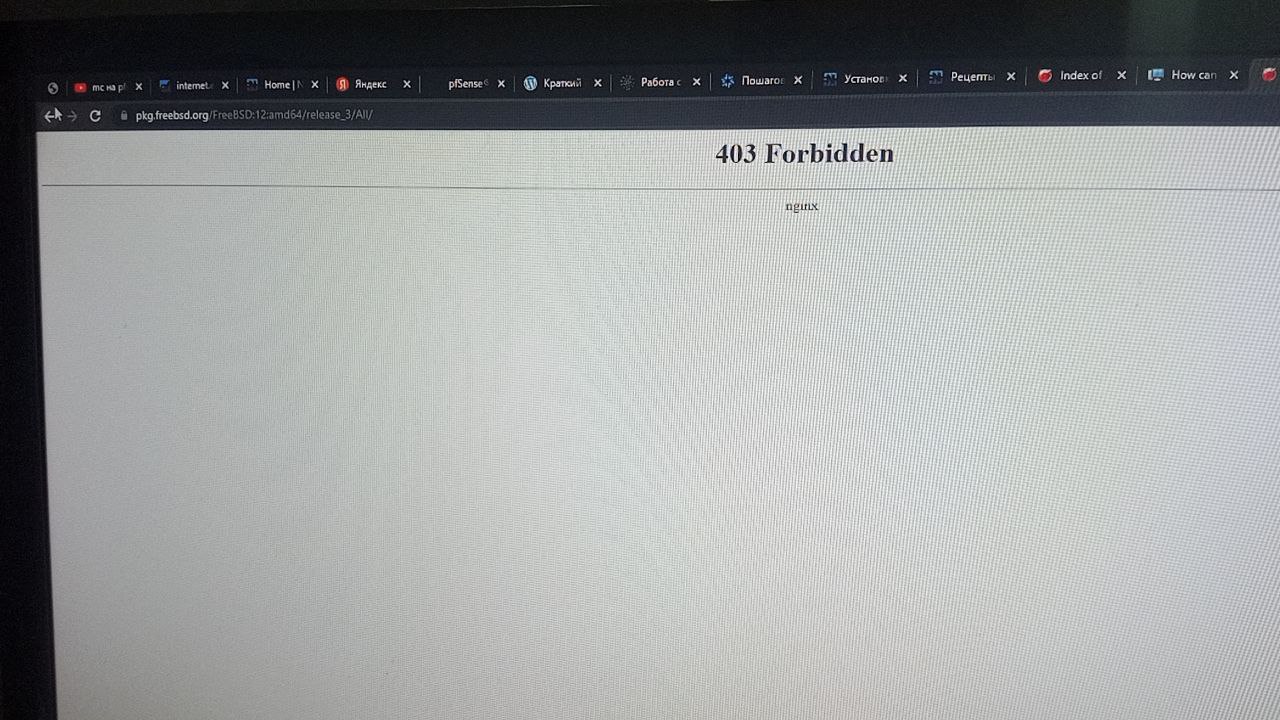 Diego
Diego
If you don't understand this yet, you should use RELEASE.
Thanks. Sorry, but I’m new on BSD. What are differences from stable and release? Thanks
Jackie
Thanks. Sorry, but I’m new on BSD. What are differences from stable and release? Thanks
Well, welcome to the BSD world then. I am a fairly new user of FreeBSD too.
If you want to know more about RELEASE STABLE & CURRENT, check out :
https://forums.freebsd.org/threads/solved-clarification-on-releng.48063
and Q1.6 - Q1.11 at
https://docs.freebsd.org/en/books/faq/
Diego
Well, welcome to the BSD world then. I am a fairly new user of FreeBSD too.
If you want to know more about RELEASE STABLE & CURRENT, check out :
https://forums.freebsd.org/threads/solved-clarification-on-releng.48063
and Q1.6 - Q1.11 at
https://docs.freebsd.org/en/books/faq/
Thank you. This is very clear 👍🏻
Anonymous
hummm on a release I wonder what the security issues are with icons and wallpapers
Anonymous
Is there a way to see if a process is not currently running and then start it? Like keep monitoring in background and if the process closes for some reason, it can automatically start again
(and using the name of the application, I guess with pgrep I can get the number of the process)
Anonymous
Hi. How to enable port 3306? Virtual machine. In firewall system.
Anonymous
FreeBSD 13.1
 Krond
Krond
Have you enabled firewall? If no then it should be available by default.
Anonymous
I didn't turn on anything. I installed 13.1 from scratch yesterday, and I need to unlock this port to connect to the mysql database remotely via the program.
ɴꙩᴍᴀᴅ
Maybe there's some pf config messing around with the ports? Idk
Anonymous
I don't know, I'm a beginner at freebsd
Jackie
I didn't turn on anything. I installed 13.1 from scratch yesterday, and I need to unlock this port to connect to the mysql database remotely via the program.
if FreeBSD and nysql are in a VM, maybe you need port forward?
Anonymous
I'm not 100% sure, but I think you need to enable remote access for mysql. It's a mysql setting, the default should be 127.0.0.1.
Anonymous
I don't have a local mysql installation, so I can't verify it.
Anonymous
It is 127.0.0 by default
Anonymous
? webmin for services configs
Anonymous
It is 127.0.0 by default
So it only accepts local connections. If you want to enable remote access, you could set it to 0.0.0.0. Be sure not to expose it to the internet.
Anonymous
bind-address = 0.0.0.0 | not work
 Hardcode
did you try to restart the DB afterwards ?
X
The sides of the circle are not all equal - Pierrrr Square
 Raniri
Hello, is it normal if my laptop speaker and headset have some noise and hissing sound (it's started yesterday and never happen before)? IIRC I didn't do something related to sound other than setting ssh. In my debian (I'm dualbooting with debian) this thing never happen / normal and no hissing / noise sound. I'm on freebsd 13.1-RELEASE. Also it happens when I enter multi-user and surprisingly it does not happen when I enter single-user. Any clue ? Thanks.
 Neville
Hello, is it normal if my laptop speaker and headset have some noise and hissing sound (it's started yesterday and never happen before)? IIRC I didn't do something related to sound other than setting ssh. In my debian (I'm dualbooting with debian) this thing never happen / normal and no hissing / noise sound. I'm on freebsd 13.1-RELEASE. Also it happens when I enter multi-user and surprisingly it does not happen when I enter single-user. Any clue ? Thanks.
I had a hissing sound. My fix was to open the audio mixer and turn the microphone volume to zero or mute it
Raniri
I had a hissing sound. My fix was to open the audio mixer and turn the microphone volume to zero or mute it
I had done that but the hissing sound is still exist, I will try it again. Thanks Neville .
Raniri
Hello, is it normal if my laptop speaker and headset have some noise and hissing sound (it's started yesterday and never happen before)? IIRC I didn't do something related to sound other than setting ssh. In my debian (I'm dualbooting with debian) this thing never happen / normal and no hissing / noise sound. I'm on freebsd 13.1-RELEASE. Also it happens when I enter multi-user and surprisingly it does not happen when I enter single-user. Any clue ? Thanks.
Update, I try to mute the mic and it works, thanks. I don't know if tomorrow I need to use the mic and hissing sound is still exist.
 Matthew
Hi
 Joey
Joey
if your ssh gets out of date it does indeed hiss a little. If it goes to long it'll start to whine, and maybe even beg for food
Raniri
if your ssh gets out of date it does indeed hiss a little. If it goes to long it'll start to whine, and maybe even beg for food
Not funny and it's already solved.
Jeff
Not funny and it's already solved.
comedy is in the eye of the beholder. maybe you need glasses? or the proverbial chill pill.
Ihor
Hello, please answer where I can find help in JUNos
 r2g2
r2g2
https://support.juniper.net/support/
 Juraj
Juraj
and you will need an active juniper support.
 Belgacem
download playlist youtube under freebsd : Howto?
 Chris
Chris
yt-dlp and pipe-viewer(gtk) is awesome, jdownloader2 is also decent
Joey
surely there's a community group somewhere for juniper stuff
Joey
try actual IRC or some forum somewhere, maybe
 Shresth
 SteelCaptain
Ghostbsd might interest you
Ive had a lot of issues on ghostbsd compared to regular freebsd
 bittin-
https://www.bsdnow.tv/464
Chad
Hello. I'm not sure why but drm-kmod make my screen flash continuously. The CPU is i7 -11867G (Alder Lake) I've searched and read just about everything and am missing something. Anyone else had this issue?
Anonymous
Anonymous
hello. any way to get iwlwifi working?
Anonymous
iwlwifi works on FreeBSd
Anonymous
well
Anonymous
i mean wifibox. i cant find any iwlwifi
Anonymous
i m on iwm, which give me 20 mpbs download instead of 1 gbps
Anonymous
There are some resources available. See https://wiki.freebsd.org/WiFi/Iwlwifi and https://www.freebsd.org/cgi/man.cgi?query=iwlwifi&sektion=4&manpath=FreeBSD+13.0-stable
 Jeremy
anyone gone through enabling one wire on raspberry pi running freebsd?
Jeremy
I looked at this guide, but I'm guessing source isn't included in the raspberry pi images anymore (or at least not the rpi-b version that I'm using). https://vzaigrin.wordpress.com/2016/01/12/one-wire-on-raspberry-pi-with-freebsd-11/
I also have no idea how relevant this guide is anymore. However, this is what I'm trying to do.
Jeremy
Think it may require me to cross compile to change the FDT. Otherwise, I was able to load the modules I needed. It's just not showing up while connected, so I assume that's why.
ɴꙩᴍᴀᴅ
I don't have a rpi so I have no clue at all, sry
bittin-
https://www.bsdnow.tv/465
Jackie
what's the proper way to eject a flash drive in FreeBSD? I usually camcontrol stop and then camcontrol eject, but I notice it's still in /dev/
Jackie
in Linux I do udisksctl unmount and udisksctl power-off and it's gone, no entry in /dev/
r2g2
no idea about linux but just unmount it and remove it?
ɴꙩᴍᴀᴅ
Yeah, umount /media/drive or whatever location is mounted at should work
Jackie
great. thanks.
Jeff
hello. any way to get iwlwifi working?
iwlwifi definitely works great on CURRENT, and I think on 13.1-RELEASE.
Anonymous
what's the proper way to eject a flash drive in FreeBSD? I usually camcontrol stop and then camcontrol eject, but I notice it's still in /dev/
I do this:
# umount -v mountpoint
# camcontrol eject da1
# usbconfig list
# usbconfig -d 4.3 power_off
Read usbconfig(8).
Jackie
Jackie
I am asking because when I eject a removable hard disk in Linux, I can see the led indicator turn off, I can also feel it stop spinning if I put my hand on its case. but this doesn't seem to be the case in FreeBSD