 Jaco
Jaco


copying speed is also very slow, much slower than gnu/linux and MS windows
Jaco
seems there's some issue with the hardware support
With the laptop i am using? it's a 2014 acer aspire A6, when i ran hw-probe and visited the site it showed all my drivers are there and working.
XS
ok
XS
can you paste a sysctl -a | grep cam
XS
I guess I would try to change kern.cam.da.default_timeout to 0
Jaco
can you paste a sysctl -a | grep cam
/u/h/jaco sysctl -a | grep cam Wed Nov 24 02:09:32 2021
kern.features.ata_cam: 1
kern.cam.enc.emulate_array_devices: 1
kern.cam.enc.verbose: 0
kern.cam.sa.allow_io_split: 0
kern.cam.da.0.trim_ticks: 0
kern.cam.da.0.trim_goal: 0
kern.cam.da.0.sort_io_queue: -1
kern.cam.da.0.unmapped_io: 0
kern.cam.da.0.rotating: 1
kern.cam.da.0.flags: 0x2b5c<PACK_LOCKED,PACK_REMOVABLE,ROTATING,WAS_OTAG,OPEN,SCTX_INIT,PROBED,ANNOUCNED>
kern.cam.da.0.p_type: 0
kern.cam.da.0.error_inject: 0
kern.cam.da.0.max_seq_zones: 0
kern.cam.da.0.optimal_nonseq_zones: 0
kern.cam.da.0.optimal_seq_zones: 0
kern.cam.da.0.zone_support: None
kern.cam.da.0.zone_mode: Not Zoned
kern.cam.da.0.trim_lbas: 0
kern.cam.da.0.trim_ranges: 0
kern.cam.da.0.trim_count: 0
kern.cam.da.0.minimum_cmd_size: 10
kern.cam.da.0.delete_max: 65536
kern.cam.da.0.delete_method: NONE
kern.cam.da.default_softtimeout: 0
kern.cam.da.enable_biospeedup: 1
kern.cam.da.disable_wp_detection: 0
kern.cam.da.send_ordered: 1
kern.cam.da.default_timeout: 60
kern.cam.da.retry_count: 4
kern.cam.da.poll_period: 3
kern.cam.ada.0.trim_ticks: 0
kern.cam.ada.0.trim_goal: 0
kern.cam.ada.0.sort_io_queue: -1
kern.cam.ada.0.rotating: 1
kern.cam.ada.0.unmapped_io: 1
kern.cam.ada.0.flags: 0x3be3b5e<CAN_48BIT,CAN_FLUSHCACHE,CAN_NCQ,CAN_DMA,WAS_OTAG,OPEN,SCTX_INIT,CAN_POWERMGT,CAN_DMA48,CAN_LOG,CAN_WCACHE,CAN_RAHEAD,PROBED,ANNOUNCED,DIRTY,PIM_ATA_EXT,UNMAPPEDIO,ROTATING>
kern.cam.ada.0.max_seq_zones: 0
kern.cam.ada.0.optimal_nonseq_zones: 0
kern.cam.ada.0.optimal_seq_zones: 0
kern.cam.ada.0.zone_support: None
kern.cam.ada.0.zone_mode: Not Zoned
kern.cam.ada.0.write_cache: -1
kern.cam.ada.0.read_ahead: -1
kern.cam.ada.0.trim_lbas: 0
kern.cam.ada.0.trim_ranges: 0
kern.cam.ada.0.trim_count: 0
kern.cam.ada.0.delete_method: NONE
kern.cam.ada.enable_biospeedup: 1
kern.cam.ada.write_cache: 1
kern.cam.ada.read_ahead: 1
kern.cam.ada.spindown_suspend: 1
kern.cam.ada.spindown_shutdown: 1
kern.cam.ada.send_ordered: 1
kern.cam.ada.default_timeout: 30
kern.cam.ada.retry_count: 4
kern.cam.cd.timeout: 30000
kern.cam.cd.retry_count: 4
kern.cam.cd.poll_period: 3
kern.cam.scsi_delay: 5000
kern.cam.cam_srch_hi: 0
kern.cam.nda.nvd_compat: 1
kern.cam.nda.enable_biospeedup: 1
kern.cam.nda.max_trim: 256
kern.cam.pmp.hide_special: 1
kern.cam.pmp.default_timeout: 30
kern.cam.pmp.retry_count: 1
kern.cam.debug_delay: 0
kern.cam.dflags: 0
kern.cam.num_doneqs: 1
kern.cam.announce_nosbuf: 0
kern.cam.xpt_generation: 17
kern.cam.boot_delay: 0
kern.cam.mapmem_thresh: 65536
kern.cam.sort_io_queues: 1
XS
what retains my attention is:
- kern.features.ata_cam: 1
- kern.cam.da.0.minimum_cmd_size: 10
XS
the problem is that the kernel fails to determine the the protocol to be used
Jaco
the problem is that the kernel fails to determine the the protocol to be used
So i need to set kern.cam.da.default_timeout to 0 with sysctl to fix that? the 0 and 1 are like on or off?
XS
no, don't touch it yet
XS
you might break something that uses CAM actually
XS
look at the da cam parameters here: https://www.unix.com/man-page/FreeBSD/4/da/
XS
I'll first try by gently lowering kern.cam.da.retry_count and kern.cam.da.default_timeout values
XS
to see if it effectively changes how long it takes to set the mass storage recognized
XS
sysctl -w kern.cam.da.default_timeout=1 # you might try 0 as well
Jaco
to see if it effectively changes how long it takes to set the mass storage recognized
I see, GhostBSD can run in live mode and it has automount enabled by default. If i can run the system live i can get those values? it should theoretically work?
XS
haha this might be a good approach
XS
but there's not much parameters to change I think you could try with your actual system
Jaco
haha this might be a good approach
😅this is my first week on FreeBSD, i know nothing😂
XS
but anyway, good idea to try something with another system and see if there's a similar issue to determine where's the problem comes from
XS
so
XS
sysctl -w kern.cam.da.default_timeout=1 # you might try 0 as well
try this as root right now and see if it has any positive effect.. or not
Jaco
but anyway, good idea to try something with another system and see if there's a similar issue to determine where's the problem comes from
Eric does an excellent job with GhostBSD but i want a more hands on approach. The command returned with kern.cam.da.default_timeout: 60 -> 1. Still no change
XS
if you replug the disk either ? did you know if that happens with ghostbsd ?
XS
I've never tried it tbh
Jaco
if you replug the disk either ? did you know if that happens with ghostbsd ?
yes i replugged. On GhostBSD it instantly recognizes the usb's. I think GhostBSD uses automountd, I tried DSBMC, maybe the software is the problem?
XS
anyway, it seems more or less clear that the da driver fails 3 time to issue his commands to the drives
XS
it might be related with the version of the driver as well
XS
DSBMC, never tried this hotplug daemon
XS
but perhaps some parameters it sets somewhere is in cause
Jaco
it might be related with the version of the driver as well
Thank you so much!😊 I'll get to the bottom of it
Jaco
DSBMC, never tried this hotplug daemon
It's got a GUI and everything, i found it on Vermaden's website with a guide. IF i don't get this fixed it's not such a big deal, will just have a bit more patience
XS
maybe you can install what ghostbsd uses for that on FreeBSD
Jaco
maybe you can install what ghostbsd uses for that on FreeBSD
tbh i have considered it, i think i'll do it for my 2nd attempt at trying to fix
Jaco
https://vermaden.wordpress.com/2018/10/11/freebsd-desktop-part-17-automount-removable-media/ @xsuuu if you want to have a look at DSBMC
XS
evaluate the scope of the configuration of your tool, see if it involves CAM or underlying driver parameters
XS
https://vermaden.wordpress.com/2018/10/11/freebsd-desktop-part-17-automount-removable-media/ @xsuuu if you want to have a look at DSBMC
Thanks, that looks to be nicely done
XS
check his logfile as well: /var/log/dsbmd.log
Jaco
Thanks, that looks to be nicely done
Vermaden's website and also Robonuggie's videos has helped me tremendously in making the transition. Absolute legends!
Jaco
@xsuuu i would also like to recommend you try GhostBSD, it's a FreeBSD desktop out the box with some extra's. Eric and his team really do a great job in making it, my whole family runs it except my brother, he uses Manjaro because of gaming and other nonsense
XS
sounds really neat
XS
glad to see desktop success
Jaco
sounds really neat
It is, no bloat, exactly what you want in a desktop system, always friendly and helpful community😊made me as a point-click user feel right at home!
XS
I know this kind of experiences, I'm very used to X11. Despite its age, it always proven to have reliable base and ecosystem for a myriad of tasks.
Jaco
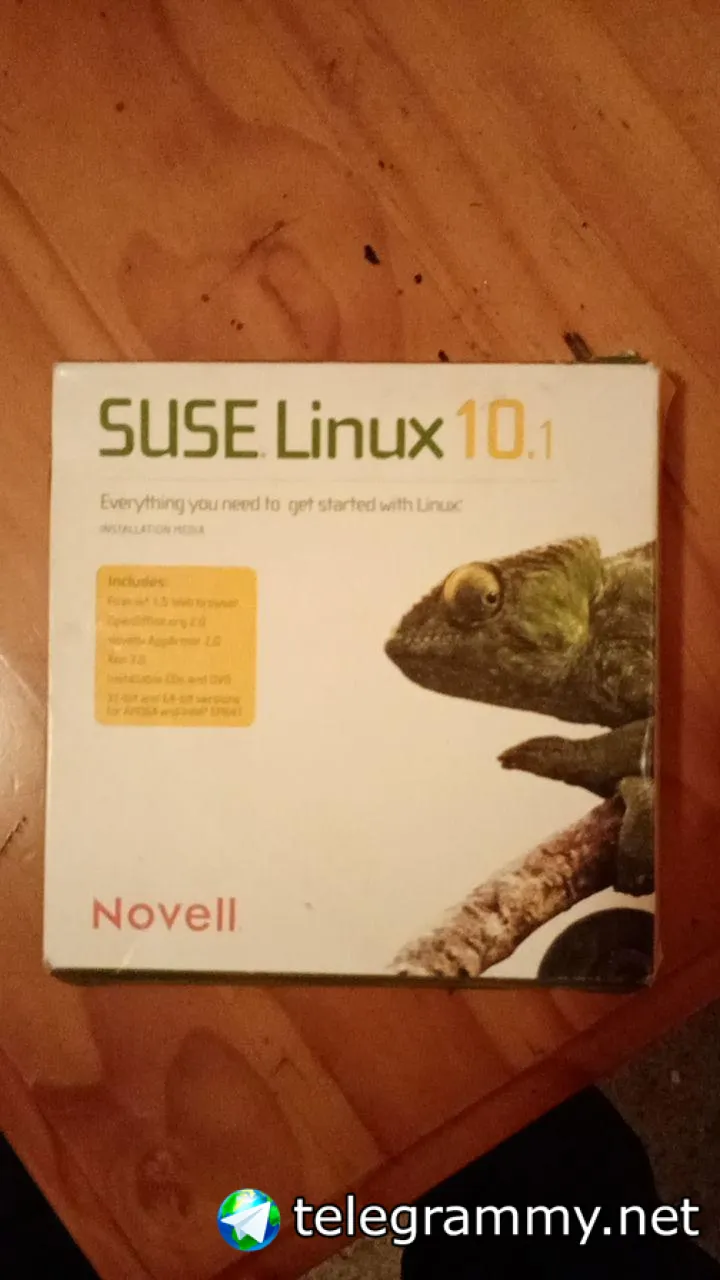
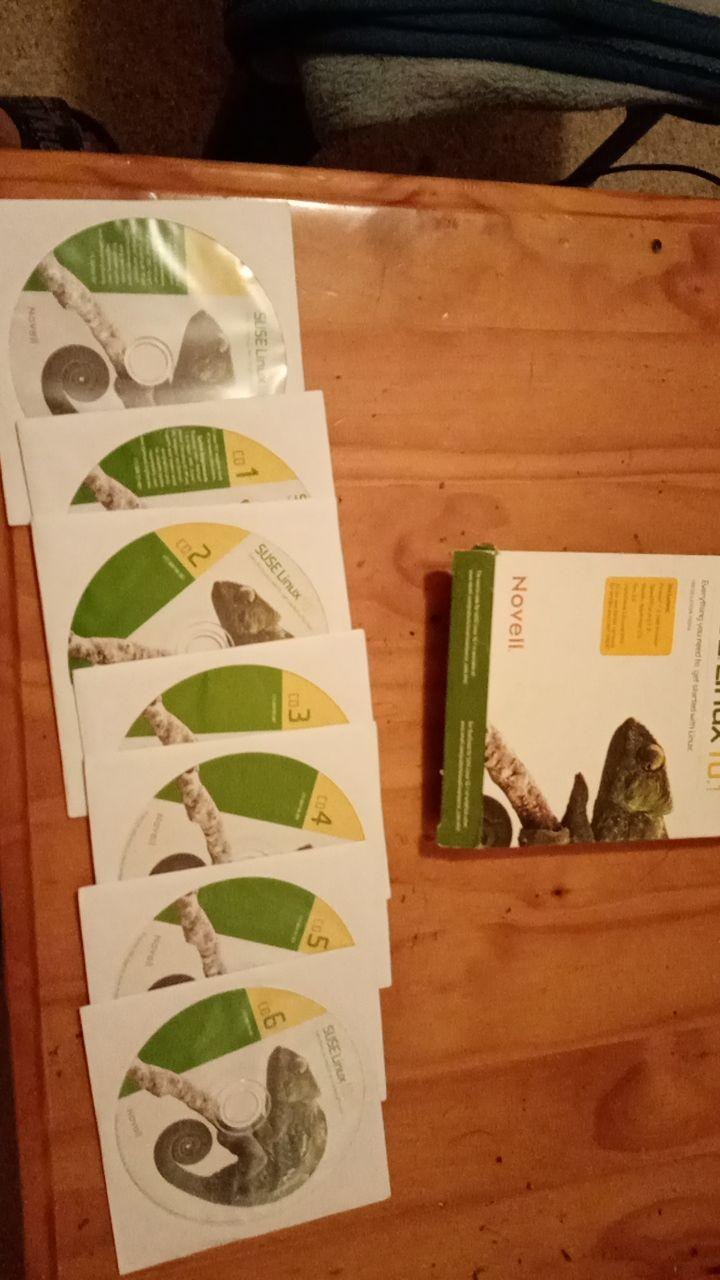
I began my journey on Novell Suse 10.1, it was basically point-click and i never minded to learn the tools or software, just worked on it. Now on FreeBSD i had to do a little bit of reading on xorg and how it works. I still have plenty to learn, sometimes it feels like i'll never grasp all the information but once you try FreeBSD, you just want to keep trying!😄@xsuuu
Jaco
 Jaco
Jaco
 XS
XS
worked in a company that used suse on desktop back in time ?
Jaco
worked in a company that used suse on desktop back in time ?
no, I work in reselling and repairing, very basic stuff. My boss at the time had this in his office and gifted it to me, I didn't even know what it was back then until i installed it over Win XP😅
XS
fun story
Jaco
fun story
I have no computer science degree or alot of knowledge about computers, everything i know is from expirements and experiences. Since then i haven't used a Microsoft product personally. After Suse i ran Ubuntu and Debian for a very long time
Jaco
But as i said yesterday, for me it's much harder to understand than GhostBSD/FreeBSD. too many changes to soon in gnu/linux and it alienates "normal" users.
Jaco
I want something i can setup and work on without instability, that i can also fix if it breaks and it can be anything i want, easily understable etc.
Anonymous
K
Lucky
Jaco
Never used Windows?
I have yes but i don't like it, gave too many issues. Also not a fan of the "one size fits all". I would prefer anything else really
Anonymous
Hello, I'm Devansh, I'm thinking of installing FreeBSD, but there are some packages which are not available for it, like I want to install Spotify, but there isn't any package for it. In a nutshell, I need help.
Anonymous
Hello, I'm Devansh, I'm thinking of installing FreeBSD, but there are some packages which are not available for it, like I want to install Spotify, but there isn't any package for it. In a nutshell, I need help.
You have to use their web apps for stuff like Spotify or discord
Anonymous
You have to use their web apps for stuff like Spotify or discord
Isn't there any way to get these things installed
Anonymous
Isn't there any way to get these things installed
Unless the package for them exists, no
XADE
Hello, I'm Devansh, I'm thinking of installing FreeBSD, but there are some packages which are not available for it, like I want to install Spotify, but there isn't any package for it. In a nutshell, I need help.
freebsd don't have good support for proprietary stuff
Jaco
Good day folks! 🤚🙂Is there like a FreeBSD gamers group or subreddit i can join?
I have setup linuxulator but i am having errors from the linux-steam-utils.
1. I did install linux-steam-utils
2. Added entries to /etc/fstab
3. Mount -a
But still steam gives issues, other softwares work
Jaco
I have even tried /compat/ubuntu/ linux jails and install steam but nothing, Homura keeps restarting my pc for some reason
Jaco
Any FreeBSD gamers in here that could point me in the right direction? I would really appreciate it, i tried all the search results i could find
Anonymous
Any FreeBSD gamers in here that could point me in the right direction? I would really appreciate it, i tried all the search results i could find
You want to play games?
I mean, you are looking for the games?
Jaco
You want to play games?
I mean, you are looking for the games?
No. I have games that worked on a previous BSD install.
What i am trying to achieve is to get Linux-steam-utils to work.
I have followed all the guides and compared them(a monkey can install linux-steam).
I have made the necessary changes to /etc/fstab, i did mount -a, even restarted the system
Jaco
Also Homura crashes and restarts my system if i try to install Steam. I mainly use Steam to play torchlight
Anonymous
No. I have games that worked on a previous BSD install.
What i am trying to achieve is to get Linux-steam-utils to work.
I have followed all the guides and compared them(a monkey can install linux-steam).
I have made the necessary changes to /etc/fstab, i did mount -a, even restarted the system
OH, sorry.
I did not install steam like programs.
I did not install Homura too.
Jaco
I played torchlight on a previous FreeBSD install too and GhostBSD install, i am not knowledgeable enough to know where to look further. Dmesg output gives 0 clues
Jaco
OH, sorry.
I did not install steam like programs.
I did not install Homura too.
Thanks anyway 🙂
 Carl
Carl
you would must launch it in a terminal to see what errors you have ... if the program restart your system, launch it in a termnal but redirect the output to a file and you will see what it writed before the restart
 ɴꙩᴍᴀᴅ
ɴꙩᴍᴀᴅ
Also Homura crashes and restarts my system if i try to install Steam. I mainly use Steam to play torchlight
Did you follow a guide similar to this? https://t.me/FreeBSD/30
Jaco
Did you follow a guide similar to this? https://t.me/FreeBSD/30
This is one of them yes, i believe it was the first one i used
ɴꙩᴍᴀᴅ
This is one of them yes, i believe it was the first one i used
The guy that did the guide seems to have some contact info on the page. Maybe you can try reaching him if the steps didn't work for you
ɴꙩᴍᴀᴅ
Also what Carl said is a good way to go. It requires you to investigate a bit more, but you'll learn through the process and you will also get some logs to share
 🇵🇸🍉
🇵🇸🍉
Did you follow a guide similar to this? https://t.me/FreeBSD/30
now bsd run games next will be openindiana and temple os
Jaco
you would must launch it in a terminal to see what errors you have ... if the program restart your system, launch it in a termnal but redirect the output to a file and you will see what it writed before the restart
I did launch steam through terminal here, can i share output later when I'm back at the machine?
Jaco
ɴꙩᴍᴀᴅ
I did launch steam through terminal here, can i share output later when I'm back at the machine?
Sure but for logs use a pastebin like service like https://bsd.to/ or https://dpaste.org/ in order to maintain readability and avoid huge messages (: