dk dc till they fix it.
Fair
 Anonymous

 Anonymous
I guess what I’m looking for is something like a FreeBSD equivalent of a Xubuntu, i.e. a minimal XFCE DE with non free hardware/driver support out of box and some basic GUI utilities (pulse audio, network manager, etc)
I think giving GhostBSD another try is my best bet
Anonymous
yes Ghost is ok.
 Arminio
I guess what I’m looking for is something like a FreeBSD equivalent of a Xubuntu, i.e. a minimal XFCE DE with non free hardware/driver support out of box and some basic GUI utilities (pulse audio, network manager, etc)
I think giving GhostBSD another try is my best bet
That's just 4 or 5 "pkg install"'s away from a fresh FreeBSD installation, too. It's not hard to setup a desktop on FreeBSD.
Anonymous
I would appreciate this very much! I have read the handbook but it doesn't elaborate on subjects too much, which is what i want
So I'm guessing you want a deep dive into UNIX in general?
Anonymous
Anonymous
Like do you only i3, dwm etc? I tried once but it seems hard if your not familiar with keybindings and setting up configs
Learn vi(1) and get familiar with it, then you'll really get comfortable with the keyboard and start to set up your own key bindings
Arminio
 Arminio
That's a FreeBSD man-page in a fullscreen terminal on 3840x2160 - this is simply pointless
Anonymous
Anonymous
With an environment variable.
Anonymous
Read man(1).
Arminio
You can change it.
Oh wow, all I needed was "export MANWIDTH=tty"? I had no idea, thank you!
Anonymous
Oh wow, all I needed was "export MANWIDTH=tty"? I had no idea, thank you!
If you use tcsh or csh:
$ printf "%s\n" "setenv MANWIDTH 110" >> ~/.cshrc
If you use bash:
printf "%s\n" "export MANWIDTH=110" >> ~/.bashrc
(You can change the number)
 Krond
Krond
Well, I'd votged fhe bigger font, wide text is clearly becoming less readable IMHO…
Anonymous
Anonymous
I'm running on 1920x1080, yet the man page takes up the whole terminal space
Anonymous
What shell are you using? because bash has checkwinsize command to set ROWS and COLUMNS env variable, I think this might solve your problem
Anonymous
Oh wow, all I needed was "export MANWIDTH=tty"? I had no idea, thank you!
or this, I didn't know man had its own way of doing it
Arminio
or this, I didn't know man had its own way of doing it
Yea that magically works, what I use now is just
# use full terminal width for man pages on FreeBSD
if [[ "$(uname)" == FreeBSD ]]; then
export MANWIDTH=tty
fi
in my ~/.env file which gets sourced from shell initialization files.
Arminio
(I'm using both ZSH and BASH)
Jaco
Learn vi(1) and get familiar with it, then you'll really get comfortable with the keyboard and start to set up your own key bindings
Vim should be good too? I know very basic Vim😅
XADE
Vim should be good too? I know very basic Vim😅
there's no reason to use vi these days
Jaco

 kub-kun
 ɴꙩᴍᴀᴅ
ɴꙩᴍᴀᴅ
As far as I know, it doesn't. At least in the pkg
Anonymous
Yes
Advanced programming in the UNIX environment
The course is taught on NetBSD, but it should work fine on FreeBSD
https://stevens.netmeister.org/631/
ɴꙩᴍᴀᴅ
Vim should be good too? I know very basic Vim😅
If you want to learn Vim I can suggest a place here at Telegram to do so
Jaco
Advanced programming in the UNIX environment
The course is taught on NetBSD, but it should work fine on FreeBSD
https://stevens.netmeister.org/631/
Thank you😊I'll have a look when I'm home
Jaco
If you want to learn Vim I can suggest a place here at Telegram to do so
Sure! I don't have to have any prior Dev experience or such?
ɴꙩᴍᴀᴅ
Sure! I don't have to have any prior Dev experience or such?
Not at all. Let me send you the link via pm
Anonymous
Using X's clipboard feature?
Anonymous
So when you copy in vim, it also gets stored in Xorgs clipboard buffer?
Anonymous
Well that's a neet feature I need to enable
 Candy
Candy
So when you copy in vim, it also gets stored in Xorgs clipboard buffer?
Normally in vim, you use the + register as the clipboard. So "+y and "+p copies + pastes from the X11 clipboard. I don't think this needs any patches. It's a standard Vim feature.
Anonymous
XS
vim needs to be built with X support for X clipboard to work
XS
Yah, afaik it's disabled in most places, OpenBSD do provide an x11 bin flavour but idk for FreeBSD
XS
X is not necessarily used where vim can be, when you deploy vim on headless system you usually don't require X and thus, that programs supports it
Candy
FreeBSD has a vim-x11 package. The vim-gtk3 package should also support the X11 clipboard
Candy
You can on Arch if you install gvim
XS
it's actually official vim provided by vim packages
XS
just configure flags changing
Candy
It enables it in the regular vim binary too when you install the gvim package. It's all part of "official vim"
Anonymous
No bot?
Anonymous
Where can I find the list of hardware supported by FreeBSD 13?
XADE
Where can I find the list of hardware supported by FreeBSD 13?
https://t.me/FreeBSD1/19736
to probe u can use
use freebsd CI image
or any other bsd's image which r not read only
Anonymous
Where can I find the list of hardware supported by FreeBSD 13?
Live booting FreeBSD is the best way to find out
Anonymous
What to do after live boot?
Test if your hardware works
For example see if your Ethernet card works ( it most likely is supported ) by trying to connect to your router
Anonymous
Test if your hardware works
For example see if your Ethernet card works ( it most likely is supported ) by trying to connect to your router
Ethernet works, it worked in 12 also. Wireless doesn't work
Anonymous
Ethernet works, it worked in 12 also. Wireless doesn't work
I'm guessing your wireless card doesn't show up as an interface when running ifconfig?
Anonymous
I'm guessing your wireless card doesn't show up as an interface when running ifconfig?
Yes and it doesn't work after installing as well
XADE
Test if your hardware works
For example see if your Ethernet card works ( it most likely is supported ) by trying to connect to your router
thats not an efficient way,
check every hardware is not possible in freebsd live boot & will consume time
XADE
simply hw-probe
Jaco
Also pciconf -lv
Jaco
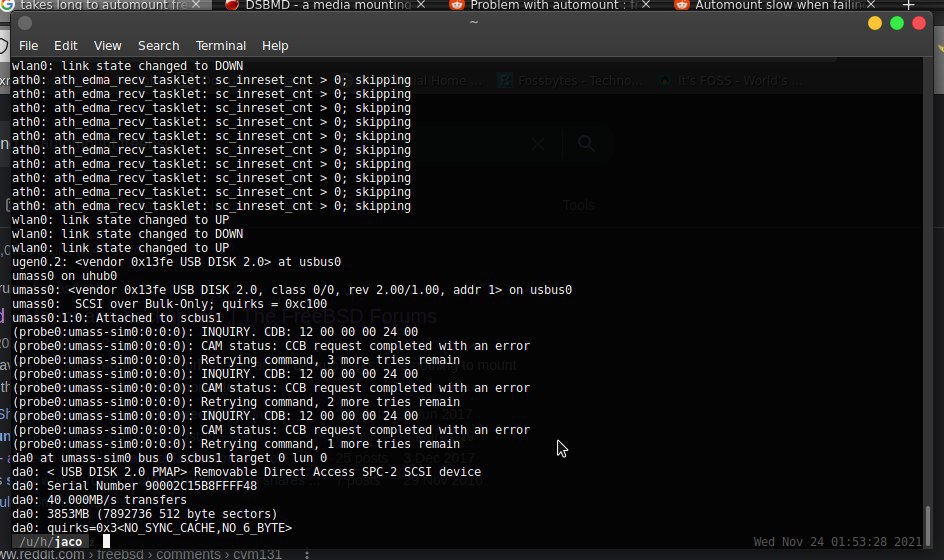
Anybody here use DSBMC to automount removable usb devices? I have set up DSBMC and everything mounts perfectly and i can access the drives. My problem is it takes like 10 minutes before it recognizes the pendrive/USB storage, WHY is that?🤔
Jaco
 Jaco
Jaco
As you can see i have millions of tabs open in the background about this issue😅
XS
have you the same error with another usb stick ? It seems the issued command fails and the retry is taking the time you wait / 3
XS
is that an USB 3 port ?
Jaco
have you the same error with another usb stick ? It seems the issued command fails and the retry is taking the time you wait / 3
Yes, any usb stick or drive, it literally takes 5 to 10 mins
XS
okay, same problem with other USB ports ?
Jaco
okay, same problem with other USB ports ?
1 usb port has died but the other 2 has the same time issue yes
XS
seems there's some issue with the hardware support