 wahaj
wahaj


But it didn't booted
 K
K
Not sure how to help you there. What I did was to install 12.2 snapshot arm64 then compile 13.0 and upgrade from within the machine
wahaj
I wanna compile by own image
wahaj
Can you please give me the script.
wahaj
I wanna get a iso or .img file
wahaj
Let me be clear
wahaj
I wanna port ghostbsd to raspberry pi.
I'm tryin to compile raspberry pi 4b image freebsd.
I used the crochet method although I got the image but it didn't boot.
I looking for a appropriate method.
K
how did you flash the image?
wahaj
U-boot
wahaj
I did
 ɴꙩᴍᴀᴅ
ɴꙩᴍᴀᴅ
Cool
wahaj
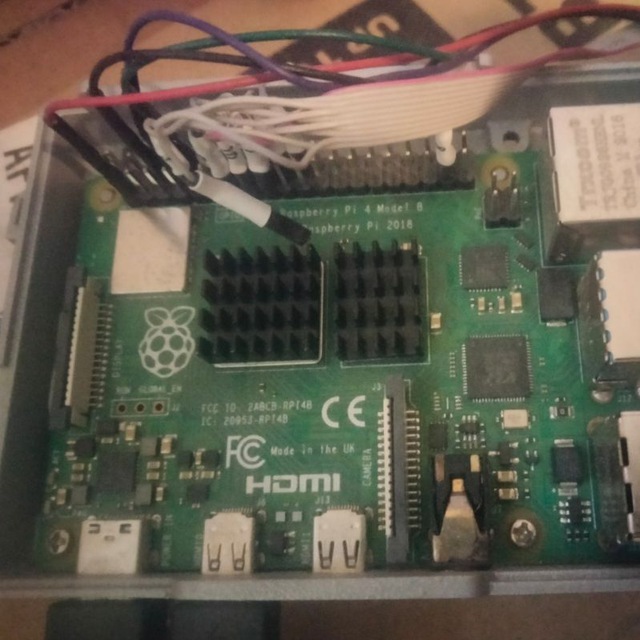
How Can I write
wahaj
8GB in hexadecimal
wahaj
For vedio core
 Fred
Fred
Morning , search online hexadecimal converter?
Ox1000 0000 0000 0000 ?? How many Zeros?
 kub-kun
Morning , search online hexadecimal converter?
Ox1000 0000 0000 0000 ?? How many Zeros?
Wait a moment will help ya
 Rberto
Hi there.
Rberto
I have a question, which program "BalenaEtcher" style do you use to boot a windows Iso from Freebsd?
Fred
I have a question, which program "BalenaEtcher" style do you use to boot a windows Iso from Freebsd?
camcontrol list
dd if=mywindows.iso of=/dev/xyz bs=4m progress=show
Fred
I have a question, which program "BalenaEtcher" style do you use to boot a windows Iso from Freebsd?
boot?? you mean run a virtual Machine in FreeBSD to boot up and run windows in a virtual machine?
 Pouria
camcontrol list
dd if=mywindows.iso of=/dev/xyz bs=4m progress=show
dd can make a windows Boot able USB?
Rberto
boot?? you mean run a virtual Machine in FreeBSD to boot up and run windows in a virtual machine?
no haha, I did'nt explain good
Pouria
Fred
I have to reboot into GhostBSD (like FreeBSD) to answer you question better, Rberto Vil. You can answer me. What boot means for your needs? Write windows.iso file to a usb flash drive, to boot up on another computer? or boot windows.iso file in a virtual machine?
Rberto
I want to create a bootable usb
Fred
The .ISO or .IMG file is a straight sequence of bytes that is written to a USB flash drive or to a CD or to a DVD. What makes it bootable is the operations, tool that created the file.
Rberto
I have to reboot into GhostBSD (like FreeBSD) to answer you question better, Rberto Vil. You can answer me. What boot means for your needs? Write windows.iso file to a usb flash drive, to boot up on another computer? or boot windows.iso file in a virtual machine?
I want to write a windows.iso file to a usb drive, to boot up on another computer.
Fred
https://github.com/WoeUSB/WoeUSB-ng
 Lee
Lee
If iso is win10 You can mkfat and unzip iso to usb
Lee
a few years ago in a Gnu/Linux distribution i was test it, and did not work.
I did it and it not work so i say no
Lee
make usb as a fat32 fs,and unzip iso to usb fs
Fred
If iso is win10 You can mkfat and unzip iso to usb
No, Use the (data destroyer) dd command on FreeBSD.
if is input file
of is output file
xyz is the device name /dev/da1 /dev/da1
bs is the block size 1m or 4m
progress is to show status of the write. Usual takes 6-10 minutes to write a 2.5 Gigabyte file
dd if=mywindows.iso of=/dev/xyz bs=4m status=progress
Now, I would suggest writing a puppylinux.com .iso file to usb flash drive, boot Puppylinux then insert a 2nd Usb flash drive to write the windows.iso file into.
Puppylinux is graphical and has tools to write a file to a usb flash drive.
Besides a bootable puppylinux usb flash drive, is good to have around if something breaks on your window computer.
Here is download link
http://distro.ibiblio.org/puppylinux/puppy-fossa/fossapup64-9.5.iso
Lee
If turn iso to img, dd may be works
Lee
or mount iso and copy all files to usb ,usb must use fat32 fs
Fred
http://distro.ibiblio.org/puppylinux/puppy-fossa/fossapup64-9.5.iso Yes, I know this is FreeBSD Telegram group, but this Man asked a good question. I don't know of graphical tool like Balena Etcher etcher.io that runs on FreeBSD. Maybe I will find one a little bit later. I know puppylinux.com works as a live image and has the graphical tool to write an image to a usb flash drive.
rufus.ie The Rufus program runs on windows and can write a windows.iso to a usb flash drive.
Fred
Here is the freebsd answer in the Forums.freebsd.org area
https://forums.freebsd.org/threads/how-can-i-create-bootable-usb-in-freebsd.65232/
sysctl kern.disks
camcontrol list
gpart show
gpart status
geom disk list
Be absolutely sure what device you are writing onto. like /dev/da0 or /dev/da1
dd if=/home/john/ubuntu-16044-desktop-amd64.iso of=/dev/da1
Fred
Let us know your result. Like did it work for you?
Lee
https://docs.microsoft.com/en-us/windows-hardware/drivers/bringup/boot-and-uefi
 n
n
a few years ago in a Gnu/Linux distribution i was test it, and did not work.
It works very well on arch
Mmmm
anyone using poudriere here?
K
 K
K
 Krond
Krond
Actually it was common to disable interactive login on console 0 so it would only contain logs.
Krond
Not sure of current Xorg time preferences...
K
Actually it was common to disable interactive login on console 0 so it would only contain logs.
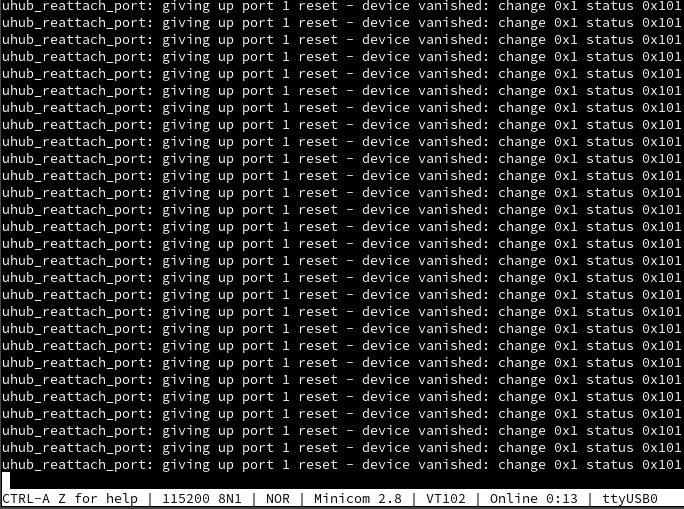
raspberry pi 3b+, connected to linux computer using usb serial
K
ttyUSB0 was the console
Krond
Oh, OH...
Fred
anyone using poudriere here?
I would like you to share url links and docs about setting up poudriere. Are you compiling? How is that working for.
Mmmm
I would like you to share url links and docs about setting up poudriere. Are you compiling? How is that working for.
i am following guide.
well its like you make your own repository. U can install using package from your own repository.
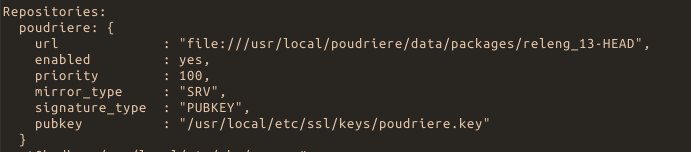
https://danschmid.de/en/blog/poudriere-guide
Mmmm
 Mmmm
Mmmm
 z4ck
z4ck
Hi people, after upgrading tmux to 3.2 on FreeBSD mouse doesn't work now, has anyone the same issue? I mean "set-option -g mouse on", works on linux, but not on fbsd
z4ck
Relax, no one asked you, every your answer is useless trash.
Andriy
 Neruq
Neruq
Hello
Neruq
Does anyone here virtualize FreeBSD desktop on KVM/Qemu ?
Mmmm
it is better asking on freebsd channel at irc.
Neruq
But the freenode FreeBSD irc channel seems to be encrypted for the visiting user without registration.
K
There are the mailing list and the forum too
Mmmm
But the freenode FreeBSD irc channel seems to be encrypted for the visiting user without registration.
you can register your own nick, it is not so hard.
a lot nicer people there.
but i guest they are changing server to libera.chat
Neruq
Can you tell your experience of FreeBSD virtualized desktop on KVM/Qemu sharing its libraries and others between the main system and the guest system?
Fred
Good question , I think the answer might be yes on supporting Ghidra ida.
Buy yourself a couple 64, 128, or 256 GB usb 3.0 flash drives, so you can install GhostBSD.org/download or FreeBSD.org/where operating systems. Then it's a simple plug in usb flash drive to your laptop or desktop, turn on power, hit the F12 key a few times ( could be F10 or esc key, depending on BIOS) to select boot drive, Bob's your uncle, and you to can test FreeBSD or GhostBSD with Ghidra ida. Might need to use the linuxulator to support a Linux version of Ghidra.
ɴꙩᴍᴀᴅ
Hello and welcome @haenno
 haenno
Ulf
haenno
Ulf
Hi
I have downloaded the following package from "Adaptec":
StorMan-amd64.pkg.tbz
How do I install it on FreeBSD 13 ?
ɴꙩᴍᴀᴅ
Try to extract it
ɴꙩᴍᴀᴅ
$ tar -xjf StorMan-amd64.pkg.tbz -C /tmp/adaptec
ɴꙩᴍᴀᴅ
And then take a look at what is inside
ɴꙩᴍᴀᴅ
You can also try using pkg and install it directly:
$ pkg add StorMan-amd64.pkg.tbz