 Ulf
Ulf


Thank you
Will try it.
 ./pascal.sh
Does someone know why I can't launch powermon?
I get the error
Couldn't open /dev/cpuctl0: Operation not permitted
Although I enabled the cpuctl service
Could that have something to do with the secure level ?
./pascal.sh
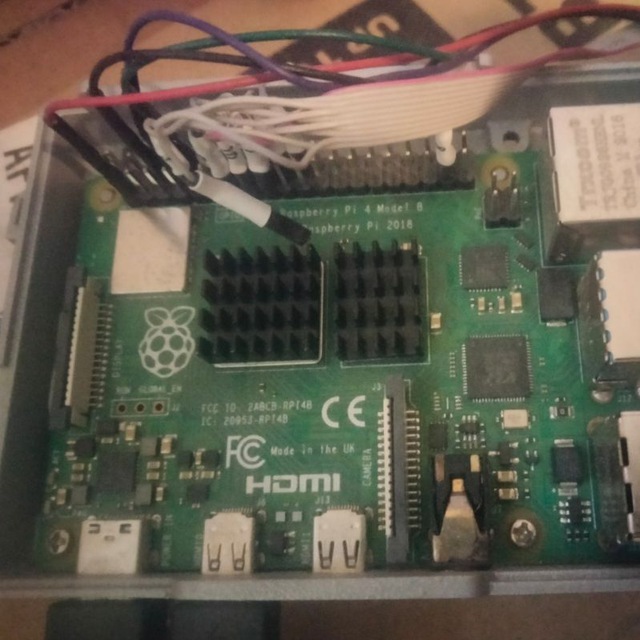
I wanted to know the power consumption of my server haha
 Fred
Fred
Might you need doas or sudo or su root
TheWhyteCrow
Or set the file permissions to 0660 for the wheel group in devfs.conf, supposing you are in the group. Doas and sudo have their own security flaws and thus they are not recommended.
TheWhyteCrow
I ran the command as root
OK. If you want to check regularly, consider setting up the devfs rule so you wouldn't need to switch to root. Otherwise stick to su.
./pascal.sh
OK. If you want to check regularly, consider setting up the devfs rule so you wouldn't need to switch to root. Otherwise stick to su.
I am just using su
I don't need sudo
K
Doas is nice
Sudo is ok for multi server policies
Null
Power use of UNIX - Dan North
Being comfortable at a shell prompt and having a healthy working knowledge of Unix commands and regular expressions will give you a whole new level of capability. In this fun talk, Dan North introduce a few commands and shell tricks you should have in your back pocket, and show you how to start taking control of your operating system.
GOTO website:
https://gotopia.tech/
Fred
Welcome YILMAZ,. How is your FreeBSD experience.
Fred
Good, glad you have joined. We just created an image compiled from freebsd_src code to boot and run on a Raspberry Pi 4B with 8 gigs dram.
Anonymous
What would be the best way to run a xWayland desktop environment in FreeBSD?
 ɴꙩᴍᴀᴅ
ɴꙩᴍᴀᴅ
You would need to setup a Wayland desktop first I guess
Anonymous
That is done
ɴꙩᴍᴀᴅ
And you have installed xwayland port/pkg?
Anonymous
Yes
ɴꙩᴍᴀᴅ
Well, from what I'm reading you are almost there. Maybe this reads can help a bit. I only ran Wayland once in FreeBSD as a test but nVidia GPU was kinda a mess
https://wayland.freedesktop.org/xserver.html
https://bbs.archlinux.org/viewtopic.php?id=185297
Anonymous
Ugh, I wish I could find or build a mobile desktop without wayland
Anonymous
Because Wayland and Phosh are pain
Anonymous
I mean, I need a beta-test desktop, so ty this should work
Anonymous
 Anonymous
??
Anonymous
No?
Anonymous
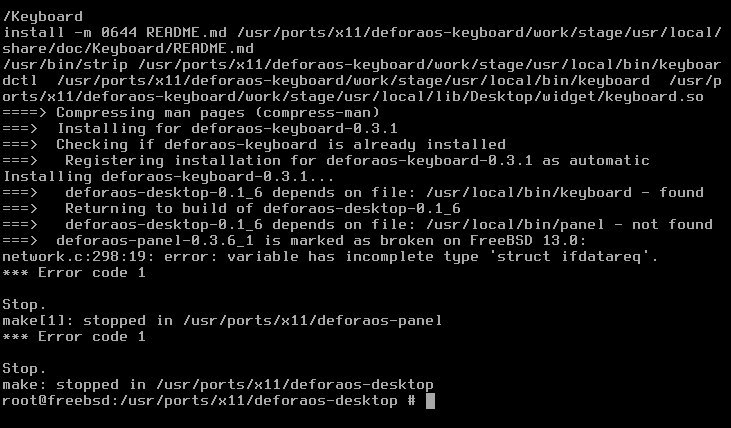
deforaos's desktop is not in the repos
Anonymous
Thanks...
Anonymous
This is false. My evidence? It's DailyMail
Anonymous
DailyMail is well known to have low credibility, is known to be propaganda that ignores facts, DailyMail was the first deprecated news source on Wikipedia. Please do not spread lies.
ɴꙩᴍᴀᴅ
Ugh, I wish I could find or build a mobile desktop without wayland
Oh, wait. Are you running FreeBSD on a smartphone?
ɴꙩᴍᴀᴅ
Never tried it before, but sounds cool 😁
Lemme read a bit and scrap the net about more info
Null
 Anonymous
 Pouria
Anyone has FreeBSD sticker pack?
The Beastie is attacking/kicking Windows 10.
Pouria
I am looking for this sticker pack.
Pouria
Thanks man.
 kub-kun
And he want to censor this
Neruq
What will happen to the #freebsd-vbox channel hosted on freenode?
kub-kun
What will happen to the #freebsd-vbox channel hosted on freenode?
They will probably move to liberachat or stay on freenode
Neruq
They will probably move to liberachat or stay on freenode
Wouldn't it be better to register on reddit's freebsd?
Pouria

 Joe
Joe
 Neruq
Neruq
Any explanatory video to register this way /nick YourNick in libera.chat to access #freebsd channel ?
Mmmm
Any explanatory video to register this way /nick YourNick in libera.chat to access #freebsd channel ?
you need to register your nick to be able join freebsd channel
Neruq
you need to register your nick to be able join freebsd channel
I know that, but registering /nick YourNick this way is very confusing, and I can't do it.
Carlos
Carlos
 Joe
Joe
 neb
neb
2.5 Admins: 2.5 Admins 40: Crown Prince of Freenode https://2.5admins.com/2-5-admins-40/
Pouria
Hi guys.
I use SpectrWM in FreeBSD.
I have some scripts and commands for startup.
When i quit from SpectrWM the scripts and commands are still working.
What should i do for this?
I want when i quit from SpectrWM the scripts and commands terminated with TERM signal, i just want scripts and commands does not works when i quit from SpectrWM.
Pouria
IceWM has shutdown executable file.
when IceWM is terminated, the executable file will run commands.
Pouria
I think SpectrWM does not have this feature.
Buf IDK what should i do and which way is better.
Pouria
Book can help me?
Pouria
:/
Pouria
But thanks.
I will reading it.
Pouria
OK.
But i know i can write a shell script for this.
Bug i want the best way.
I downloaded the book, i will read soon.
Pouria
OK.
I solve it by myself.
What is the OFC? it is short word of what?
Pouria
Thanks.
 Carl
Carl
Thanks.
if you want a clue, you can use echo "$$" > /rute/to/file to save the own pid in a file for a later use
Carl
and kill -P pidnumber for kill a process and his childs
Carl
sorry ... pkill -P pidnumber
Pouria
if you want a clue, you can use echo "$$" > /rute/to/file to save the own pid in a file for a later use
I know i can kill process's by manual.
But i want to automate that, like IceWM.
If you have IceWM look at this:
- $ man icewm-shutdown
If you have not IceWM look at this:
- FreeBSD man page for icewm-shutdown
Carl
are you using xinit with the .xinitrc ??
Pouria
You mean i do this:
Content of ~/.xinitrc file:
#!/bin/sh
exec $2
kill .....
Is that work?
Carl
/usr/local/bin/bspwm & wmpid=$!
script1 &
script2 &
wait $wmpid
### it will continue here
### when the wm is finished
## orders to kill