 Carl
Carl


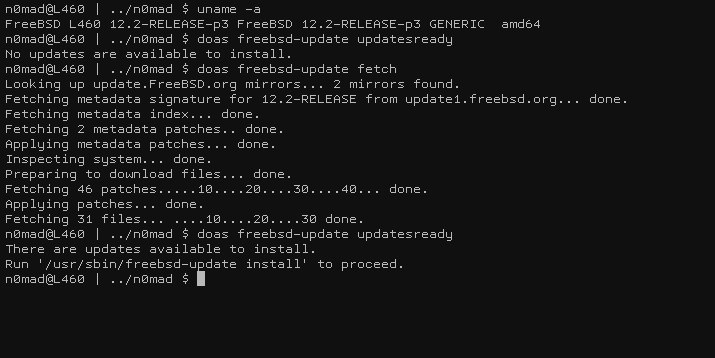
can somebody please show me the output of freebsd-update updatesready with pending updates?? i made an upgrade last week and mine not have
 Eliab/Andi
https://open.spotify.com/episode/4Zkas587iYcMM5JL5aGH22?si=3RrHkX1-QpmUlLaY4Ec6_w&context=spotify%3Ashow%3A1YYNYSrNwwJrStqq68CeO9
Carl
 Carl
Carl
i am sure somebody have updates in stand by
 ɴꙩᴍᴀᴅ
ɴꙩᴍᴀᴅ
thanks a lot, but i need a positive one .... mine is like yours
indeed. It's bit weird isn't it?
ɴꙩᴍᴀᴅ
Oh well, I can reach that state by trying to update and left them without finishing
Mmmm
use BE if you want to upgrade to 13.0
Carl
many people do auto fetch, and then manual upgrade
Carl
i talk about patches ... no a release change
 Maitikaonyx
Hello all i install Ubuntu emulator and focal fossa depots, can i run all linux application?
Carl
i will do freebsd-update fetch and then, freebsd-update updatesready will trigger an icon in the lemonbar to show me there are updates ... but i will wait if nobody have an output to show
Maitikaonyx
Hehe yes of course i just play afternoon to install chrome and balenaetcher, but i just ask myself if all application are working
ɴꙩᴍᴀᴅ
Hello all i install Ubuntu emulator and focal fossa depots, can i run all linux application?
You can try enabling linux compatibility layer in FreeBSD and then run a Linux program from there
 ɴꙩᴍᴀᴅ
ɴꙩᴍᴀᴅ
Anytime (:
Carl
this would upgrade your actual world ..not a new release ... so i will cron the fetch and the icon will apear when new patches for the actual world are ready
ɴꙩᴍᴀᴅ
cool
G
Should be a package
G
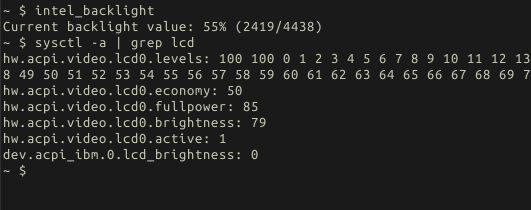
what is the output
 Andriy
https://github.com/iocage/iocage/issues/1256#issuecomment-830638063
Andriy
Fix for the iocage, guys
Andriy
16 hrs to get it fixed 💪🏻
 Joe
Joe
 Mark
Mark
I installed FreeBSD 13 official image for ARM on pi 4. Then installed x86-video-scfb
Mark
startx worked fine
Mark
Installed kde plasma and sddm then started sddm and unfortunately goes to a black screen
Mark
I’m not sure how to troubleshoot it ... looked around in /var/log a bit for sddm and xorg logs ... any ideas?
Anonymous
Mark
Defaults other than I added
Mark
dbus_enable=“yes”
Mark
hald_enabled=“yes”
Mark
Regular double quotes capitalized YES
Mark
Sorry typing this on my mobile phone
Mark
Just found telegram for FreeBSD
Rafa
Installed kde plasma and sddm then started sddm and unfortunately goes to a black screen
When sddm comes up, before you log in, check on the bottom left corner. It defaults to Wayland. Change that to plasma and then log in
Mark
I’ve seen that happen on other machines gets stuck on wayland
Mark
Unfortunately on the pi it isn’t getting that far just a black screen after starting sddm
Mark
root@generic:~ # cat /etc/rc.conf
hostname="generic"
ifconfig_DEFAULT="DHCP"
sshd_enable="YES"
sendmail_enable="NONE"
sendmail_submit_enable="NO"
sendmail_outbound_enable="NO"
sendmail_msp_queue_enable="NO"
growfs_enable="YES"
dbus_enable="YES"
hald_enable="YES"
Mark
remote ssh and start xorg making it possible to do more when starting it
G
https://i.redd.it/a7jcjaobvhw61.png
Mark
service sddm stop
Mark
and went back to the command line
Mark
tail -f /var/log/Xorg.0.log
Mark
shows nothing when starting and stopping sddm
Mark
[09:46:07.239] (II) DAEMON: Initializing...
[09:46:07.265] (II) DAEMON: Starting...
[09:46:07.266] (II) DAEMON: No session manager found
[09:46:07.266] (II) DAEMON: Adding new display on vt 9 ...
[09:46:07.268] (II) DAEMON: Loading theme configuration from ""
[09:46:07.268] (II) DAEMON: Display server starting...
[09:46:07.268] (II) DAEMON: Adding cookie to "/var/run/sddm/{8c0e6a55-6e07-4ce6-957d-2f27b915b0d8}"
[09:46:07.283] (II) DAEMON: Running: /usr/local/bin/X -nolisten tcp -auth /var/run/sddm/{8c0e6a55-6e07-4ce6-957d-2f27b915b0d8} -background none -noreset -displayfd 17 -seat seat0 vt9
[09:46:08.437] (II) DAEMON: Setting default cursor
[09:46:08.443] (WW) DAEMON: Could not setup default cursor
[09:46:08.444] (II) DAEMON: Running display setup script "/usr/local/share/sddm/scripts/Xsetup"
[09:46:08.454] (II) DAEMON: Display server started.
[09:46:08.455] (II) DAEMON: Socket server starting...
[09:46:08.456] (II) DAEMON: Socket server started.
[09:46:08.458] (II) DAEMON: Loading theme configuration from "/usr/local/share/sddm/themes/breeze/theme.conf"
[09:46:08.459] (II) DAEMON: Greeter starting...
[09:46:08.511] (II) HELPER: [PAM] Starting...
[09:46:08.512] (II) HELPER: [PAM] Authenticating...
[09:46:08.512] (II) HELPER: [PAM] returning.
[09:46:08.514] (II) HELPER: Starting: "/usr/local/share/sddm/scripts/Xsession /usr/local/bin/sddm-greeter --socket /tmp/sddm-:0-SBJjPl --theme /usr/local/share/sddm/themes/breeze"
[09:46:08.525] (II) DAEMON: Greeter session started successfully
[09:46:08.833] (II) DAEMON: Message received from greeter: Connect
[09:46:26.637] (II) HELPER: [PAM] Closing session
[09:46:26.638] (II) HELPER: [PAM] Ended.
[09:46:26.645] (II) DAEMON: Auth: sddm-helper exited successfully
[09:46:26.646] (II) DAEMON: Greeter stopped.
Mark
sorry if that is too long
Mark
not sure about etiquette on telegram
ɴꙩᴍᴀᴅ
not sure about etiquette on telegram
selecting text and then inside formatting there's mono font style
ɴꙩᴍᴀᴅ
For long logs, config sharing and reports, it's better to use a pastebin-like service like https://bsd.to/
https://dpaste.org/
Mark
okay thanks
Mark
/etc/X11/xorg.conf
https://bsd.to/U3kf
Mark
also tried this one
Mark
https://bsd.to/sL0L
Mark
suggested here https://adventurist.me/posts/0075
Anonymous
AAAAAAAAAAAAAAAAAAAAAAAAAAAAAAAAAAAAAAAAAAAAAAAAAAAAAAAAAAAAAAAAAAAAAAAAA[
 Peter Paterson
 Andriy
Wayland on FreeBSD with AMDGPU | [bobulate]
https://euroquis.nl/kde/2021/05/01/wayland.html
Anonymous
I did not what do I need to add in fstab?
proc /proc procfs rw 0 0
and also add this line in rc.conf
sddm_enable="YES"
Mark
Great thanks giving it a try
Mark
Yes
Mark
Raspberry Pi 4
Anonymous
good
Anonymous
how much did it cost ?
Mark
Mine came in a kit so about 100 usd
Mark
From a local store
Mark
The CanaKit
Mark
Wayland on FreeBSD with AMDGPU | [bobulate]
https://euroquis.nl/kde/2021/05/01/wayland.html
Nice I’ve wondered about wayland
Anonymous
that's costly
Mark
It wasn’t the cheapest way to get it