 Anonymous

 Anonymous
install both lightdm and lightdm-gtk-greeter
Anonymous
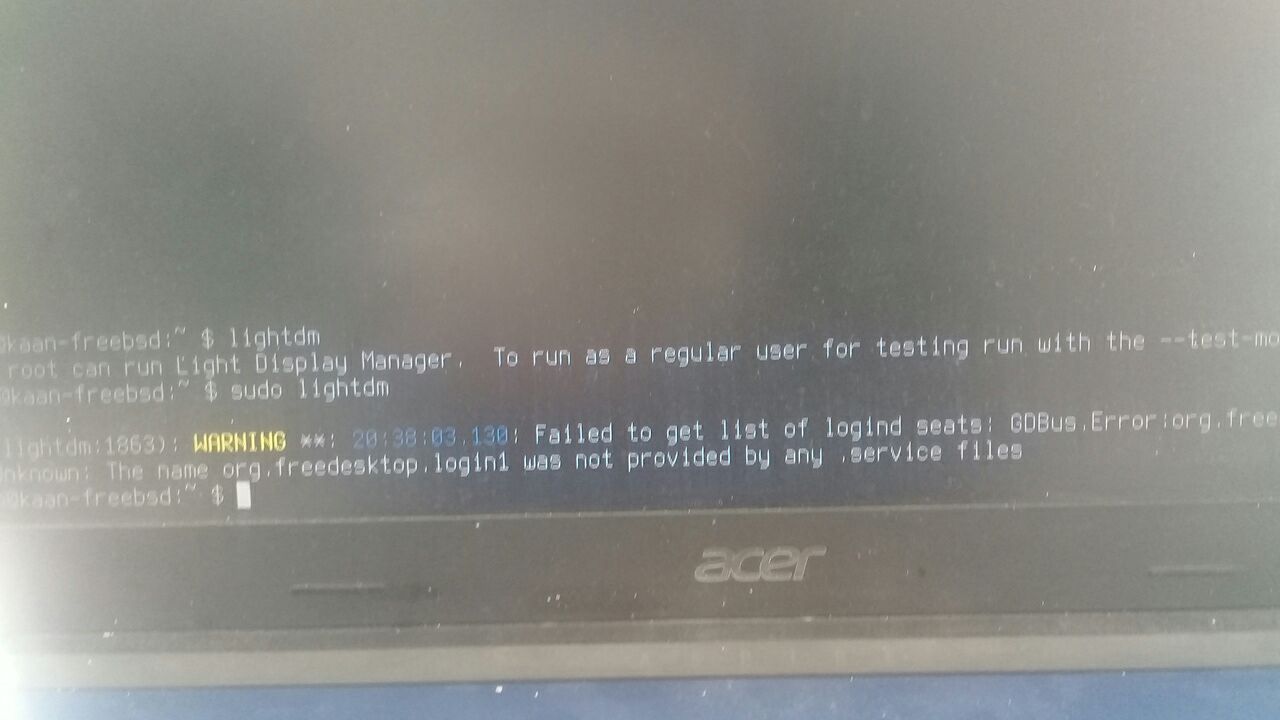
you are using any guide or not ?
Kaan deyil🤨🤨🤨
But stucked
Kaan deyil🤨🤨🤨
In this error
Kaan deyil🤨🤨🤨
And I installed same method
Kaan deyil🤨🤨🤨
On virtual machine
Anonymous
i used both slim and lightdm with freebsd12.2
Anonymous
didn't had such issue
Kaan deyil🤨🤨🤨
Light dm same error
Anonymous
just followed the guide and all good
Anonymous
just got successful login through slim
Anonymous
I am running dwm
Anonymous
it took out gnome for me ... unexpected
Anonymous
you did a autoremove and gnome was left safe ??
I didn't had gnome but xfce and KDE
so I first remove those packages which I wrote while installing then I do "pkg autoremove" to remove its dependencies
Anonymous
kde, mate xfce are all ok i do have ome weirdness w/ xorg tho.
Anonymous
kde, mate xfce are all ok i do have ome weirdness w/ xorg tho.
will see if I got gnome someday
Anonymous
 Anonymous
you in a clean machine or a VM
Anonymous
VM sucks
Anonymous
ok could explain why I got strange happenings. testing in VM
Anonymous
xorg config with root works ~~ but when i move it to /etc/11 its says error error error damn.
Anonymous
xorg config with root works ~~ but when i move it to /etc/11 its says error error error damn.
what xorg config exactly , I install my xorg on user rather than on root
Anonymous
no the setup
Anonymous
xorg config with root works ~~ but when i move it to /etc/11 its says error error error damn.
try linking instead of moving
Anonymous
ok thinking it doesnt like my graphic card
Anonymous
thats true enough
Anonymous
better get some wm and rest in peace
Anonymous
Anonymous
I'm going to go with how it is
Anonymous
wine is not an emulator dude
how could you not explain what WINE'S recursive acronym is :)
Anonymous
W.I.N.E -> Wine is not an emulator
 ./pascal.sh
can someone help me to get mariadb running again?
I don't know why it is not starting
i have installed the mariadb105-server and maria105-client
and i have set mysql_enable="YES"
./pascal.sh
if i check the service with service mysql-server status
the return is that the service is not running
./pascal.sh
if i try to start the service, there stands "Starting mysql" for a quite long time and if i check with service mysql-server status again the service is not running
./pascal.sh
maybe someone can help me ?
here is the log
https://pastebin.com/K6RWCwPg
 Алик Сережевич
How did you install it?
./pascal.sh
i was somehow able to fix it
./pascal.sh
my brain feels like its melting down
 Maitikaonyx
Hello all I'm looking for some script can copy any bootable iso on usb key
Maitikaonyx
I'm looking script can do the same way than balena etcher
 ɴꙩᴍᴀᴅ
ɴꙩᴍᴀᴅ
I'm looking script can do the same way than balena etcher
$ doas dd if=stick.img of=/dev/daN bs=10M conv=sync
Where stick.img is your iso, and
/dev/daN is the disk you want to write into.
Check your disks with
$ gpart show
ɴꙩᴍᴀᴅ
i was somehow able to fix it
What was the issue? I only used MariaDB once, and it was inside Debian :/
./pascal.sh
What was the issue? I only used MariaDB once, and it was inside Debian :/
Well honestly I don't know anymore I changed something in the /etc/my.cnf
And uhm yea had to remove or replace some files in the mysql db
./pascal.sh
For now I am quite happy that it's running again 😅
Andriy
Upgraded iocage... Now it's totally broken 🤦🏻♂
./pascal.sh
😂
Andriy
Awesome switch to py38 🙃
Anonymous
what ?
Mmmm
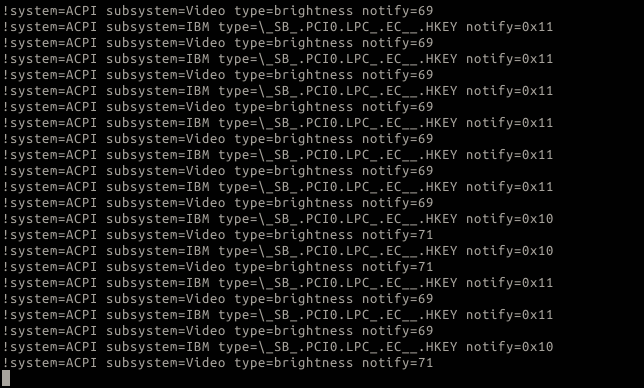
anyone able to adjust lcd brightness using Fn key in thinkpad X230?
Mmmm
i am following guide here but couldn't make it work https://cyber.dabamos.de/unix/x230/#screen-brightness
ɴꙩᴍᴀᴅ
anyone able to adjust lcd brightness using Fn key in thinkpad X230?
$ sysctl -a | grep dev.acpi_ibm should return a list of available hardware and its status
Andriy
anyone able to adjust lcd brightness using Fn key in thinkpad X230?
Hm can't remember i did something additional for that 🤔
Andriy
Only volume keys needs setup
ɴꙩᴍᴀᴅ
Does your /etc/rc.conf has the line:
devd_enable="YES"
?
ɴꙩᴍᴀᴅ
it is already enable.
Well if you want to configure the keys I guess so.
from man page of acpi_ibm(4)
The acpi_ibm driver provides support for hotkeys and other components of
IBM laptops. The main purpose of this driver is to provide an interface,
accessible via sysctl(8) and devd(8), through which applications can de-
termine the status of various laptop components.
ɴꙩᴍᴀᴅ
https://www.freebsd.org/cgi/man.cgi?query=acpi_ibm&apropos=0&sektion=0&manpath=FreeBSD+12.2-RELEASE+and+Ports&arch=default&format=html
Mmmm
already enable, event without put devd_enable="YES" on /etc/rc.conf
ɴꙩᴍᴀᴅ
Hehe, that was fast
Mmmm
 Mmmm
Mmmm
i am trying another guide here using intel-backlight
https://www.davidschlachter.com/misc/freebsd-acpi_video-thinkpad-display-brightness
ɴꙩᴍᴀᴅ
i am trying another guide here using intel-backlight
https://www.davidschlachter.com/misc/freebsd-acpi_video-thinkpad-display-brightness
I have a similar script that does the same. I'm on a X260 and what's curious is that hw.acpi.video.lcd0.brightness: report a reasonable value while dev.acpi_ibm.0.lcd_brightness: always return 0.
According to man page, dev.acpi_ibm.0.lcd_brightness should return the actual brigthness value but it doesn't.🤔
Also never tried to configure fn keys. I'm looking at the man page now
Mmmm
I have a similar script that does the same. I'm on a X260 and what's curious is that hw.acpi.video.lcd0.brightness: report a reasonable value while dev.acpi_ibm.0.lcd_brightness: always return 0.
According to man page, dev.acpi_ibm.0.lcd_brightness should return the actual brigthness value but it doesn't.🤔
Also never tried to configure fn keys. I'm looking at the man page now
never configure dev.acpi_ibm.0.lcd_brightness, ya i usually use hw.acpi.video.lcd0.brightness
Mmmm
but would be good to use fn key to adjust brightness as per room condition. just lazy to type hw.acpi.*