 mrphyber


nothing, everything is going to stay as it is
 Pouria
nothing, everything is going to stay as it is
and if i run it what will happen?
just i can access to UUID's?
mrphyber
there are no UUIDs in mbr partition schemas, you are just labelling a ufs partition with a label chosen by you and then referencing that very partition with its new name
 Pouria
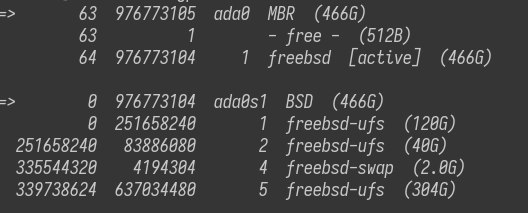
I just noticed that you're using a bsd label in an mbr slice
you mean my partition label is bsdlabel/bsd?
mrphyber
yes i do
Pouria
i run bsdlabel da0 but i get an error.
mrphyber
that is because your bsdlabel is located at ada0s1, but I think I misunderstood
mrphyber
we were talking about an usb stick
Pouria
that is because your bsdlabel is located at ada0s1, but I think I misunderstood
yes, i ran bsdlabel /dev/ada0s1 and get some info.
mrphyber
just
tunefs -L <newlabel> <usbpartition>
to add a label to your ufs partition on the usb and then you can use it by
/dev/ufs/<newlabel>
Pouria
just
tunefs -L <newlabel> <usbpartition>
to add a label to your ufs partition on the usb and then you can use it by
/dev/ufs/<newlabel>
Thanks man, where can i read about partition label and partition slice ?
 Badugar
iirc man bsdlabel
mrphyber
man pages are pretty complete
mrphyber
tunefs(8) and bsdlabel(8)
Pouria
Thanks guys.
mrphyber
no problem
Badugar
man -k is good when you're searching for a keyword
Badugar
What's kern.geom.label.disk_ident.enable ? Didn't find a manpage for that
mrphyber
What's kern.geom.label.disk_ident.enable ? Didn't find a manpage for that
sysctl -d <sysctl>
mrphyber
it shouldn't
Pouria
even on other BSD OS's?
(like OpenBSD or NomadBSD)
mrphyber
even on other BSD OS's?
(like OpenBSD or NomadBSD)
nomad is freebsd so it should work, i'm not sure on {open,net}bsd
Mmmm
Hi everyone, i have a problem.
I could not boot after destroying zfs dataset.
What i do, boot single user with live cd, login as root
Tried zfs import -f zroot and give me no pools available.
Mmmm
Also zfs list, no datasets available
Carlos
Mmmm
Why you did that?
I tried zfs be with beadm, then i unable to remove BE, so i use zfs destroy zroot/ROOT/13
 Krond
Krond
zpool import -D -f
Krond
And what does zpool import and zpool status show?
Mmmm
And what does zpool import and zpool status show?
zpool import is not showing anything.
zpool status no pools available.
I am running command from live cd anw.
Krond
Oh, nice magnitude of weirdness… I'm in.
Krond
First of all, you can't destroy the pool with zfs destroy…
Krond
Let's check devices. You know what drives your pool was using? What partitioning schema?
Krond
List currently available devices with camcontrol devlist. Do they match the ones you used?
Krond
For each device you used (whatever it's called right now) check ls /dev/da0*. In this example I'm listing partitions of drive at da0.
Mmmm
Let's check devices. You know what drives your pool was using? What partitioning schema?
It is just one drive only, ada0.
GPT with uefi.
ada0p1 efi
ada0p2 freebsd-boot
ada0p3 freebsd-zfs
Krond
It is just one drive only, ada0.
GPT with uefi.
ada0p1 efi
ada0p2 freebsd-boot
ada0p3 freebsd-zfs
You do see those partitions under /dev?
Krond
What was system version and livecd version?
Mmmm
Both are 12.2 release.
Krond
Where does the boot from drive stop?
Mmmm
I used vermaden guide for beadm,
I run cp /boot/boot1.efi /mnt/efi/boot/bootx64.efi
Krond
That's an early stage, it can say that even if drive isn't mountable or available.
Krond
What's on your ada0p2 partition?
Krond
Yeah, I saw that. Actually freebsd-boot in this configuration should contain whole /boot partition including kernel, loaders, and zfs cache file.
Krond
So the error you see is not coming from problems with ZFS pool, but from problems on earlier stages of boot.
Krond
Oh, scratch that, I found the guide. freebsd-boot probably contains just partcode (boot2), and that's exactly where the issue happens: when you try reading real files from the filesystem.
Krond
You can try listing files yourself at that moment:
>> FreeBSD/i386 BOOT
Default: 0:ad(0,a)/boot/loader
boot:
This prompt accepts ? to list directory contents. To list subdirs use /dir/?.
Mmmm
 Mmmm
Mmmm
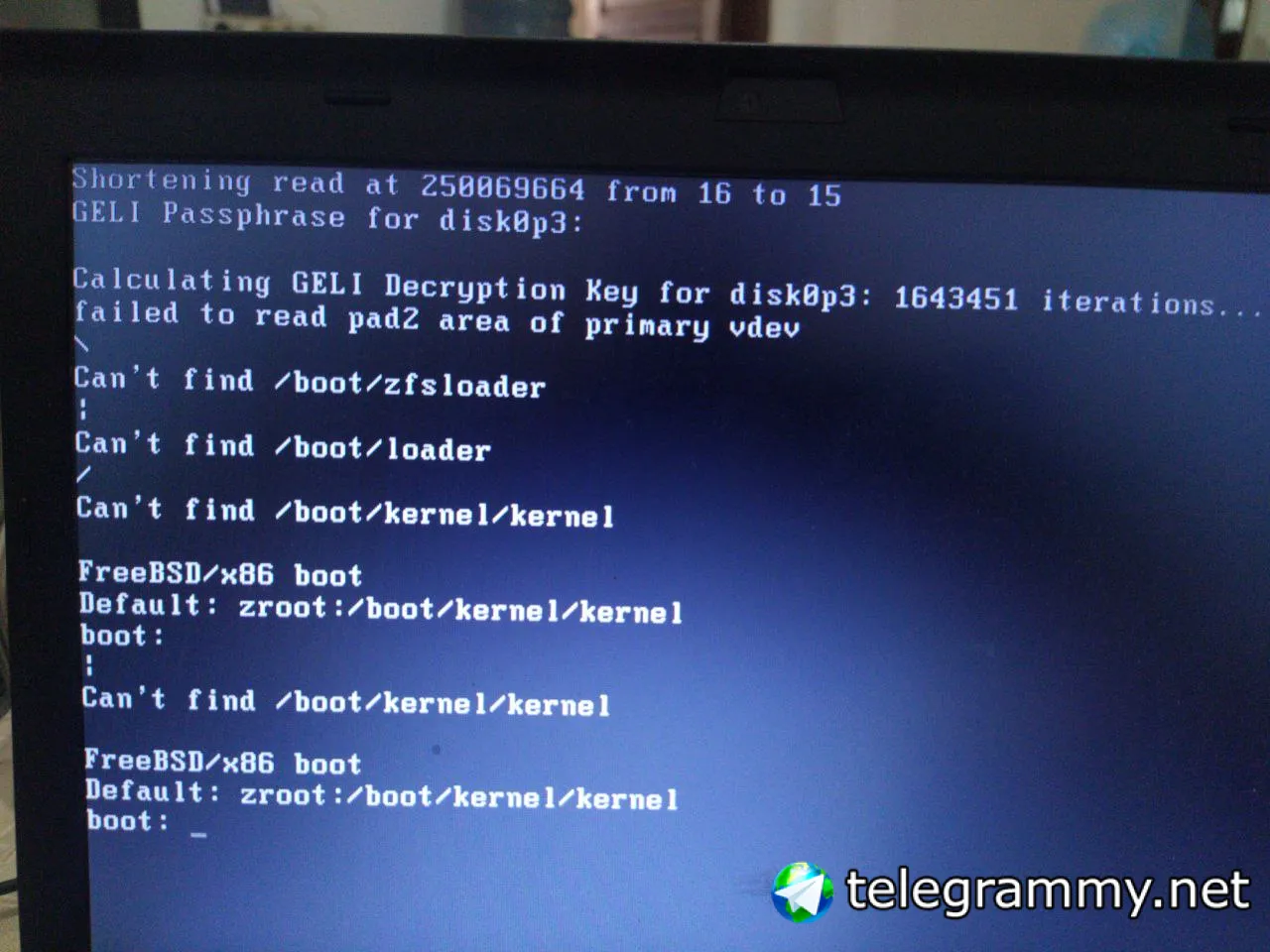
Mind look like this.
Krond
Oh, GELI.
Krond
That kindda explains why you can't import it. You need to "open" GELI device first.
Krond
If you are using encryption whole ZFS is encrypted and when booting livecd you can't even see the partition available, hence zfs import should fail.
Mmmm
Mmmm
I am able to see zfs list
Mmmm
geli attach /dev/ada0p3
Krond
 Mmmm
Mmmm
Then zpool import -f -R /some/where zroot
Mmmm
I'll continue later, need to grab a coffee first, hot like hell here...
 Himanshu
Hello guys
Himanshu
I wanted to install FreeBSD from ".vhd" file for virtual box.
This .vhd is only 5 gb. Is there a script I can follow to install the system to another virtual drive.
Andriy
I wanted to install FreeBSD from ".vhd" file for virtual box.
This .vhd is only 5 gb. Is there a script I can follow to install the system to another virtual drive.
This should help
https://leonardorame.blogspot.com/2013/02/freebsd-resize-virtualbox-disk.html?m=1
Andriy
I wanted to install FreeBSD from ".vhd" file for virtual box.
This .vhd is only 5 gb. Is there a script I can follow to install the system to another virtual drive.
vhd is a ready to go image for installation use iso 😉
Himanshu
Himanshu
This should help
https://leonardorame.blogspot.com/2013/02/freebsd-resize-virtualbox-disk.html?m=1
I was expecting something like arch linux "pacstrap command"
Himanshu
is it now possible in BSD ?