Hi guys, another newbie here. I have a 10 yrs old notebook, 32 bit, 6 GB RAM. I would like to install FreeBSD 13 with DE on it. Any recomendation on which DE to use? I tried Xfce on VirtualBox but could not configure it properly
A few weeks ago i have finished reviving of a 14yo laptop. It can't address more than 3Gb but after changing cpu it IS capable to run 64bit OS. So 10 yo with 6Gb should be even more capable 😉
 Andriy

 Andriy
13 is better and will be final stable release in a few days
Has better gpu and overall performance 👍🏻
Rafa
in version 5 brings the script?
It's a script which should be available on FreeBSD. One of the steps this script asks is which DE you want.
Rafa
https://wiki.freebsd.org/unitrunker/desktop-installer
Rafa
I guess the script is available on 13 also ... but I haven't checked
Rafa
Once you install FreeBSD you would have to run the following commands:
# pw groupmod video -m <your_user>
# pw groupmod wheel -m <your_user>
# pkg install desktop-installer
# dekstop-installer
Rafa
But better read the whole link
Rafa
Here's the official link
Rafa
http://acadix.biz/desktop-installer.php
Eliab/Andi
+1
 The Uncle
I bow direct ...
Next step on that scheme = Anti OS [a true RMS clone]
Anonymous
(base) root@ix:~# dnstrace -c 250 -n 500 google.com
Benchmarking 127.0.0.1:53 via udp with 250 concurrent requests
Total requests: 125000 of 125000 (100.0%)
Connection errors: 0
Read/Write errors: 36
DNS success codes: 124874
DNS response codes
NOERROR: 124874
SERVFAIL: 90
Time taken for tests: 23.317225738s
Questions per second: 5360.8
DNS timings, 124964 datapoints
min: 8.388608ms
mean: 32.035904ms
[+/-sd]: 33.667204ms
max: 1.006632959s
Anonymous
DNS-over-HTTPs can be fun
Anonymous
if you don't forget that the internet is basically a mountain of reverse proxies nowdays...
Anonymous
and it seems ive yet to find the maximum...
Anonymous
Total requests: 175000 of 175000 (100.0%)
Connection errors: 0
Read/Write errors: 46
DNS success codes: 174827
DNS response codes
NOERROR: 174827
SERVFAIL: 127
Time taken for tests: 27.378629895s
Questions per second: 6391.8
DNS timings, 174954 datapoints
min: 8.388608ms
mean: 33.850004ms
[+/-sd]: 34.765253ms
max: 1.140850687s
Anonymous
not too bad for 200 lines of code (little UDP->DoH proxy/load balancer
Anonymous
4360 qps, 2 fps
9479 qps, 6 fps
9504 qps, 8 fps
10063 qps, 10 fps
10129 qps, 10 fps
9343 qps, 8 fps
4229 qps, 6 fps
572 qps, 3 fps
82 qps, 1 fps
23 qps, 0 fps
 remzi ©
guys I have ungualified hostname error, how can I fix this? (qemu legacy freebsd installation)
 ɴꙩᴍᴀᴅ
ɴꙩᴍᴀᴅ
guys I have ungualified hostname error, how can I fix this? (qemu legacy freebsd installation)
Installing Qemu inside FreeBSD or installing FreeBSD inside Qemu in other OS?
remzi ©
I installed FreeBSD inside QEMU in Void Linux
ɴꙩᴍᴀᴅ
What's the output of /etc/hosts ?
If your unqualified host name isn't in /etc/hosts try adding it
ɴꙩᴍᴀᴅ
Also, can Qemu access KVM?
ɴꙩᴍᴀᴅ
If you can share a log in a bsd.to, pastebin or file format maye we get a clue on where's the issue. I'm not on Linux nor with Qemu but maybe someone has more knowledge on that and can help with a log
 Pouria
Hi guys, how can i use mixer command? it is a audio management program,IDK which package i should install; is anyone know?
Pouria
mrphyber
it is included in base
mrphyber
it should already be there
ɴꙩᴍᴀᴅ
mrphyber
the freebsd oss audio subsystem is really phenomenal, but I think the only thing missing is playback recording (I know that there is virtual_oss, but still), it would be nice to have this without going through userland
Phil
the freebsd oss audio subsystem is really phenomenal, but I think the only thing missing is playback recording (I know that there is virtual_oss, but still), it would be nice to have this without going through userland
cat /dev/dsp2 > /dev/dsp1
where dsp2 is the recording device and dsp1 the speaker
I don't know if it's okay ?
mrphyber
cat /dev/dsp2 > /dev/dsp1
where dsp2 is the recording device and dsp1 the speaker
I don't know if it's okay ?
what I meant was that to record the outgoing audio of an userland application you have to go through userland with virtual_oss or sndio or another sound server
mrphyber
what I meant was that to record the outgoing audio of an userland application you have to go through userland with virtual_oss or sndio or another sound server
the thing is that outgoing audio is not avaiable to be read by a process using /dev/dsp* pseudofiles
Phil
Ah okay 😃
Andriy
Can't get my sound go thru Lenovo docking station 🤷🏻♂
Andriy
It's sound "routing" complications in oss i think. It works fine while direct attached to laptop 💁🏻♂
Andriy
https://twitter.com/FreeBSDHelp/status/1380339074825785345?s=09
Eliab/Andi
Party time 🥳 next week
 Paul
Andriy
Paul
Andriy
https://lists.freebsd.org/pipermail/freebsd-announce/2021-April/002030.html
Andriy
FreeBSD/arm64 becoming Tier 1 in FreeBSD 13
 Badugar
Hello.
Badugar
Can someone maybe give me a hint about devfs with UUID support for partitions? Which man page should I look at for that?
Badugar
I have an USB stick with two partitions and would like to use the UUID of the first partition in a small script for automounting it when starting e.g. Plasma5
Badugar
Under Linux it worked with /dev/disk/by-uuid/, but I didn't find a way for something similar on FreeBSD
mrphyber
Under Linux it worked with /dev/disk/by-uuid/, but I didn't find a way for something similar on FreeBSD
what is the label of the disk? gpt?
mrphyber
you shoud have them at /dev/gptid, if not sysctl kern.geom.label.gptid.enable=1 and reboot
Badugar
mrphyber
I'm sorry, put kern.geom.label.gptid.enable=1 in /boot/loader.conf and reboot
Badugar
Thanks! 😁
mrphyber
no problem
Pouria
you shoud have them at /dev/gptid, if not sysctl kern.geom.label.gptid.enable=1 and reboot
what should we do if label is mbr?
mrphyber
afaik mbr doesn't support uuids
mrphyber
so you could use labels with ufs and access partitions from /dev/ufs/
Pouria
afaik mbr doesn't support uuids
my partition table is mbr and my file system is ufs.
what should i do?
mrphyber
you should already have a /dev/ufs entry, if not your ufs partition doesn't have a label
Pouria
you should already have a /dev/ufs entry, if not your ufs partition doesn't have a label
the /dev/ufs does not exists.
mrphyber
you could tunefs -L newlabel disk
mrphyber
and after reboot you should be able to access it by /dev/ufs/newlabel
Pouria
and after reboot you should be able to access it by /dev/ufs/newlabel
 Pouria
and after reboot you should be able to access it by /dev/ufs/newlabel
it is a problem the /dev/ufs does not exists?
Pouria
or it is a normal ?
mrphyber
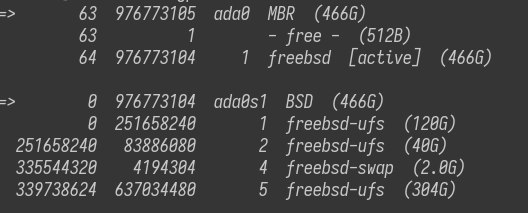
try gpart show -l, it should list partitions by name
mrphyber
partition names are (null).
as I said, your partitions aren't labelled, to label a partition use tunefs -L <newlabel> <partition>
Pouria
as I said, your partitions aren't labelled, to label a partition use tunefs -L <newlabel> <partition>
if i do not run tunefs -L newlabel partition what will happen?