 rosbridge


<hbelusca> ```
01 fffff880`04bb8b30 fffff880`04e2b559 : fffff8a0`004ae580 00000000`00000000 fffff8a0`00000002 00000000`000001b0 : win32k!EngCreateDeviceSurface+0x4e [H:\reactosx64\win32ss\gdi\eng\surface.c @ 397]
02 fffff880`04bb8ba0 fffff880`04f5a2f7 : fffff8a0`004705c0 00000001`00000001 00000000`00000001 fffff800`00533639 : vgaddi!DrvEnableSurface+0x199 [H:\reactosx64\win32ss\drivers\displays\vga\main\enable.c @ 487]
03 fffff880`04bb8bf0 fffff880`05028f74 : fffff8a0`00473010 fffff8a0`00420654 00000001`00000000 fffff8a0`004b0010 : win32k!PDEVOBJ_pSurface+0x37 [H:\reactosx64\win32ss\gdi\eng\pdevobj.c @ 243]
04 fffff880`04bb8c40 fffff880`0502a54a : fffff8a0`004b0010 fffff880`00000000 fffff8a0`00473010 000007ff`00000059 : win32k!DC_vInitDc+0x194 [H:\reactosx64\win32ss\gdi\ntgdi\dclife.c @ 173]
05 fffff880`04bb8c90 fffff880`0502b0a4 : 00000000`00000000 00000000`00000000 00000000`00000000 00000000`00000000 : win32k!GreOpenDCW+0x1da [H:\reactosx64\win32ss\gdi\ntgdi\dclife.c @ 678]
```
rosbridge
<hbelusca> ```
06 fffff880`04bb8d00 fffff800`004052bc : 00000000`00000000 00000000`00000000 00000000`00000000 00000000`00000000 : win32k!NtGdiOpenDCW+0x2b4 [H:\reactosx64\win32ss\gdi\ntgdi\dclife.c @ 779]
07 fffff880`04bb8df0 000007ff`b353f5a2 : 000007ff`b350d8a9 00000000`0012ea00 000007ff`b25a2108 00000000`00000000 : nt!KiSystemServiceExit (TrapFrame @ fffff880`04bb8e70)
08 00000000`0012e968 000007ff`b350d8a9 : 00000000`0012ea00 000007ff`b25a2108 00000000`00000000 000007ff`b25c5a68 : gdi32!NtGdiOpenDCW+0xa
09 00000000`0012e970 00000000`0012ea00 : 000007ff`b25a2108 00000000`00000000 000007ff`b25c5a68 000007ff`00000001 : gdi32!IntCreateDICW+0x359 [H:\reactosx64\win32ss\gdi\gdi32\objects\dc.c @ 62]
```
rosbridge
<hbelusca> ```
0a 00000000`0012e978 000007ff`b25a2108 : 00000000`00000000 000007ff`b25c5a68 000007ff`00000001 00000000`00000000 : 0x12ea00
0b 00000000`0012e980 00000000`00000000 : 000007ff`b25c5a68 000007ff`00000001 00000000`00000000 00000000`0012e9b8 : user32!DISPLAYW
kd> ?? cx
unsigned long 0
kd> ?? cy
unsigned long 0
```
rosbridge
<hbelusca> (Ends there)
 Chungy
@LothaireLaBrebis stop being a tard. 64-bit and multi-core are two entirely disconnected topics. 64-bit support is great and doesn't require the other in the slightest.
Chungy
It's also significantly harder to develop and debug. Most hobby OSes never bother with multi-core, and most of them these days are x86_64.
 Mike
Mike
Which is the best VM to try 64 bit reactos?
Chungy
any should work, I imagine.
Chungy
as long as you can run 64-bit VMs
 🦥Alex Fails
 ✝️ ☺️🌞 HD Scania
Did you deactivate Secure boot and enabled CSM ?
Booted ReactOS in BIOS mode ?
Put your drive in IDE mode instead of AHCI
And tell us now if it works better
When UEFI? CSM was outdated at all for FreeBSD/Linux platforms thanks?
✝️ ☺️🌞 HD Scania
https://www.forbes.com/sites/daveywinder/2020/01/15/us-government-issues-critical-windows-10-update-now-alert/amp/ get fucked normies
Anonymous
When UEFI? CSM was outdated at all for FreeBSD/Linux platforms thanks?
What do you even mean ?
Chungy
i think he means to ask when ReactOS supports native UEFI booting. Unless someone gets the itch, I doubt it'll be any time soon. Most mainboards even today still support legacy boot.
Chungy
personally I use legacy boot for a lot of reasons. (I hate UEFI with a passion)
Anonymous
i think he means to ask when ReactOS supports native UEFI booting. Unless someone gets the itch, I doubt it'll be any time soon. Most mainboards even today still support legacy boot.
Yup, it's mostly impossible to get proper UEFI booting with secure boot anyway.
Only the biggest Linux distros achieve that alongside Windows, and BSD
Chungy
That's not even true nor remotely related to why I don't use it. In fact, if Secure Boot benefited my personal desktop (and it doesn't), I would go through the pain to put up with the rest of it.
 Stas'M
personally I use legacy boot for a lot of reasons. (I hate UEFI with a passion)
UEFI is hacky sometimes, and its predecessor EFI is even more hacky. But still it's interesting thing, I see no reason for hating it. 😛
Anonymous
That's not even true nor remotely related to why I don't use it. In fact, if Secure Boot benefited my personal desktop (and it doesn't), I would go through the pain to put up with the rest of it.
The fact that all distro do not always have secure boot is true
Chungy
It's way too overcomplicated and difficult to use in its goal to replace bootloaders; and it's not even very good at that task so everyone in the Linux world just has it load grub.efi anyway and if you can get that to work, your boot process from there looks similar to legacy :b
Chungy
I have four hard drives though and I want them set up in a redundant fashion so any one of them can fail and I don't have to do anything to continue booting successfully. UEFI expects the EFI System Partition to exist on one and only one drive and doesn't natively support any kind of redundancy for it. There's hacks that work on some boards, not mine. Installing the efi variables didn't seem to do much, I spent a couple days fighting it and having to type out the path name to my kernel even when it should be automatic. I gave up. Legacy boot is easier, its only method it knows to boot a drive is to jump program execution; special partitions or file systems aren't necessary. It's easy to have the same boot code on all drives and it works perfectly well.
Chungy
The fact that all distro do not always have secure boot is true
if you're talking about very old distros not having signing tools, maybe. But that's more a matter of them existing before secure boot existed.
Anonymous
I have four hard drives though and I want them set up in a redundant fashion so any one of them can fail and I don't have to do anything to continue booting successfully. UEFI expects the EFI System Partition to exist on one and only one drive and doesn't natively support any kind of redundancy for it. There's hacks that work on some boards, not mine. Installing the efi variables didn't seem to do much, I spent a couple days fighting it and having to type out the path name to my kernel even when it should be automatic. I gave up. Legacy boot is easier, its only method it knows to boot a drive is to jump program execution; special partitions or file systems aren't necessary. It's easy to have the same boot code on all drives and it works perfectly well.
Hence why UEFI is stupid af for server configurations
And hence why no one uses it in this scenario
Chungy
the fact I became practically partitionless(*) just before UEFI started to rear its ugly head didn't make me happy. From partitionless to requiring special partitions... blah. :P
(*) on a technical implementation side, they exist, but I have a system where I don't need to worry about them at all.
Anonymous
if you're talking about very old distros not having signing tools, maybe. But that's more a matter of them existing before secure boot existed.
Even some modern distros do utilise UEFI, but not the secure boot thing
Chungy
UEFI puts too many constraints on how you can boot.
Chungy
Even some modern distros do utilise UEFI, but not the secure boot thing
UEFI and Secure Boot are two different topics only marginally related. It's like x86_64 and multicore. Stop trying to confuse things.
Anonymous
the fact I became practically partitionless(*) just before UEFI started to rear its ugly head didn't make me happy. From partitionless to requiring special partitions... blah. :P
(*) on a technical implementation side, they exist, but I have a system where I don't need to worry about them at all.
Interesting, so your partition scheme is kind of simple then
A partition for /boot and another one for your root
Anonymous
UEFI puts too many constraints on how you can boot.
I got too many problems when trying using UEFI on my machine
Chungy
Interesting, so your partition scheme is kind of simple then
A partition for /boot and another one for your root
each drive has three: GRUB partition, boot pool, root pool; the later two are two unique ZFS pools, spanned mirrors. the boot pool is stuck at version 28 so GRUB works with it, root pool has all features enabled.
Anonymous
By the way, UEFI was advertised to eliminate some steps in the booting process so it'll boot a bit faster, but I never saw more than 2-3 seconds difference
Chungy
UEFI pulls the processor instantly into 32- or 64-bit mode and the operating system doesn't need to concern itself with stepping up from real mode or initializing certain hardware drivers. Both are required in legacy booting.
Anonymous
each drive has three: GRUB partition, boot pool, root pool; the later two are two unique ZFS pools, spanned mirrors. the boot pool is stuck at version 28 so GRUB works with it, root pool has all features enabled.
Uh okay...
So even GRUB restricts you in your partition config ?
Chungy
not really. GRUB just needs a little place to install its stage1 image that has the bare-minimum amount of drivers to access the boot files. on MBR disks it normally tries to wedge itself between the MBR and first partition, if space exists. On GPT disks (which I use), it requires a specific partition type, ef02 in gdisk. the stage1 image is only a few kilobytes and it doesn't even hurt to put it on a ~1MB partition in "slack" space that normally never gets used between the GPT and first real partition (it's in an unoptimial-for-read layout, but it loads so fast it doesn't matter)
Anonymous
UEFI pulls the processor instantly into 32- or 64-bit mode and the operating system doesn't need to concern itself with stepping up from real mode or initializing certain hardware drivers. Both are required in legacy booting.
Well, I think that when 64bit only OSes without the multilib we get on Linux, UEFI may become a necessity.
The legacy booting is mostly at first in 32b real mode, so the OS has way more trouble booting
If the boot process goes in 64bit mode all the way, that'll mean legacy booting won't be a possibility ?
Chungy
Linux is not and will not be anytime soon "64-bit only", nor will it discontinue old booting methods. the multiboot protocol used by GRUB is identical whether GRUB is loaded from BIOS or UEFI.
Chungy
the kernel doesn't really care what firmware is used.
Anonymous
not really. GRUB just needs a little place to install its stage1 image that has the bare-minimum amount of drivers to access the boot files. on MBR disks it normally tries to wedge itself between the MBR and first partition, if space exists. On GPT disks (which I use), it requires a specific partition type, ef02 in gdisk. the stage1 image is only a few kilobytes and it doesn't even hurt to put it on a ~1MB partition in "slack" space that normally never gets used between the GPT and first real partition (it's in an unoptimial-for-read layout, but it loads so fast it doesn't matter)
Interesting.
GPT isn't really made for legacy boot anyway, it's a requirement for UEFI iirc
The fact that GRUB can work in a lot of scenarios even when butchered in a 1MB partition between two other ones means you got the flexibility to make it booting properly.
Chungy
legacy boot knows nothing about partitions. Its main job is to jump program execution to some drive and whatever code is on the drive's sector takes over.
Chungy
GRUB installs code that reads the GPT, looks for the type needed, loads the image from there, and it goes from there.
Anonymous
Linux is not and will not be anytime soon "64-bit only", nor will it discontinue old booting methods. the multiboot protocol used by GRUB is identical whether GRUB is loaded from BIOS or UEFI.
I know that, a lot of distros are still working on 32bit machines, and will still be supported this decade
Debian never announced they'll stop 32b
Arch was one of the first to do so
We'll probably never see Gentoo based end it as well
Fedora, CentOS, EL, Oracle Linux and others didn't had reasons to continue supporting it
Chungy
GPT is defined in the UEFI spec, but it's still pretty well divorced. GPT works fine on BIOS. UEFI even works with MBR disks (the ESP gets type 0xEF)
Anonymous
legacy boot knows nothing about partitions. Its main job is to jump program execution to some drive and whatever code is on the drive's sector takes over.
Well, he has to know where is the boot sector, at least on MBR
I don't know how it works with GPT, as I don't think boot sectors are handled the same way
Chungy
It's handled in exactly the same way. Boot code exists at the very first sector of the disk. GPT even includes a 'fake' MBR that spans the whole disk so legacy partitioners don't screw it up.
Anonymous
GPT is defined in the UEFI spec, but it's still pretty well divorced. GPT works fine on BIOS. UEFI even works with MBR disks (the ESP gets type 0xEF)
The problem is that UEFI makes PCs way more dependent of proprietary non free blobs
All the boot process isn't FOSS, even with a UEFI boot sequence
Anonymous
Chungy
and some people manage to abuse the dual-life of GPT and MBR so partitions can be seen by OSes that recognize either type. It gets very fragile in such setups (one should especially never edit partitions from a GPT-unaware OS)
Chungy
# fdisk -l -t dos /dev/sda
Disk /dev/sda: 3.65 TiB, 4000787030016 bytes, 7814037168 sectors
Disk model: WDC WD40EFRX-68N
Units: sectors of 1 * 512 = 512 bytes
Sector size (logical/physical): 512 bytes / 4096 bytes
I/O size (minimum/optimal): 4096 bytes / 4096 bytes
Disklabel type: dos
Disk identifier: 0x00000000
Device Boot Start End Sectors Size Id Type
/dev/sda1 1 4294967295 4294967295 2T ee GPT
Anonymous
and some people manage to abuse the dual-life of GPT and MBR so partitions can be seen by OSes that recognize either type. It gets very fragile in such setups (one should especially never edit partitions from a GPT-unaware OS)
That practice isn't that common thankfully
And OSes that doesn't support GPT are getting rare
Chungy
telling fdisk to ignore gpt, display only the dos (MBR) partitions :P
Chungy
also without some gross and largely-incompatible-with-everything hacks, MBR only supports up to 2TiB. So despite being a 4TB disk, it shows the GPT protective partition being 2T.
Anonymous
also without some gross and largely-incompatible-with-everything hacks, MBR only supports up to 2TiB. So despite being a 4TB disk, it shows the GPT protective partition being 2T.
So you still have to do two partitions in MBR to get your full 4TB ?
Chungy
it is kind of possible to push MBR to support up to 16TiB, but it only really works on OSes that already support GPT so it's pointless and you might as well just use GPT.
Chungy
So you still have to do two partitions in MBR to get your full 4TB ?
given I use GPT and GPT has a maximum partition size of 16EiB, no.
Chungy
I might need to double-check, I'm not sure if it's really 16E, might be bigger.
Chungy
ok, it's up to 2^64 sectors for a disk. 8ZiB for 512B sectors. that works out to 64ZiB on 4K sectors.
Anonymous
it is kind of possible to push MBR to support up to 16TiB, but it only really works on OSes that already support GPT so it's pointless and you might as well just use GPT.
GPT is just way more stable for these capacities anyway
When MBR was a thing, 2TB wasn't really an issue
We're pretty far from approaching these GPT limits
Anonymous
ok, it's up to 2^64 sectors for a disk. 8ZiB for 512B sectors. that works out to 64ZiB on 4K sectors.
Then it's safe to say it's impossible to go to, and just like IPv6, we'all die way before we get to the limit
Chungy
GPT's limits are big enough that it's literally impossible to make a drive with that full capacity even if you use every atom in the planet Earth to make one.
Chungy
that's more bytes than there exists atoms on this planet.
Chungy
GPT is just way more stable for these capacities anyway
When MBR was a thing, 2TB wasn't really an issue
We're pretty far from approaching these GPT limits
stability isn't really a proper word. OS support is what matters.
Anonymous
that's more bytes than there exists atoms on this planet.
So, we'll never see something else after GPT.
Anonymous
stability isn't really a proper word. OS support is what matters.
And the quality of the implementation
Chungy
It's possible to use MBR with 4096B sectors for disks/partitions up to 16TiB, but any OS where MBR is needed won't support the 4096B sectors... so it's pointless.
Anonymous
Because if I understand correctly, it's not only a matter of getting GPT support inside the OS, it's also to get it properly working with the rest of the OS, and that every single aspect of the system can communicate with the drive
Anonymous
It's possible to use MBR with 4096B sectors for disks/partitions up to 16TiB, but any OS where MBR is needed won't support the 4096B sectors... so it's pointless.
There's not even a 16TiB drive on the consumer market as of now, I think there's only 14TiB
Chungy
probably depends on the OS design I guess. I don't know how NT handles it. It's a bit simple on Linux at least; kernel drivers understand all kinds of partition layouts, and create block devices for each partition. File system drivers see a big block device and work off of that, totally unaware of partition layout.
Anonymous
probably depends on the OS design I guess. I don't know how NT handles it. It's a bit simple on Linux at least; kernel drivers understand all kinds of partition layouts, and create block devices for each partition. File system drivers see a big block device and work off of that, totally unaware of partition layout.
Yeah, we know it's on top of a GPT partition structure, but if we didn't knew that only the kernel drivers will know it, but the rest of the OS won't
Chungy
GPT supports unlimited amounts of partitions, though largely fixed to a certain size at creation time. Minimum 4, almost everything creates a label big enough for 128 partitions by default. It supports capacities that go way beyond physical limits of the planet earth, and uses 128-bit UUIDs to identify partition types with the goal of avoiding collisions like frequently happens with MBR (of course, collisions already happened, but due to people copy+pasting IDs instead of generating new ones)
Chungy
Partitions can get labels in up to 36 UCS-2 characters, too.
Chungy
it also has 64 bits for partition attributes (hidden, read-only, boot, etc) that basically get ignored by every OS
Chungy
also the special partition UUID for BIOS booting is 21686148-6449-6E6F-744E-656564454649
It's funny if you look at it from a hexdump point of view.
Chungy
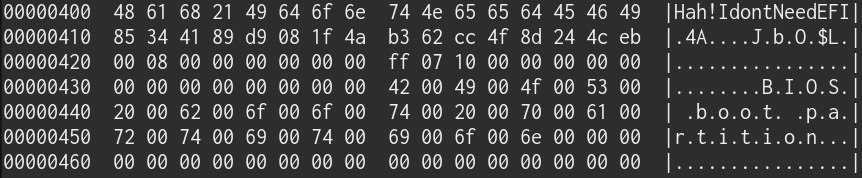 Anonymous
also the special partition UUID for BIOS booting is 21686148-6449-6E6F-744E-656564454649
It's funny if you look at it from a hexdump point of view.
Yeah, this is very weird, almost seems like a dev joke
Chungy
because it is a dev joke.
Chungy
GPT is defined as part of the UEFI standard but nothing about it is really tied to UEFI.
Chungy
i've been running purely off GPT since way before I even had a UEFI mainboard. :P
Anonymous
GPT is defined as part of the UEFI standard but nothing about it is really tied to UEFI.
However it's weird as when people think about UEFI they mostly think about GPT, and not everyone do UEFI on MBR (it's not very practical as well for specific configs)
Chungy
I even use it on all my USB drives even though it's a bit atypical.