 Chungy


I believe all help is welcome.
 hacker12455
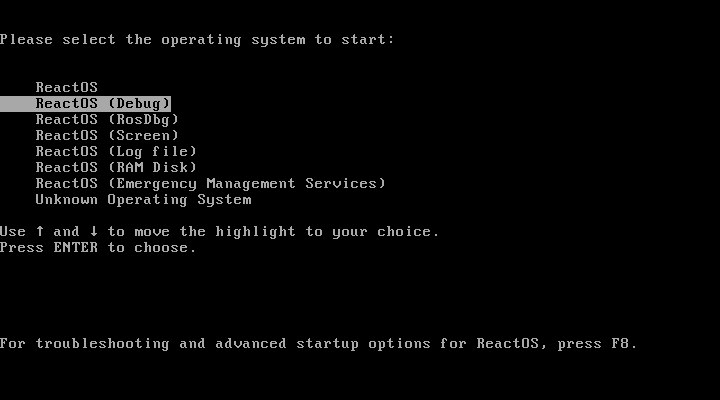 hacker12455
This is the debug mode
 Anonymous
You also have to set a few additional settings to access real-time debug logs.
hacker12455
^
Anonymous
Such as pipe the output so you can read it using PuTTY
Anonymous
I believe all help is welcome.
I will read the website first then. Programming sounds more fun but translations are good too ^^
Anonymous
Chungy
old NT always had a menu like that :P
Chungy
checked builds have a debug mode too
hacker12455
Yup, I remember it from XP
Chungy
I meant older than XP or 2000 :P
Chungy
NT 3.x and 4 used to have a large boot menu
Anonymous
The only "hackerman paths" I took back then was spam F8 and safe mode with networking. ^^
Anonymous
https://git.reactos.org/?p=reactos.git;a=commitdiff;h=50b00f0 this seems fun.
Mark
dont use named pipes
Mark
its slow and you need to start the vm before putty / windbg
Mark
use com0com
Mark
it's a com loopback application
Anonymous
wiki needs some updating them ^^
Anonymous
then*
Mark
it connects 'CNCA0 <-> CNCB0' on a default install
Mark
so you put CNCA0 in your VM as com port
Mark
and use CNCB0 in windbg as com port
Anonymous
Currently wiki advises people to use "\\.\pipe\ros_pipe"
Potato
I've made a small config change, just doing a quick *test*
Mark
have at it @Cernodile
Anonymous
will play around with it and see if I can write something later.
 Stas'M
<BieHDC> i hope it hels @x86corez
its a very diverse dump
https://cdn.discordapp.com/attachments/480317303339089930/480423404462407681/smbiosdumps.zip
smbios-09f0h-p4.bin => HP Compaq dc7600 Convertible Minitower
smbios-0968h-p4.bin => HP 0968h
smbios-h67ma-i7.bin => H67MA
smbios-hpmini-intel_atom.bin => HP 361A
smbios-Z170A-G45-i7.bin => MSI Z170A-G45 GAMING (MS-7977)
Stas'M
Thanks @BieHDC !
rosbridge
<BieHDC> the pentium 3 P2B board wouldnt dump sadly
rosbridge
<BieHDC> and another person is also dumping right now, so stay tuned 😛
rosbridge
<Cernodile> hm, did it have any specific error?
 Stas'M
Mark, requesting some help. How to send .patch file to buildbots / tests? I never did that, only tested Pull Requests.
Mark
you have login for that buildbot thing?
Stas'M
Yes
Stas'M
Going to upload USB all-in-one patch for tests ☺️
Mark
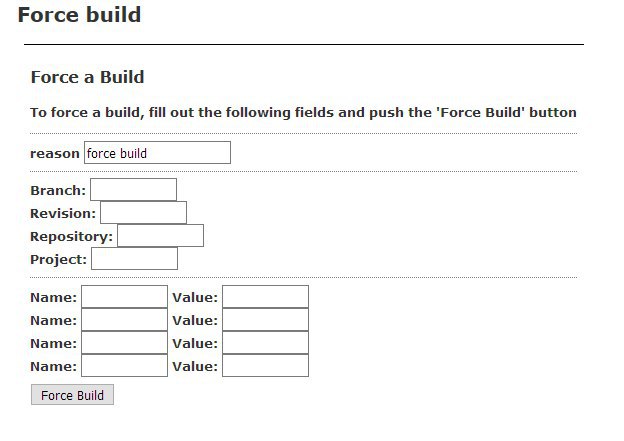 Mark
Mark
in the first name field, put 'id'
Mark
without quotes
Mark
in the value field, put the jira attachment id
Stas'M
aha, so I also have to upload .patch file to JIRA, ok
Anonymous
is the "all-in-one" patch even up to date? i mean there have been commits over time
Anonymous
or you made a new "all-in-one" patch?
Stas'M
It's up to date (applyable to master)
Stas'M
Nikita Krapivin helped me to prepare the patch for tests
Anonymous
Isn't "all-in-one" early yet? considering one of the PRs has as low as only 6 comments?
Stas'M
Isn't "all-in-one" early yet? considering one of the PRs has as low as only 6 comments?
Maybe, but let's begin with something 😁
Anonymous
well, doesn't hurt to try.
Anonymous
Hello!
Anonymous
well that test failed fast
Anonymous
irc reported that it failed
Anonymous
Telegram certainly seems interesting.
Anonymous
failed preparing source
Stas'M
uhm...
 Никита
Hi
Никита
I am creator of that aio patch
Никита
Something is wrong?
Stas'M
^ yes, confirming he is Nikita Krapivin
Никита
My amazon instance building fine.
Stas'M
https://build.reactos.org/builders/Build%20GCCWin_x86/builds/5809/steps/preparing%20source/logs/stdio
Никита
Well I see exit code 5
Никита
But why it happened? Maybe convert line-endings to DOS format?
Stas'M
Well, I don't see any error about applying the patch...
Stas'M
Mark I've specified file id 48001, or I should specify full file name?
Mark
no should be just that
Никита
My Amazon VPS doing fine.
Никита
No errors. Already tested iso
Никита
I will try unix2dos.
Mark
I always use Build GCCLin_x86
Mark
I dont know about the others
Никита
Well, Stas using build GCCWin_x86
Stas'M
Ok, let's try GCCLin_x86
Никита
Ok, Stasik.
Stas'M
https://build.reactos.org/builders/Build%20GCCLin_x86/builds/22004
Stas'M
Looks like success? :)