 Dmitry


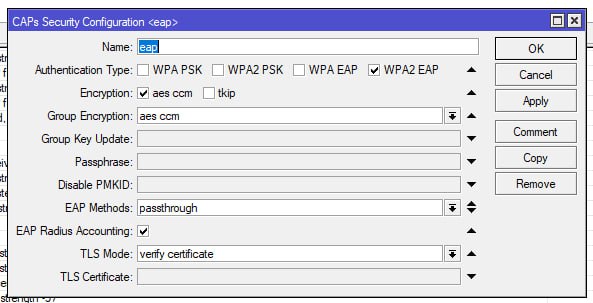
да, устройства ругаются или на них надо ставить корп. корневые сертификаты
Dmitry
работает акторизация, как по логину паролю, так и по сертификату, как пользователя так и компьютера
Dmitry
для ноутбуков в домене сертификат и настройки сети прилетают автоматически, через групповые политики
 Petr
 Гордей
Скажите сколько клиентов может обслуживать точка доступа cap ac, cap Xl ac? Как только маков на точке больше 10-15, у кого-то из них начинаются проблемы с вайфай.
 Innokentiy
IIyа
Скажите сколько клиентов может обслуживать точка доступа cap ac, cap Xl ac? Как только маков на точке больше 10-15, у кого-то из них начинаются проблемы с вайфай.
Столько и может. Там же бытовой вайфай-чип и его ПО. Ставьте дополнительные точки, поднимайте капсман.
Рукус, Аруба, Циска стоят совсем других денег.
Кстати, попробуйте AX - может там ситуация получше будет.. 🤔
Гордей
Юбики на другой площадке совершенно спокойно тянут 35-40 клиентов, ожидал такого же от микротика.
IIyа
Юбики на другой площадке совершенно спокойно тянут 35-40 клиентов, ожидал такого же от микротика.
Обновите ROS и драйвер WiFi до последних. Там вроде получше.
Гордей
АХ стоят в другом месте, там жалобы на плохое переключение между точками, и тоже проблема при большом количестве клиентов присутствует, хотя не так ярко.
IIyа
АХ стоят в другом месте, там жалобы на плохое переключение между точками, и тоже проблема при большом количестве клиентов присутствует, хотя не так ярко.
АХ тонко настраивать надо, но полсотни довольных клиентов я бы тоже не ждал.
В энтерпрайзных точках внутри по нескольку радиоинтерфейсов, не говоря уже обо всем остальном.
IIyа
Юбики на другой площадке совершенно спокойно тянут 35-40 клиентов, ожидал такого же от микротика.
Я бы попробовал ROS 7.16 и пакет wifi-qcom-ac
Гордей
Я бы попробовал ROS 7.16 и пакет wifi-qcom-ac
Такой вариант стоит на ещё одной площадке, но там людей на порядок меньше. Поэтому не могу оценить что лучше.
IIyа
Хуже точно не будет
Innokentiy
будет, потому что придеься настраивать новый капсман
 Василий
Это ж бот
 AliKo
Василий
ну тогда ладно, но потом всё равно забанить!
Alex
Вопрос интересный.
Имеется:
Серв с:
1. ESXI 7.0
2. Router OS 7.16
3. Ubuntu 22
Есть некий сервис там далеко в америкосии с пингом 110мс
Этот сервис шлет порядка 18000 сообщений в секунду, это около 70-90мбит трафика плюс-минус
Бубунта <> RouterOS (NAT) <> Сервис
По какой-то неведомой для меня причине эта схема обрывается с ошибкой socket read error
Я перебрал весь софт который читает этот поток (думал можно не успевает читать и тд), добавил логирование и методом тыка выяснялось что в какой-то момент сервис продолжает писать в мой сокет, а он переполнен и отключается. Хотя по факту все прочитано
Ну, я перебесился тут и думаю – твою ж мать, где ошибка. Выдал белый IP убунте и все заработало без проблем, точнее работает уже сутки. Ради интереса решил повторить через ROuterOS прогнать и нат – опять соединение глохнет.
Вопрос, что надо настроить чтобы этого не было?
Гордей
будет, потому что придеься настраивать новый капсман
Новый капсман на этой площадке не сделать, потому что в qcom-ac нельзя использовать несколько вланов на интерфейсе и тегировать в принципе.
Innokentiy
тегировать можно (но немножко сложнее, чем в старом). и несколько вланов можно
Гордей
Вручную в бридж я добавлял но тегированный трафик не шел. Только нетегированный, соответственно только один влан.
Innokentiy
неа. там можно, но с приключениями
 Artem
Всем привет, как от "нетинсталлить" cap ac, после неудачного обновления, без айпи адреса? Реально ди вообще такое? Я его, пробовал сбросить, не помогло. По стандартному адресу 88.1 нетинсталлом не находится. До этого адрес получал как dhcp-client.
 Aleksey
Всем привет, как от "нетинсталлить" cap ac, после неудачного обновления, без айпи адреса? Реально ди вообще такое? Я его, пробовал сбросить, не помогло. По стандартному адресу 88.1 нетинсталлом не находится. До этого адрес получал как dhcp-client.
почитайте документацию как пользоваться нетисталлом
Aleksey
Всем привет, как от "нетинсталлить" cap ac, после неудачного обновления, без айпи адреса? Реально ди вообще такое? Я его, пробовал сбросить, не помогло. По стандартному адресу 88.1 нетинсталлом не находится. До этого адрес получал как dhcp-client.
https://translated.turbopages.org/proxy_u/en-ru.ru.8659ee8d-67357f14-52e78d77-74722d776562/https/help.mikrotik.com/docs/spaces/ROS/pages/24805390/Netinstall
 Иван
выпущенный корп. центром сертификации
Upd:
Решил проблему, ошибка была в попытке использовать wildcard серт под доменное имя. Все устройства кроме винды его воспринимают корректно, помог выпуск серта под доменное имя nps сервера, спасибо за наводку.
 Никита
Всем привет. Можете подсказать про значения certificate в log'ах. Сам вопрос, он может еще что-то написать кроме start CRL update?
 Sergey
 Sergey
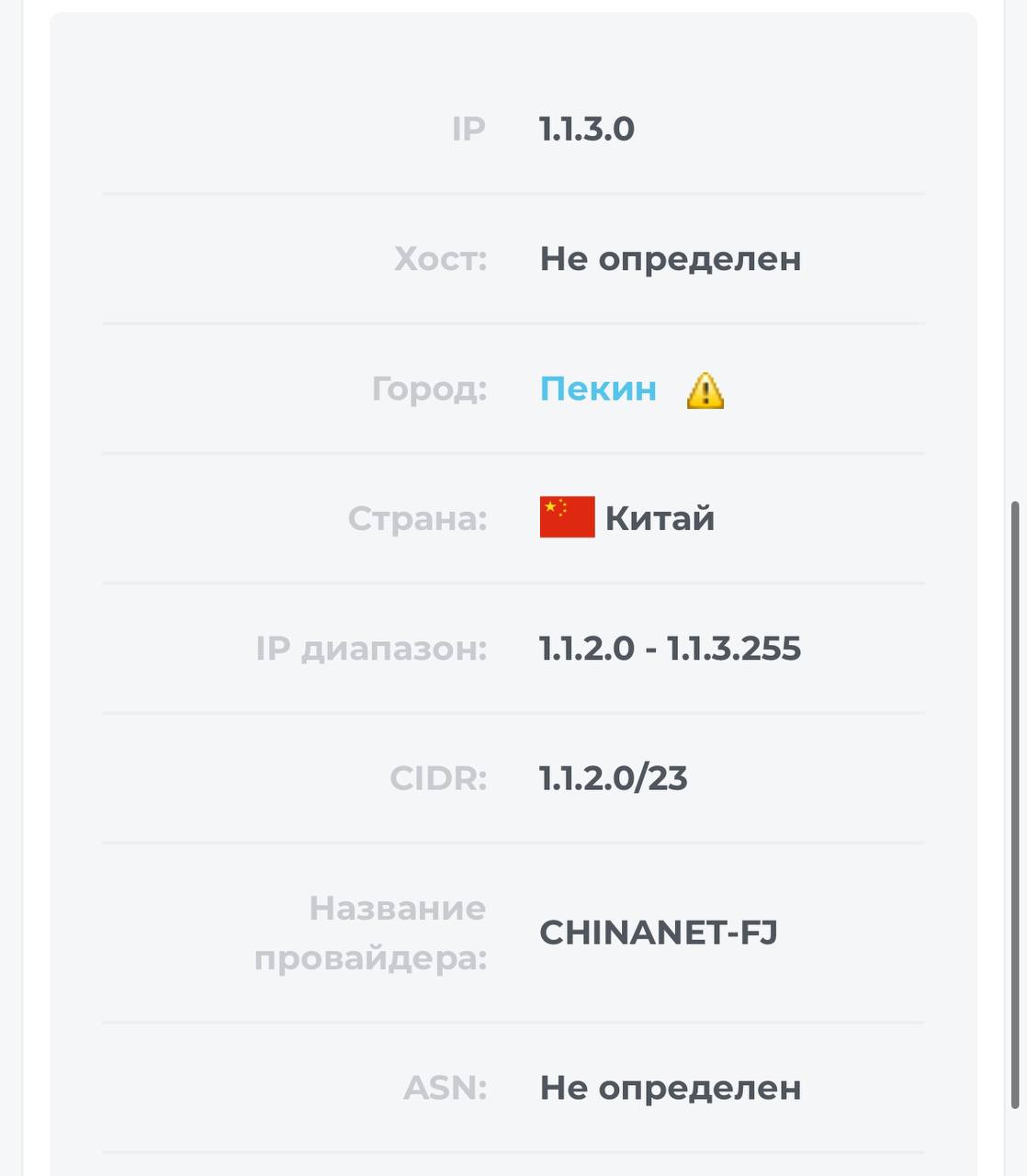
Нет, это айпи просто для примера, так как проблема на многих российских белых айпи. На других роутерах, с ROS 6, таких проблем не наблюдается
 Олег
Максим
Добрый день.
Имеется большой склад с 150 железками RBD22UGS-5HPacD2HnD на 6.49.17
нужна работа K/V/R так как часть клиентов упорно плохо переключаются между точками.
кто в больших сетях уже перешел на 7?
увидели ли профит от работы капсмана?
 Руслан
 BIZM
Всем привет, как от "нетинсталлить" cap ac, после неудачного обновления, без айпи адреса? Реально ди вообще такое? Я его, пробовал сбросить, не помогло. По стандартному адресу 88.1 нетинсталлом не находится. До этого адрес получал как dhcp-client.
У вас Windows 11 и в Netinstall не видно Микротик?
Artem
У вас Windows 11 и в Netinstall не видно Микротик?
Нет, у меня Ubuntu, но по инструкции выше все получилось
Sergey
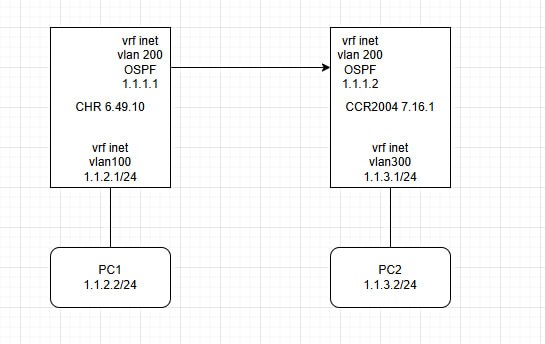
например, вы себе запретили icmp с/в интерфейс vlan300. это можно сделать ip- или bridge-файрволом.
или у вас есть неправильное правило pbr, которое ломает связность между подсетью 1.1.3.0/24 и адресом 1.1.3.1
фаер проверили, ничего не блочим и не отключали. На соседния роутерах с ROS v6 все работает отлично.Связанность не нарушена, трафик ходит весь и везде кроме iсmp между PC2 и его шлюзом (и аналогичными PC directory connected к роутеру с ROS 7) склоняемся к вот такому багу, хотя и хотелось бы решить проблему
There's a bug in ROS 7:
Using VRF as replacement will not work properly. The MT support confirmed that today. In fact they say "You cannot use VRFs as a pure routing marks in v7".
Here is a quote of my support request. Described for a lab setup (see attachement). You can simplify the setup by deleting the eth2, vrrp, vlan600 parts. I tought, that it could be something with this features, but the issue is more basic.
The ping command fails if used with VRFs/Routing marks and gateways in the main routing table. e.g. ping 1.1.1.1 vrf=mark1.
The lab setup:
There are two routers in the lab setup (network scheme is attached). Each of them has two interfaces (eth2 and eth3) that are connected to each other and simulate the multiple gateway setup. eth3 is “directly” connected (no vlans or vrrp). eth2 is more sophisticated with a vrrp session and vlan on top of the vrrp session. The second router has a “internet address” (1.1.1.1) on its loopback interface to simulate a far away device. In short: the second router is only the counterpart station to router one.
The first router is the one, where the issue can be observed. Besides its two described devices, it has two VRFs (mark1 and mark2) with interface “none”. These marks are used in the routing table with two default routes. Everything else is direcly connected.
The observations:
After bootup the ping command “ping 1.1.1.1 vrf=mark1” results in timeouts. Same for mark2. If the packets are sniffed on that devices (vlan600 or eth3) the echo reply is received.
If one of the gateways are pinged (e.g. ping 192.168.1.2) and short after that, the “ping 1.1.1.1 vrf=mark1” command is executed, the ping command succeeds. It will continue to succeed, as long as it is not canceled.
If you execute the gateway ping command and wait for 12-15 seconds (I can’t figure it out exacly), before executing the ping vrf command, the ping with vrf option will time out.
Connection tracking will show nothing - as expected in this setup.
BIZM
Нет, у меня Ubuntu, но по инструкции выше все получилось
Ну вот тоже не получается, но было обновление W11, причем роутер живой.
Sergey
В нашей ситуации баг заключается в том, что что рос7 не отвечает на пинги из подсети , которая повешена на влан в vrf. А если совсем по простому клиент у которого на роутере включен checkgateway - не видит шлюз и его роутер не подключается
Alex
Добрый день.
Имеется большой склад с 150 железками RBD22UGS-5HPacD2HnD на 6.49.17
нужна работа K/V/R так как часть клиентов упорно плохо переключаются между точками.
кто в больших сетях уже перешел на 7?
увидели ли профит от работы капсмана?
K/V/R же должны быть в спецификациях, а на роутере wifi 4 где этого отродясь не было.
На тему плохого переключения обычно решается уменьшением силы сигнала, но на 150 железках это будет прям боль
Максим
K/V/R же должны быть в спецификациях, а на роутере wifi 4 где этого отродясь не было.
На тему плохого переключения обычно решается уменьшением силы сигнала, но на 150 железках это будет прям боль
Kvr это всего лишь маркеры в пакете. Которые формируются драйвером устройства. В 7 версии поменяли драйвера и сделали поддержку этих маркеров. О чем есть записи в чендж логе. Но вот как они работают в больших сетях и работают ли нормально неизвестно.
Stan&slav
подскажите пожалуйста, купили микротик 5009 , хочу настроить его, но каждый раз при удаления бриджа, не могу подключиться к нему по маку :-( приходится ресет делать
Innokentiy
а зачем вы этот бридж создаете, чтобы его удалять?)
Stan&slav
не знаю как быть :-( в конфигурации прошлого микрота не было ни одного бриджа
Stan&slav
а тут он автоматом
Innokentiy
так когда ресетите, выбирайте бланк, а не дефолт
Innokentiy
там не будет бриджей
Stan&slav
так когда ресетите, выбирайте бланк, а не дефолт
простите пожалуйста, может глупо, а где это выбирать? через кнопку ресет сбрасываю, он автоматом поднимает dhcp , nat и прочую чепуху
Stan&slav
или через winbox нужно ?
Innokentiy
при первом входе после ресета он спрашивтаь должен, что вы хотели - бланк или дефолт
Innokentiy
если выберете бланк - он оставит пустой конфиг, если дефолт - натянет бридж и прочую чепуху
Stan&slav
если выберете бланк - он оставит пустой конфиг, если дефолт - натянет бридж и прочую чепуху
🙏спасибо, невнимателен 😥
Stan&slav
получилось
Stan&slav
А можно ещё вопрос, про восстановления бекапа, после восстановления бекапа (был 10 портовый, новый 8 портовый) немного сбился порядок интерфейсов, для меня не страшно, но пишут что не стоит так делать, что будут глюки, на сколько это верно? или стоит руками всё добавлять лучше ?
 Wasp
Kvr это всего лишь маркеры в пакете. Которые формируются драйвером устройства. В 7 версии поменяли драйвера и сделали поддержку этих маркеров. О чем есть записи в чендж логе. Но вот как они работают в больших сетях и работают ли нормально неизвестно.
Так драйвера поменяли только на wave 2 устройствах, разве нет?
 Евгений
Stan&slav
Делайте через экспорт конфига
понял, спасибо именно так сейчас и делаю, много ручками приходится править :) некоторые команды не воспринимает)
Максим
Так драйвера поменяли только на wave 2 устройствах, разве нет?
Так у меня как раз устройства поддерживают wave2вопрос будет лучше работать или нет.
Wasp
Так у меня как раз устройства поддерживают wave2вопрос будет лучше работать или нет.
Я одного клиента для теста перевёл, но там не такое количество устройств, там частный дом и 5 человек с Айфонами/айпэдами/часами/макбуками. У него стало лучше работать, когда клиент ходит по дому и разговаривает по вотсапу, ему больше не рвёт звонок.
Stan&slav
Делайте через экспорт конфига
Евгений прошу прощения, тебе другая проблема, почему-то при экспорте , отсутствует параметр Disabled, что-то не так делаю? например у меня в старом микроте выключен DHCP куча правил в RAW, при импорте они все активны, открываю файл блокнотом, а там нигде нет параметра disabled
Stan&slav
export file=config_backup.rsc делал командой так
Stan&slav
а точнее как то выборочно, где-то есть, где-то нет
Dmitry
Евгений прошу прощения, тебе другая проблема, почему-то при экспорте , отсутствует параметр Disabled, что-то не так делаю? например у меня в старом микроте выключен DHCP куча правил в RAW, при импорте они все активны, открываю файл блокнотом, а там нигде нет параметра disabled
Какая печаль...
Зачем? Зачем вы используете raw без понимания?
Dmitry
В raw - в текущих условиях можно без потери производительности только drop-ать пакеты по address-list ( читай по ipset с hash )
RAW не оперирует соединениями и поэтому если там написать 1005019 правил, каждый, каждый пакет по ним пройдет
Dmitry
Ммм... Я прям чувствую как растет производительность моего мега маршрутизатора на arm...
Innokentiy
Dmitry
Ну и у меня роутер на arm - разве не у всех так в 2024 :)
Stanislav
mmips ,ppc и x86 :)
Stan&slav
Какая печаль...
Зачем? Зачем вы используете raw без понимания?
айпишники баним обычно атакующих, подскажите как лучше
читал статью https://bozza.ru/art-372.html
Dmitry
mmips ,ppc и x86 :)
Кроме x86 - у меня все это тоже есть и там я подобным точно заниматься не буду.
Dmitry
ppc, tile, mmips, mipsbe (да да, все ещё), arm и ещё какой-то новый этот новый ваш arm - уже не помню ...
Dmitry
Вот tile начал значительно подгружаться, а заменить по факту и нечем - вот это печаль и проблема.
Евгений