XS
XS


well, with no networking knowledge, the short answer is, you don't
XS
but it consists of having at least two (virtual or not) interfaces
 Tyler
Tyler
well, with no networking knowledge, the short answer is, you don't
Not no. Just not much. 😏
XS
and adding NAT rules to the hypervisor firewall
XS
https://docs.freebsd.org/en/books/handbook/firewalls/ see Simple gateway with NAT
Tyler
Ok. Thanks anyway i will try do it.
XS
This section demonstrates how to configure a FreeBSD system running PF to act as a gateway for at least one other machine. The other(s) machine(s) would be the guest bridged to a virtual switch instead of a real interface
XS
and you'll need to port forward any service you want to reach in your guests from the outside, but you can skip that if you don't need hosting services inside the guests
Tyler
I havent setup any firewall yet
Tyler
No pf
XS
pf is dope
Tyler
@xsuuu it is working now. 🤓 I just plug the ethernet cable and add the vm switch public to the em0 interface. The reason why yesterday could not work is trivial: the router if in repeater mode does not support 5Ghz signal. So first i did set in the Tp-Link mobile wifi adapter the wifi boradcast ssid from 5Ghz to 2.4Ghz. Then my host get ip from em0 interface. Then was creating the vm-switch. Now work like charm.
Thank you for ur help.👍🙏🙏 Appreciate it.
Tyler
 XS
XS
yw
Tyler
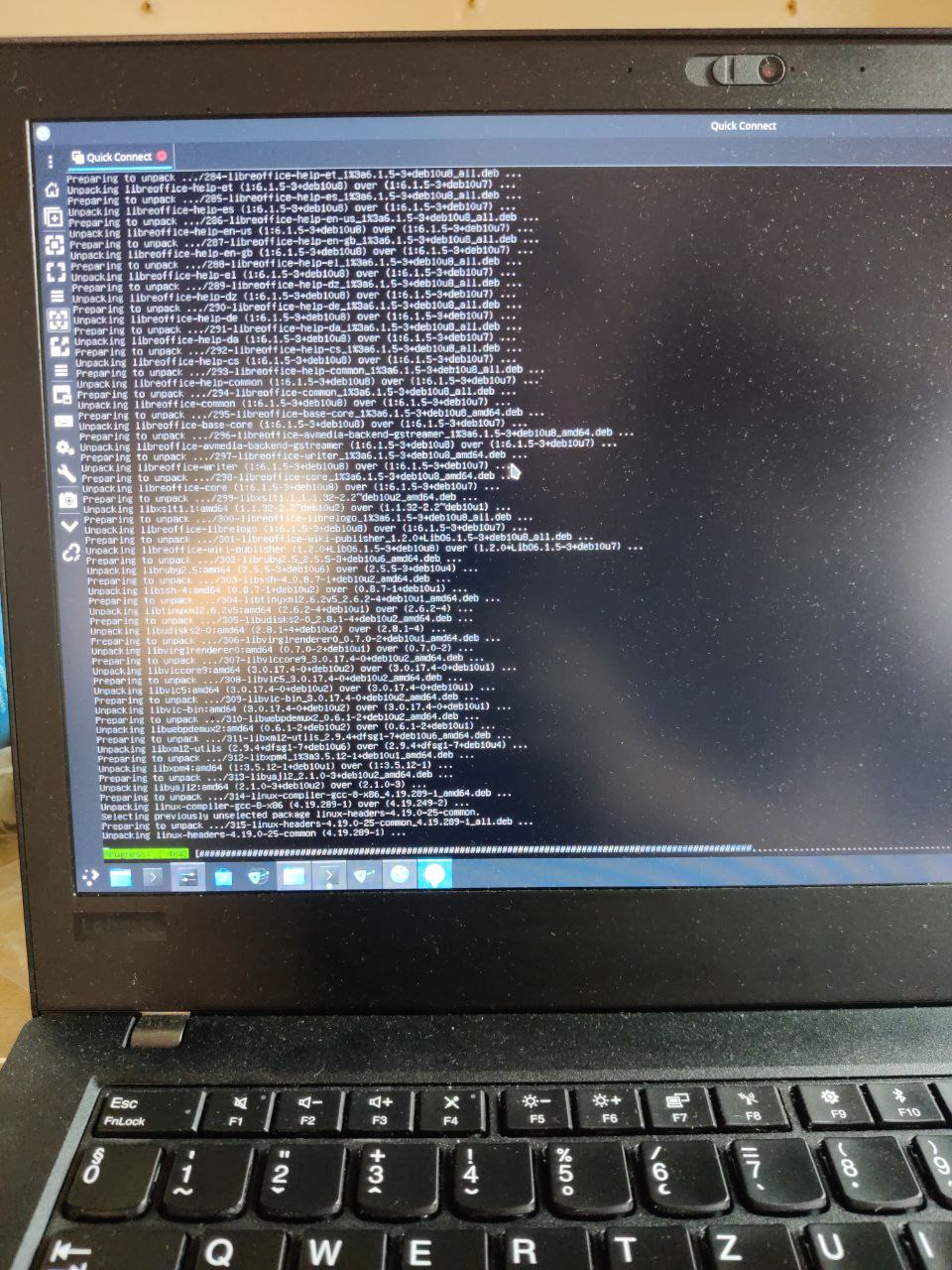
Debian nicely updating now in vm-bhyve. 😊
XS
so you finally used a cable
XS
but I don't see the relation between the AP mode and the ethernet interface em0
Tyler
but I don't see the relation between the AP mode and the ethernet interface em0
I dont see as well....But why does work now?? 🤔
Tyler
I dont see as well....But why does work now?? 🤔
Probably the authentication you mentioned earlier....
XS
always should have been working with a cable and switch properly configured to em0
XS
that's only with wlan0 that should not work without doing a nat
XS
cause auth problem
Tyler
that's only with wlan0 that should not work without doing a nat
Yes. But i did not know that. None of the guides are mentioning it...Not even vm- bhyve github official wiki or the Quickstart section. 😒
XS
That's the first thing I've said to you when you came with this problem and a wlan interface :p
Tyler
That's the first thing I've said to you when you came with this problem and a wlan interface :p
Maybe i missed that. 😳🙈
XS
yeah like most of my requests for debug outputs :p but don't mind. I'm used to that...
XS
that happens when wanting to go fast
Tyler
Maybe tomorrow will do nat then....because now all my devices need to use 2.4G. 😒
XS
but why ?
XS
should not be the case, you defenitely need to build a proper network because what you are telling me is not normal here
XS
dhcp server in the ISP box, OK, but the wifi AP settings have nothing to do with ethernet, or your router is crap
Tyler
dhcp server in the ISP box, OK, but the wifi AP settings have nothing to do with ethernet, or your router is crap
Not the router. The adapter is crap.
XS
what is that adapter ?
XS
if you connect wit a cable, connect directly to the router, or via an intermediate witch
XS
ok but this is just a separate wifi ap with a single ethernet cable
XS
I really wonder how you patched that up
Tyler
if you connect wit a cable, connect directly to the router, or via an intermediate witch
But the router is getting the net from the wifi adapter. I dont have wired connection between the wifi adapter and the router.
XS
because normally you plug that AP ethernet to the router, then in the router as well you have other ethernet ports available for your wired lan
XS
and the ISP router itself might do wifi by itself as well, this is only useful if you want to bring another wifi AP further in distance
XS
XS
that's not how a proper network might look
Tyler
and the ISP router itself might do wifi by itself as well, this is only useful if you want to bring another wifi AP further in distance
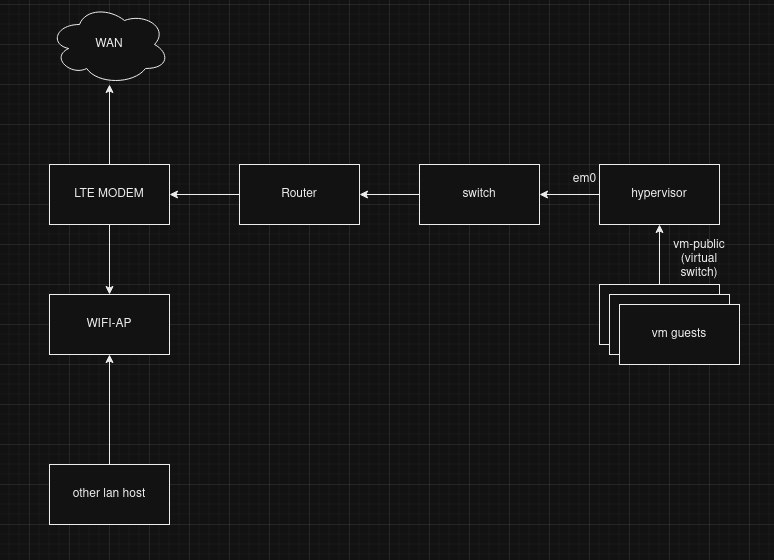
Yes. I got your point. But i dont have any "ISP". Not in the classic way you mean. I just have a SIM card. Thats it. The SIM card is the ISP provider. The tp link adapter is working like wifi hotspot. My router is getting the signal via 2.4Ghz from the hotspot then forwarding it via ethernet cable to the host. Thats all.
XS
Yes. I got your point. But i dont have any "ISP". Not in the classic way you mean. I just have a SIM card. Thats it. The SIM card is the ISP provider. The tp link adapter is working like wifi hotspot. My router is getting the signal via 2.4Ghz from the hotspot then forwarding it via ethernet cable to the host. Thats all.
 XS
XS
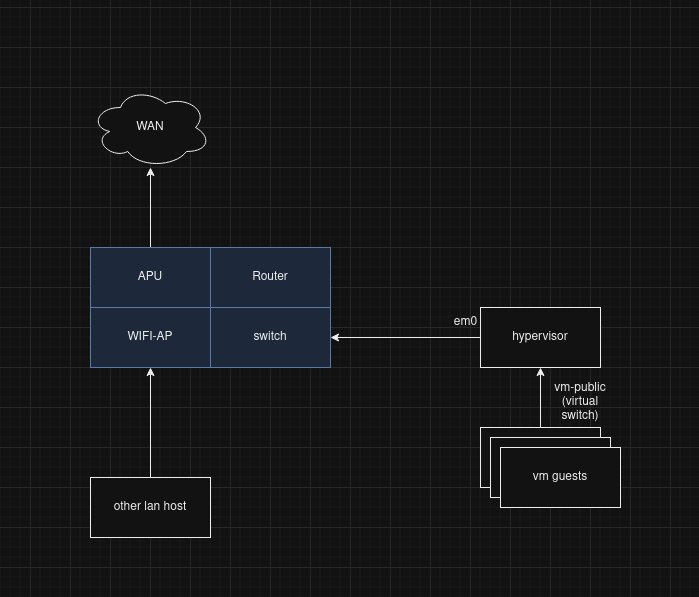
and the LTE modem, router switch and wifi AP can be in the same network appliance (eg the wifi ap that does all this)
Tyler
and the LTE modem, router switch and wifi AP can be in the same network appliance (eg the wifi ap that does all this)
Bit if i eliminate the router then i need to nat the wifi connection if i understand correctly.
XS
what is your router ?
Tyler
So the host is getting directly from the wifi adapter the net.
XS
the problem is that your LTE modem lacks ethernet ports
XS
it's not intended to be used in such setup, this is a consumer-grade product
XS
because this router has just two transmitters, designed to be used with either 2.4 or 5Ghz each independently
XS
and that your lte AP only does one
XS
but you can try to put the LTE AP in 2.4Ghz and keep the 5Ghz for the hosts
Tyler
But i dont get that if the router is not in repeater mode like now but in normal router mode then does support both 2.4 & 5Ghz also. So why does not support it on repeater mode?
XS
XS
here it will just work for reaching wan from guests
XS
but this is not even useful if you can't interact with your services within your lan
XS
You would be able to do so from the hypervisor, which is your laptop, so it may suffice for your need thus
XS
the best you can do is getting a proper LTE modem if you have no way for getting a wired wan access
Tyler
the best you can do is getting a proper LTE modem if you have no way for getting a wired wan access
Yes. I was looking for a good one. 800 euro. 😔
XS
why not something like that : https://www.varia-store.com/en/produkt/485559-4gr-4gr-wireless-n-4g-lte-gigabit-usb-router.html ?
XS
but it is getting off-topic btw
XS
why not something like that : https://www.varia-store.com/en/produkt/485559-4gr-4gr-wireless-n-4g-lte-gigabit-usb-router.html ?
never had one in hands, I mention
XS
so this one is cheap because it requires an usb LTE modem, but those you can find easily for cheap too
Tyler
so this one is cheap because it requires an usb LTE modem, but those you can find easily for cheap too
https://www.netgear.com/uk/home/mobile-wifi/hotspots/mr6150/ i was looking for this one.
XS
I don't know or use any of those products... I'm a nerd I build up all my routers and ap out of small gears and scripts heh
XS
honestly it's not even too complicated to do for a simple ap
XS
in your case I would just use a PC-Engines APU with an LTE modem directly inside
XS
like this https://pcengines.ch/apu3d4.htm
Tyler
I don't know or use any of those products... I'm a nerd I build up all my routers and ap out of small gears and scripts heh
Never mind. The main thing is the issue has been solved. Thanks again. 😊
XS
yw again, good luck
XS