 Kalei
Kalei


ugen1.5: <vendor 0x0a12 CSR8510 A10> at usbus1
ubt1 on uhub7
ubt1: <vendor 0x0a12 CSR8510 A10, class 224/1, rev 2.00/88.91, addr 5> on usbus1
XS
So it looks ubt is loaded
Kalei
That's the output of dmesg, I think it detects it for me.
Kalei
And now: “hccontrol -n ubt1hci read_connection_list”
Kalei
And nothing…It doesn't detect anything
XS
Yeah, you need to inquiry before
XS
Then do a remote_name_request to the target device's adress, got if it's in discoverable mode
Kalei
hccontrol -n ubt0hci remote_name_request
XS
+ the address as last argument
Kalei
Status: Page timeout [0x4]
Kalei
😩
XS
No inquiry results?
Kalei
BLE Problems?
XS
Idk, maybe
XS
How do you control the discoverable state of the mouse ?
XS
You have le_enable and le_scan commands available too
XS
Then le_connect
 ian
ian
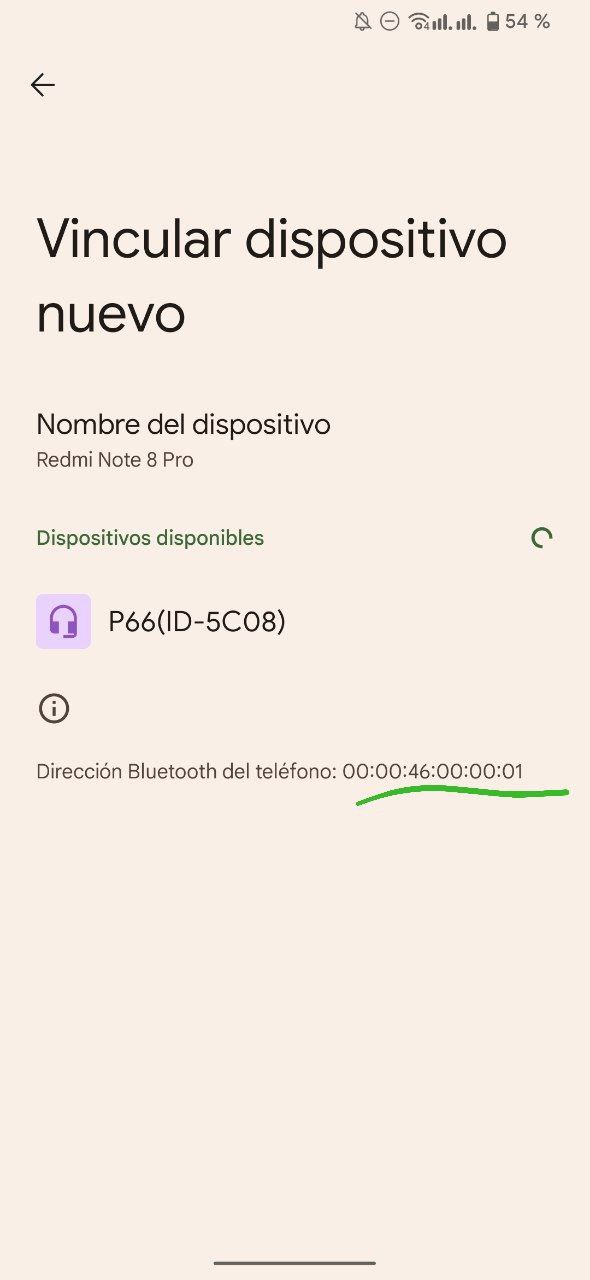
hccontrol -n ubt0hci remote_name_request
remote_name_request needs a parameter which is the BT device address.
To get the bluetooth address use: hccontrol -n ubt0hci inquiry
 XS
XS
le_scan will give more results if the mouse is actually using BLE
XS
then I guess you're supposed to use le_connect
XS
but idk for le_enable, maybe this have to be done before
ian
https://gist.github.com/dcasati/1179f6a68524b7e9dc9cce7e0244b4ae
Kalei
Impossible!!! It cant see the mouse
Kalei
My mouse is Logitech Master 3S and my USB dongle a CSR8510 A10 Qualcomm...
Kalei
im going to look for another bluetooth device
Kalei
🥴
ian
My mouse is Logitech Master 3S and my USB dongle a CSR8510 A10 Qualcomm...
bro, freebsd for servers and linux for desktop 👌🏻
ian
freebsd is beautiful, but lacks drivers (which is obviously not freebsd's fault, but the manufacturers' fault)
ian
lucky those who have a computer 100% compatible with freebsd 🥲
XS
not that complicated
XS
even my advantech raid controllers are supported, that's fine cause I have piles of them, bruh it's for servers in fact, lol
XS
FreeBSD supports many RAID controllers just fine, that's great
 Neville
Is there a powerful application in Freebsd to search for and pair bluetooth devices?
Run bluetooth-config scan
Neville
My mouse is Logitech Master 3S and my USB dongle a CSR8510 A10 Qualcomm...
You may need to create a ubt0.conf file in /etc/bluetooth with
connectable="YES"
discoverable="YES"
role_switch="YES"
In the file
Also do you have
sdpd_enable="YES"
hcsecd_enable="YES"
In /etc/rc.conf
?
Kalei
 トミ
トミ
how can i setup full disk encryption on a gpt partition instead of the whole disk?
Jeff
by reading the handbook? https://docs.freebsd.org/en/books/handbook/book/#disks-encrypting
 Hardcode
トミ
Hardcode
トミ
ok but how do i make it bootable and tell the installer to use the partition to install freebsd?
Anonymous
maybe you still need a no-crypt boot partition?
 Pouria
Does anyone know if the FreeBSD current supports the iGPU of Intel 15-12400?
Anonymous
I'm not x86 user idk
Neville
Does anyone know if the FreeBSD current supports the iGPU of Intel 15-12400?
You can download the latest builds ISO of GhostBSD which is based on FreeBSD 13 stable. Then boot into live mode. If you get to the desktop then the GPU should be supported. Download one of the latest builds
Neville
This is a live ISO. It won't install on your machine
 D.M
D.M
Hi, I would like to know if anyone has installed hyprland.
 ɴꙩᴍᴀᴅ
ɴꙩᴍᴀᴅ
The wayland compositor?
D.M
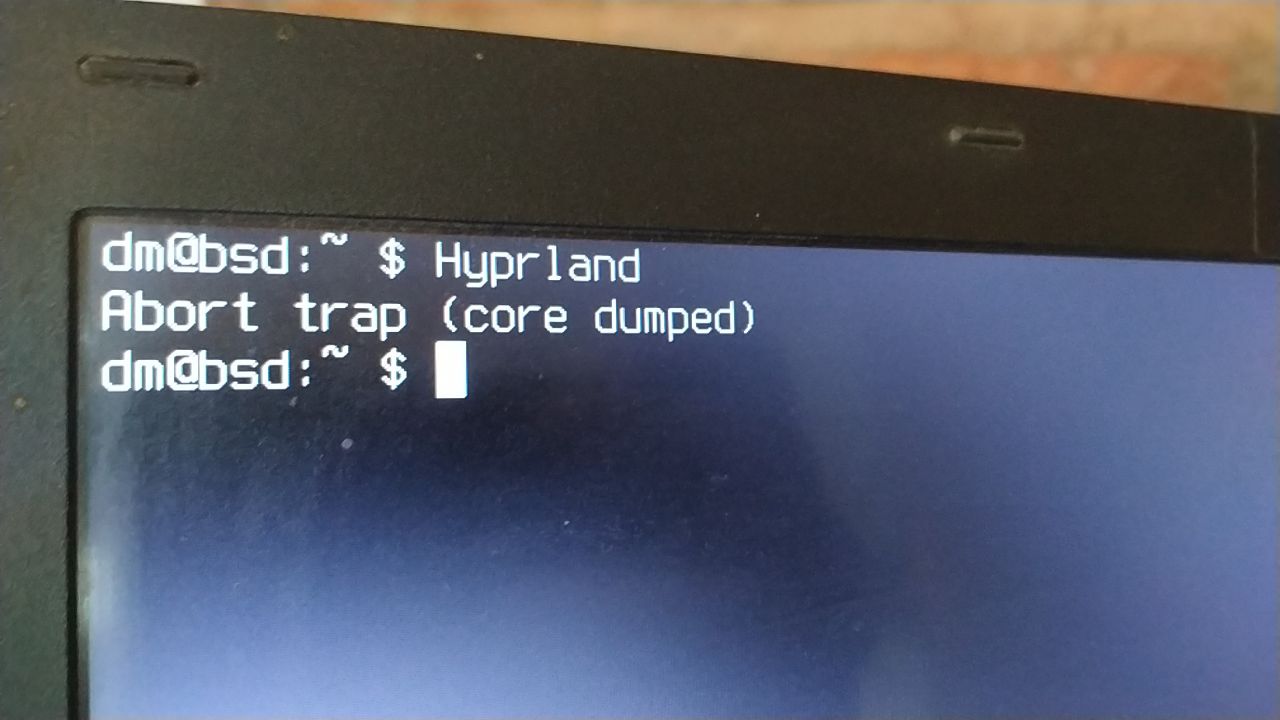
Yes, but I can't get it to start. And I don't know what I'm missing
ɴꙩᴍᴀᴅ
Yes, but I can't get it to start. And I don't know what I'm missing
Any logs you can share in a pastebin or similar?
 harmony5 🇺🇳 ⌤
Someone in the offtopic chat got hyprland running a few weeks ago, maybe ask there?
D.M
Someone in the offtopic chat got hyprland running a few weeks ago, maybe ask there?
And what is the channel
harmony5 🇺🇳 ⌤
https://t.me/freebsd_offtopics
D.M
@LukeSmithxyz Hi, I have seen your hyprland. How did you get it to start? I can't get it to start.
D.M
👍👍
 Krond
Krond
Oh, I got myself a channel with RSS feed of new ports in the tree, in case someone is interested: https://t.me/freebsd_ports
ɴꙩᴍᴀᴅ
@krond do you mind if I put a link in the description?
Krond
I'm fine with that.
Null
#FreeBSD #BSDCan
https://twitter.com/bsdbcr/status/1658906559546630157/photo/1
 Daniel Sławek
 r2g2
r2g2
usb disks connected?
Hardcode
suspend was never working entirely in every FreeBSD since it was introduced
Hardcode
I'm observing suspend complaints for 17 years straight
Hardcode
is suspend works for someone it's usually a peculiar coincidence, not a strict rule
 Juraj
Juraj
FWIW, I had problems with suspend/resume on every single OS you can think of (on every common HW), except from macOS on Apple HW. Just saying.
Jakob
Intel i5 6500 or something and debian seems to *just werk* for me, systemctl suspend (or hibernate idk) puts it into a convenient sleeping mode from which it will wake up quite swiftly
Didnt really research the detailed facts, just wanted to not only say 'wörks for me'
Null
The Computer Chronicles - UNIX (1985)
Special thanks to archive.org for hosting these episodes. Downloads of all these episodes and more can be found at: https://archive.org/details/computerchronicles
yt source
ɴꙩᴍᴀᴅ
I think now you can (:
 Tyler
Tyler
I am learning now zfs on freebsd & i was destroying my system partition zpool 😒 Any chanche to recover it? 🙄
 Samo
Samo
I am learning now zfs on freebsd & i was destroying my system partition zpool 😒 Any chanche to recover it? 🙄
That would be against basic function of destroying pool command I think
Tyler
That would be against basic function of destroying pool command I think
i messed up xorg and i could not login at all. not even with tty. the keyboard conf was missing so i decided to fix it from liveCD. but i could not so i was booting into kalilinux as i have multiboot installed. with zfs-zen deb package i have full zpool support.
Tyler
i messed up xorg and i could not login at all. not even with tty. the keyboard conf was missing so i decided to fix it from liveCD. but i could not so i was booting into kalilinux as i have multiboot installed. with zfs-zen deb package i have full zpool support.
my freebsd zfs partition was on /dev/sda12 . so first i was trying sudo zpool import LABEL but it was not work. then sudo import -f. i was succesfully imported and set mountpoint. but after i have finished my work on it i was umount it and then i did a mistake. i was destroying it. What should i have to do in next time? 🙄🧐 Export first? or how to assign back the modified pool to /dev/sda12? This is the point i was confused. 🤔
Samo
my freebsd zfs partition was on /dev/sda12 . so first i was trying sudo zpool import LABEL but it was not work. then sudo import -f. i was succesfully imported and set mountpoint. but after i have finished my work on it i was umount it and then i did a mistake. i was destroying it. What should i have to do in next time? 🙄🧐 Export first? or how to assign back the modified pool to /dev/sda12? This is the point i was confused. 🤔
I would try zpool history poolname command to see what exactly was done. I am not zfs expert, but mybe someone else could point you in right direction after we can see what has been done