 Anonymous


Hey guys.
I want to block the other ports except for SSH. I have a FreeBSD 13.1 server.
I'm trying to do it with ipfw many times but I failed, I lost my SSH connection.
That's my rules:
$ grep 'firewall' /etc/rc.conf
firewall_enable="YES"
firewall_quiet="YES"
firewall_type="workstation"
firewall_myservices="http https ssh"
firewall_logdeny="YES"
Then I enabled the ipfw service:
$ doas service ipfw start
Firewall rules loaded.
But I failed again. After enabling ipfw, I lost my SSH connection.
What's wrong with my /etc/rc.conf?
 Krond
Krond
I'm not sure, but if it defaults to stateful approach you should lose your current connection, because it wasn't started according to rules. If you try to reconnect after that, does that work?
 Xavier
I installed linuxlator on 14-CURRENT, it seems to have not DNS feature enabled, how can I enable it ?
Krond
What do you mean by DNS feature? Resolver? Is it configured on FreeBSD and working correctly?
Xavier
What do you mean by DNS feature? Resolver? Is it configured on FreeBSD and working correctly?
Yes, in the FreeBSD host machine DNS resolution is working.
see:
# apt update
0% [Connecting to archive.ubuntu.com]
 ɴꙩᴍᴀᴅ
ɴꙩᴍᴀᴅ
I installed linuxlator on 14-CURRENT, it seems to have not DNS feature enabled, how can I enable it ?
CURRENT may or may not work, it's the development version after all
K
Yes, in the FreeBSD host machine DNS resolution is working.
see:
# apt update
0% [Connecting to archive.ubuntu.com]
Hi, check /etc/resolv.conf within the linuxlator jail
Xavier
Hi, check /etc/resolv.conf within the linuxlator jail
Hi,
root@FreeBSD-MSI:~#
root@FreeBSD-MSI:~# cat /etc/resolv.conf
# Generated by resolvconf
nameserver 8.8.8.8
root@FreeBSD-MSI:~#
root@FreeBSD-MSI:~#
root@FreeBSD-MSI:~# ping google.com
^C
root@FreeBSD-MSI:~#
root@FreeBSD-MSI:~# ping -4 google.com
ping: WARNING: setsockopt(ICMP_FILTER): Protocol not available
PING google.com (142.250.185.14) 56(84) bytes of data.
64 bytes from mad41s11-in-f14.1e100.net (142.250.185.14): icmp_seq=1 ttl=120 time=17.4 ms
^C
--- google.com ping statistics ---
2 packets transmitted, 1 received, 50% packet loss, time 1002ms
rtt min/avg/max/mdev = 17.407/17.407/17.407/0.000 ms
root@FreeBSD-MSI:~#
Xavier
CURRENT may or may not work, it's the development version after all
Hi, it work without DNS resolution but, I think only need some setting but, I not know more ...
Xavier
Looks like it’s working? Jails by default cannot ping anyways.
No, DNS resolution not working.
Xavier
well, work only if I set IPv4
Xavier
but, not work for APT
# apt-get -o Acquire::ForceIPv4=true update
0% [Connecting to archive.ubuntu.com]
ɴꙩᴍᴀᴅ
I was going to say $ echo "nameserver 1.1.1.1 > /etc/resolv.conf but apparently your file is already setup. I only work with IPv4, so I'm not sure about IPv6
Xavier
I was going to say $ echo "nameserver 1.1.1.1 > /etc/resolv.conf but apparently your file is already setup. I only work with IPv4, so I'm not sure about IPv6
my linuxlator is the default installation in 14-CURRENT
Krond
Sounds like if apt wants to ping smthing this will be a no go.
Krond
Can pings be disabled there?
K
Try apt-get in place of just apt maybe
Xavier
Try apt-get in place of just apt maybe
# apt-get update
0% [Connecting to archive.ubuntu.com]
K
Actually, which version of Ubuntu are you using?
Does curl work?
Xavier
Actually, which version of Ubuntu are you using?
Does curl work?
Seems by the linuxlator default installation, curl is not installed
oot@FreeBSD-MSI:~#
root@FreeBSD-MSI:~# curl google.com
bash: curl: command not found
root@FreeBSD-MSI:~#
root@FreeBSD-MSI:~#
root@FreeBSD-MSI:~# lsb_release -a
No LSB modules are available.
Distributor ID: Ubuntu
Description: Ubuntu 20.04 LTS
Release: 20.04
Codename: focal
root@FreeBSD-MSI:~#
root@FreeBSD-MSI:~#
Krond
wget is more popular in Linux world.
Xavier
wget is more popular in Linux world.
Seems by the linuxlator default installation, wget is not installed
root@FreeBSD-MSI:~# wget
bash: wget: command not found
root@FreeBSD-MSI:~#
Anonymous
I'm not sure, but if it defaults to stateful approach you should lose your current connection, because it wasn't started according to rules. If you try to reconnect after that, does that work?
No, it doesn't work. When I enabled the ipfw service, I lost my current SSH session, and even if I want to try to connect to my FreeBSD server with a new SSH session I get failed.
I added these lines, looks like I fixed the problem:
firewall_myservices="22/tcp 80/tcp"
sshd_enable="YES"
firewall_allowservices="any"
Anyway, doesn't matter, I lost my Vultr account. XD
 Riyad
Riyad
Hello dears,
Please i have a problem that I want to login to the server vm with ssh but i get this error " ssh_exchange_identification: Connection closed by remote host"
I try many solutions but it's not work for me, if you have a idea about the solution for this?
XS
Is ssh running and listening on the default port (22) ? Seems not, on an other port or firewalled.
Riyad
Is ssh running and listening on the default port (22) ? Seems not, on an other port or firewalled.
Yes, i can login to another servers but only this one !
XS
I mean, sshd
Riyad
I mean, sshd
Yes it's work from the source server, but that what i'm think for the destination server but i can't check it
XS
"source server" is called the client
XS
if you can't go manually on the target, to enable sshd you won't connect via ssh
 Cristian
You can try adding -vvv in ssh command to get the verbose mode
XS
it won't help much I think as the sshd does not replies
XS
like said in my first message it's either disabled, or not running on the default port
XS
but us, there, with exactly 0 information and a person that presumably don't know more yet about it, we can't know
 Jekyll
Do you have any idea what OS and version is the server running?
 r2g2
r2g2
Yes it's work from the source server, but that what i'm think for the destination server but i can't check it
did you upgrade the server? from 13.0 to 13.1 there is exactly the flaw you described
 Baron
Baron
https://freebsdfoundation.org/open-positions/freebsd-userland-software-developer/
 Momo
Momo
Does anybody know (from experience) if there is a great FreeBSD Desktop install script in the ports?
Krond
Hellosystem?
Momo
I heard about it. From what I remember it is not active anymore. I will look into it. thx.
 Syahrul
Guys can you help me how to configure my hardware, it's a BCM43224 wireless card supposed to be supported by the BWN driver, so what should I do, it's a fresh install 13.1 stable memstick
Stéphane
Does anybody know (from experience) if there is a great FreeBSD Desktop install script in the ports?
I use 'desktop-installer' to help me in the configuration of a Desktop FreeBSD. You can chose your DE (or none if you install DWM as me)
Chad
Guys can you help me how to configure my hardware, it's a BCM43224 wireless card supposed to be supported by the BWN driver, so what should I do, it's a fresh install 13.1 stable memstick
Were you able to read the handbook on configuring your wireless card? It helped me. Could try bsdconfig as well.
Momo
 Kraken🦍
Guys I have a problem basically it saves everything in my home and like they don't exist , desktop, music etc.
ɴꙩᴍᴀᴅ
Guys I have a problem basically it saves everything in my home and like they don't exist , desktop, music etc.
Doing what steps on which environment?
Kraken🦍
Doing what steps on which environment?
Kde It was in English or changed to Italian but from settings not from terminal
Kraken🦍
I know it's kde's fault that I didn't set the language right
Syahrul
Were you able to read the handbook on configuring your wireless card? It helped me. Could try bsdconfig as well.
Have try all of that, from add the modules to loader conf list (it's bwn so it's just included in the kernel by defaults) but still not any single WiFi interface is showing
 Samo
Samo
Have try all of that, from add the modules to loader conf list (it's bwn so it's just included in the kernel by defaults) but still not any single WiFi interface is showing
Is your wifi card in laptop? Mybe it has keyboard combo switch to turn on or off wifi
 bittin-
Time to go to Brussels for FOSDEM
Syahrul
Is your wifi card in laptop? Mybe it has keyboard combo switch to turn on or off wifi
It is, but no it has no specified keys to activate that
 RusOpSys
Need help setting up docproj! I want to do translations, but I do not understand how. No problem with translating on my own! But with po4a... The translation instruction in FDP docproj does NOT WORK!((
ɴꙩᴍᴀᴅ
You mean the online docs?
RusOpSys
Yes. And I also need manpages. I'll have to write my own parsers.
ɴꙩᴍᴀᴅ
po4a works for man files
RusOpSys
Not work!
ɴꙩᴍᴀᴅ
For the web, you'll need to convert the HTML file into a supported format
RusOpSys
I'm not at my laptop right now, I can't show you. I remember that the error po4a-gettextize is outdated and use po4a. I have done this on Linux, Windows, OpenBSD, FreeBSD. What the FDP manual says... DOES NOT WORK!!!
RusOpSys
Create pot file, create po file, translate, create mo file, run po4a-translate command with all parameters...Error... Pot file not found...
Anonymous
finally
 Juraj
Juraj
find /directory -name ‘*pathname*’ is more apropriate
Anonymous
My cpu is hotter than in any other *nix ks
Anonymous
I'm using aarch64 cpu, freebsd wiki said it's will full speed, and little hotter than other os
Null
#386BSD #BSD #history
https://386bsd.org
Momo
#386BSD #BSD #history
https://386bsd.org
Dr. Dobb's Journal & Byte, those were the days!
Baron
https://byte-sized.de/linux-unix/linux-container-mit-bastille-fuer-freebsd-13/#english
Linux Container mit Bastille für FreeBSD 13
Great article
Anonymous
 Vieta
Vieta
 Mr
Mr
 Mr
Mr
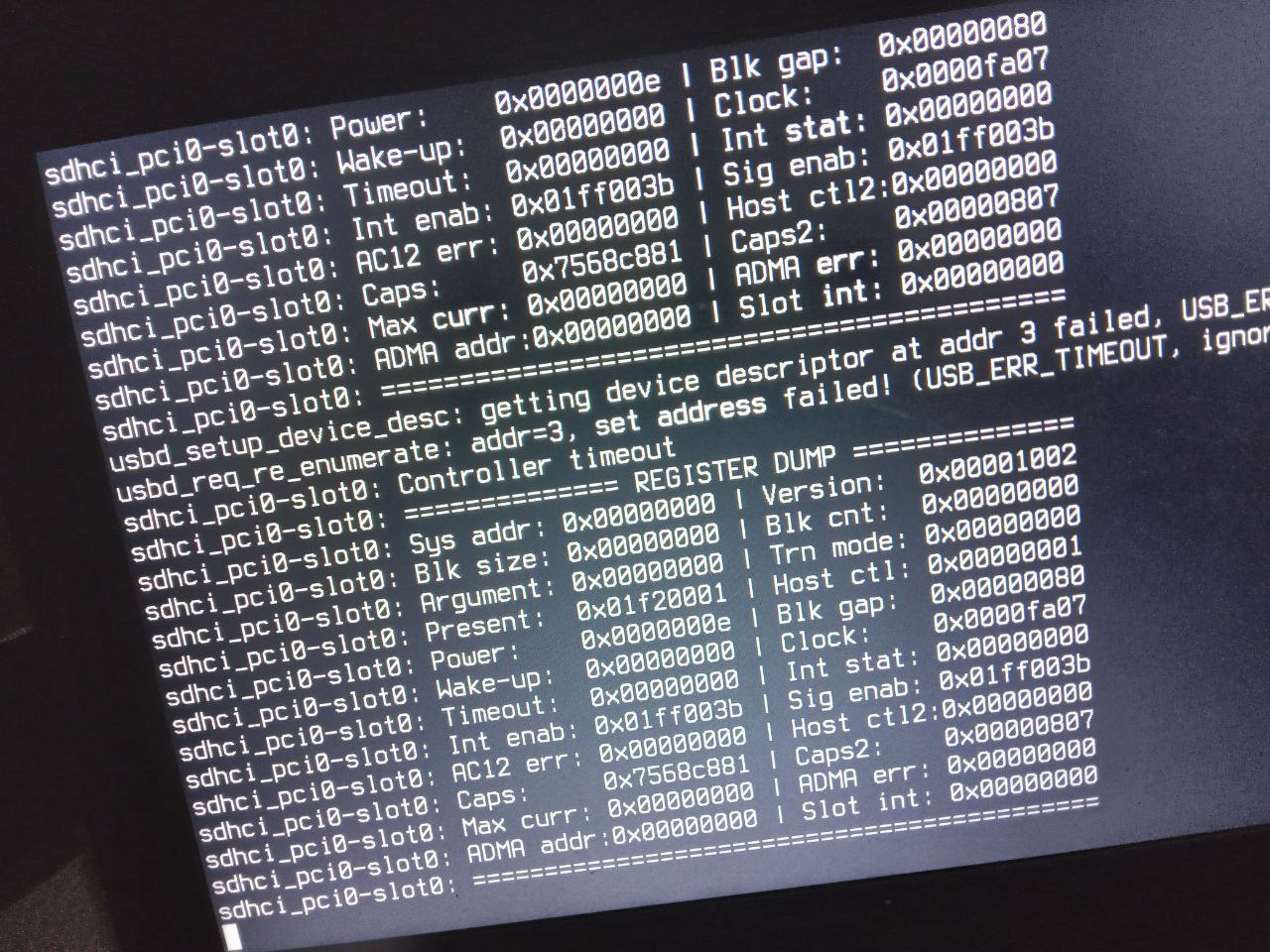
Is there any solution?
 Neville
Hi, there are anyone that have intel ax201 and use its Bluetooth?
Can you show
dmesg -a | grep ubt
Jeff
I have one system that does this, too. I recompiled the kernel and removed the following devices: mmc mmcsd sdhci rtsx