 Anonymous


check file /etc/wpa_supplicant.conf
Jackie
I have done some testing work and now I finally find out that my WiFi works if I connect to the access point I created on my Android phone with a password. But usually I have to work with my office network, which doesn't require password to connect. We have to connect and go to a site for authentication. But it's not working after 13.1.
Jackie
In 13.0, if I connect to it and open Firefox, a loggin site will prompt automatically, or I can manually open authentication site from my bookmarks, but none works now in 13.1. I can confirm it works in 13.0. No config files differ.
 r2g2
r2g2
du you have the url to your bugreport?
Jackie
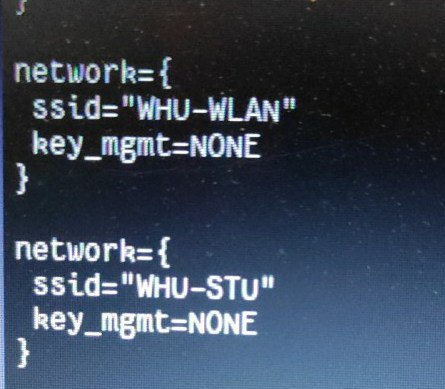 Jackie
du you have the url to your bugreport?
No sorry I haven't done it yet. I am having issue to file a bug report without network
r2g2
hehe but no issue with telegram it seems 😁
r2g2
yeah, just kidding ... the sooner the devs know about the problem the earlier they can get to fix it
Jackie
Yeah I am taking some notes and put it in a text file. Then am gonna boot into 13.0 BE and report
Anonymous
$ xbacklight -set +30
No outputs have backlight property
Anonymous
what will i do to changing brightness
Anonymous
my gpu is not intel so intel_backlight is not working
Anonymous
my gpu is amd
 ɴꙩᴍᴀᴅ
ɴꙩᴍᴀᴅ
$ backlight -f vendor_backlight value
Jackie
https://bugs.freebsd.org/bugzilla/show_bug.cgi?id=264238
Jackie
Mine reports that it's connected but there's no network actually
Anonymous
$ backlight -f vendor_backlight value
# GPU: Mullins [Radeon R2 Graphics]
root@bedavabsd:/home/cnr90 # backlight 30
backlight: Cannot update the backlight device
ɴꙩᴍᴀᴅ
# GPU: Mullins [Radeon R2 Graphics]
root@bedavabsd:/home/cnr90 # backlight 30
backlight: Cannot update the backlight device
You need to pass a value to the -f flag
Anonymous
root@bedavabsd:/home/cnr90 # ls /dev/backlight/
amdgpu_bl00 backlight0
ɴꙩᴍᴀᴅ
The first one then iirc.
$ backlight -f amdgpu_bl00 value_bright
ɴꙩᴍᴀᴅ
Value is anything from 0 to 100
Anonymous
root@bedavabsd:/home/cnr90 # backlight -f amdgpu_bl00 30
backlight: Cannot update the backlight device
ɴꙩᴍᴀᴅ
Is it using drm-kmod?
Anonymous
yes
ɴꙩᴍᴀᴅ
hmm, interesting... Should have work almost straight forward
ɴꙩᴍᴀᴅ
But it's failing somehow
Anonymous
btw its working in my second computer
Anonymous
with intel
Anonymous
is there a way to connet wifi with RTL8723BE
 SteelCaptain
@Mihai utilizator bazat de freebsd?
SteelCaptain
Am folosit freebsd pe desktop
Anonymous
De fapt, am venit să-mi promovez sondajul
Anonymous
Am un canal și fac un poll
ɴꙩᴍᴀᴅ
Mihai please keep the conversation in English
ɴꙩᴍᴀᴅ
@SteelCaptain same as Mihai, please
ɴꙩᴍᴀᴅ
De fapt, am venit să-mi promovez sondajul
This translates roughly by deepl to "Actually, I'm here to promote my survey"
Mihai you can do that in the OT room @freebsd_offtopics Not here
X
Anonymous
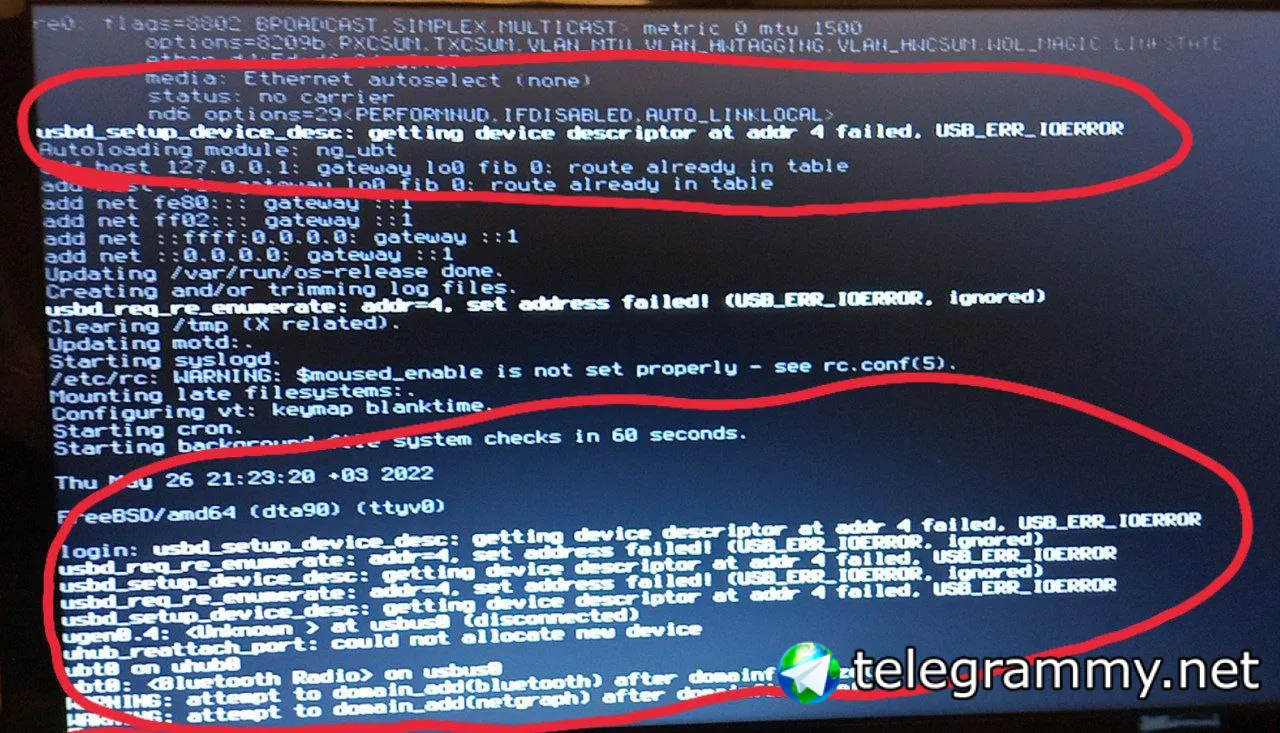 Anonymous
@n0madcoder what will i do my muallim
Anonymous
I bought a usb wireless adapter
Anonymous
Tplink tl-wn823n
Anonymous
https://www.freebsd.org/cgi/man.cgi?query=rtwn_usb&sektion=4&manpath=freebsd-release-ports
Anonymous
It says it should work
ɴꙩᴍᴀᴅ
It says it should work
It should yeah. If you load the driver and then configure wpa_supplicant and rc.conf
ɴꙩᴍᴀᴅ
I'm on the move now, will get the commands later
ɴꙩᴍᴀᴅ
@gocmen_gizani inside the /boot/loader.conf file you'll need a couple of lines similar to
if_urtwn_load="YES"
legal.realtek.license_ack=1
check the man page you shared previously to see if the module is named the same. Then read the handbook quick start guide to setup the network (32.3.2) https://docs.freebsd.org/en/books/handbook/advanced-networking/#network-wireless
Anonymous
I switched openbsd and its working nicely
Anonymous
But
Anonymous
I will try freebsd again
Anonymous
There is nothing to lose
ɴꙩᴍᴀᴅ
No worries
ɴꙩᴍᴀᴅ
Just curious, OpenBSD seems to support the card. Are you using it with the adapter on OpenBSD or just with the WiFi card? Maybe the driver code could be ported into FreeBSD, idk. As for now it seems like WiFi cardsvlike this are a headache for FreeBSD
SteelCaptain
Evening! The nvidia-driver port has an option for acpi thats disabled by default. Would building the driver with the option make it support S3 (suspend to ram)?
SteelCaptain
The lack of suspend to ram in freebsd is the only thing that stops me from daily driving it
Anonymous
Anonymous
So i used with usb adapter
Anonymous
And the freebsd wiki says they are supporting TL-WN823N
Anonymous
Anonymous
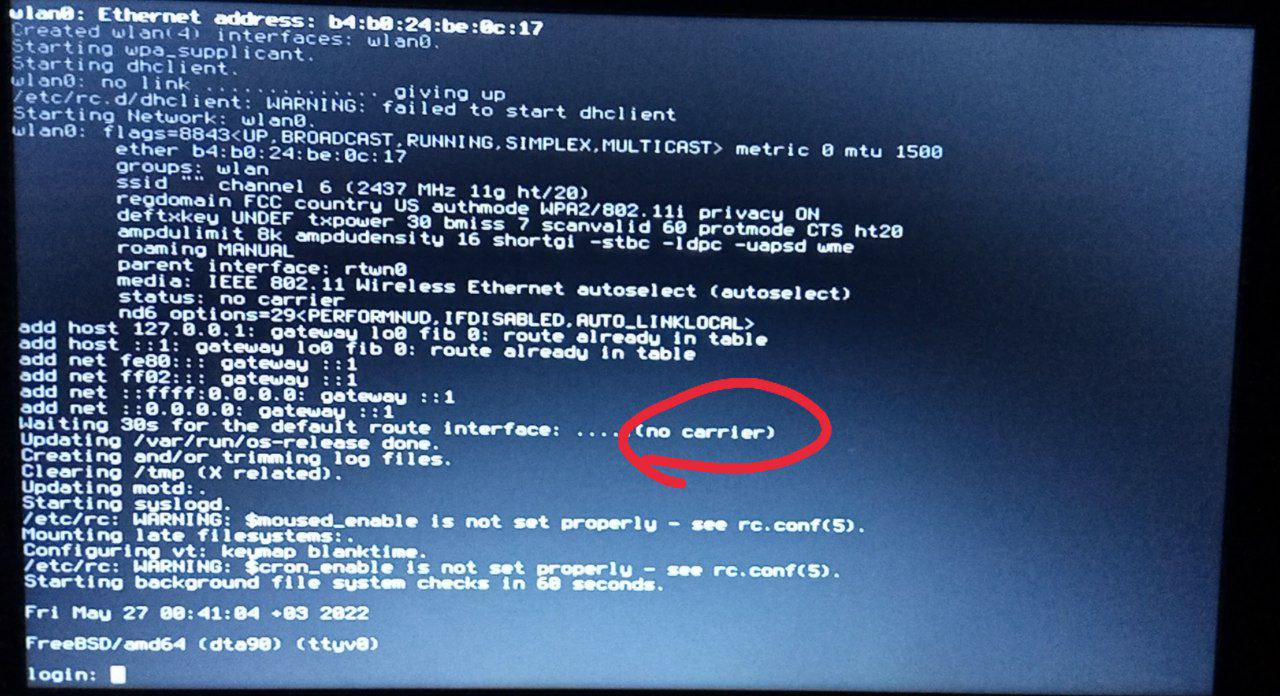 Anonymous
I did everthing true but this fucking error is still here
Anonymous
I think error is about dhclient
ɴꙩᴍᴀᴅ
And the freebsd wiki says they are supporting TL-WN823N
Indeed. It should work. What's the content inside your /etc/rc.conf and /boot/loader.conf? Just to confirm settings are ok
Anonymous