 Joey
Joey


if you are moving from 9.x to 13.x, you will have a lot of work ahead of you, as many things have changed.
 Vidra
Vidra
Hi guys I'm new in bsd world, I'm using Debian as the main os and sometimes win10. I wanted to try something different like Slackware or arch and I will eventually, but right now I think that freebsd has much more to offer. Every linux distro has it's pros and cons and the best one is the one you DIY. But I can do similar with bsd and seems to be better and much less painful experience. I'm trying out ghostbsd, it's awesome but I feel like I want to use FreeBSD and build it for my needs.
I would like to know how can I automate installation and configuration, first to create answer file, configure network driver and then to run commands and scripts to install additional software.
Also what are some of the important things for a desktop user that are not present in the stock freebsd?
I did install it in virtual box and with xfce and seems to work fine but there are probably a lot of things to add and configure. For example media codecs, fonts, ntfs and other common fs support, printing. I will go through the official docs and try to figure it out, I would appreciate if you can give me some tips so I can skip the stuff that I don't need. I will eventually compile the kernel too.
Joey
blah blah blah
Joey
I think you'll enjoy arch more
 Anonymous
Hi guys, I am planning to install FreeBSD in Laptop as base system. I want ask you how deal with wifi after installing and wanna ask also about NetworkManager, is it available in freeBSD?
Anonymous
 Anonymous
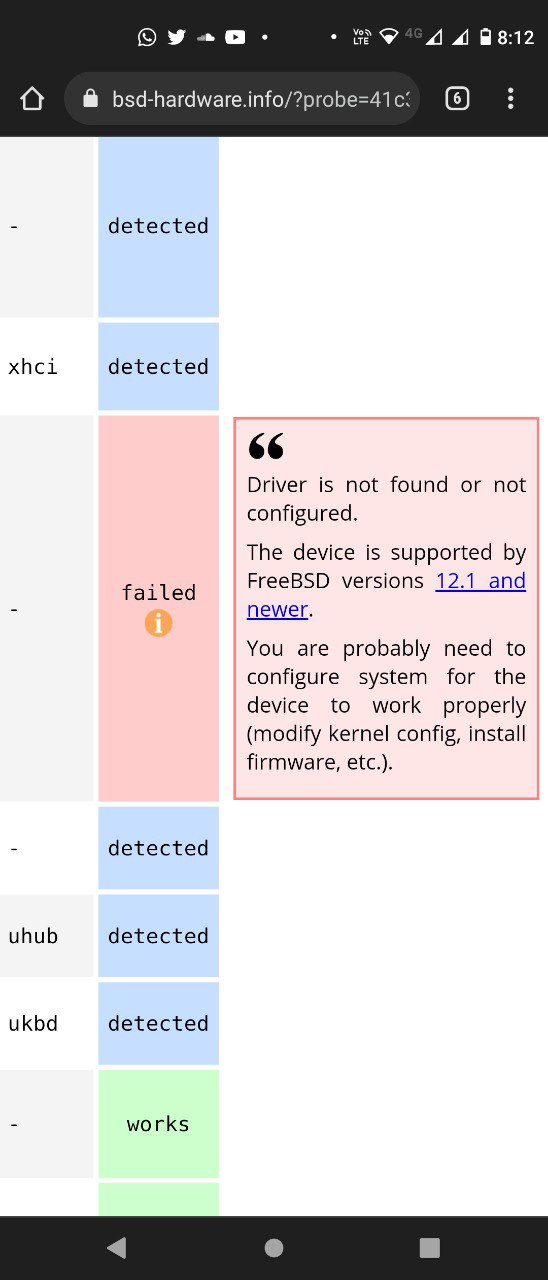
I am asking because this, my device is Lenovo ThinkPad E590;
 Krond
Krond
Hi guys, I am planning to install FreeBSD in Laptop as base system. I want ask you how deal with wifi after installing and wanna ask also about NetworkManager, is it available in freeBSD?
NetworkManager is a Linux thing, of cause we don't have it.
Krond
I am not sure what is on the screenshot. Can you describe the problem you have?
Anonymous
https://bsd-hardware.info/?probe=41c388c760
Anonymous
NetworkManager is a Linux thing, of cause we don't have it.
Thanks, can you please tell me how handle wifi
Anonymous
Only i have seen in internet is using wpa_supplicant and password of ssid is will be mentioned in config file . 💔😅
Krond
https://docs.freebsd.org/en/books/handbook/advanced-networking/#network-wireless
Mmmm
Only i have seen in internet is using wpa_supplicant and password of ssid is will be mentioned in config file . 💔😅
what is wrong with wpa_supplicant? i am using it and have no problem. I like it better.
Krond
I think NetworkManager probably also uses some files to store passwords.
Anonymous
Only i have seen in internet is using wpa_supplicant and password of ssid is will be mentioned in config file . 💔😅
You can remove your password from the file.
Run this:
wpa_passphrase "SSID_TEST" "MYPASDWD"
Anonymous
Anonymous
You can remove your password from the file.
Run this:
wpa_passphrase "SSID_TEST" "MYPASDWD"
thanks, i n linux i was not handling with wpa supplicant too much.
Anonymous
Thanks you guys
Anonymous
 Anonymous
I unable to startx
Anonymous
I unable to startx
as root run desktop-installer. freebsd does not install a desktop environment by default.
Chad
I am asking because this, my device is Lenovo ThinkPad E590;
I had the same issue... But... This isn't a push off... The handbook helped me solve the problem. The freebsd handbook is the best out there.
 Daniel Sławek
Is it any program for burn iso to memstick? I have a FreeBSD 13.1-RC6
Daniel Sławek
dd doesnt work
Daniel Sławek
Daniel@donieck ~/Downloads (master)> doas dd if=ubuntukylin-22.04-desktop-amd64.iso of=/dev/da0 bs=1M conv=sync
dd: /dev/da0: Operation not permitted
Daniel@donieck ~/Downloads (master) [1]> doas dd if=ubuntukylin-22.04-desktop-amd64.iso of=/media/da0 bs=1M conv=sync
dd: /media/da0: Is a directory
Daniel@donieck ~/Downloads (master) [1]> doas dd if=ubuntukylin-22.04-desktop-amd64.iso of=/dev/da0 bs=1M conv=sync
dd: /dev/da0: Operation not permitted
Daniel@donieck ~/Downloads (master) [1]> doas gpart destroy -F da0
gpart: Device busy
Daniel@donieck ~/Downloads (master) [1]> doas gpart destroy -F da0
gpart: Device busy
Daniel@donieck ~/Downloads (master) [1]> doas dd if=ubuntukylin-22.04-desktop-amd64.iso of=/dev/da0 bs=4m
dd: /dev/da0: Operation not permitted
Daniel@donieck ~/Downloads (master) [1]> pkg sea etcher
rubygem-gitlab-sidekiq-fetcher-0.8.0 Redis reliable queue pattern implemented in Sidekiq
Daniel@donieck ~/Downloads (master)> doas mount /dev/da0
mount: /dev/da0: unknown special file or file system
Daniel@donieck ~/Downloads (master) [1]> doas mount /media/da0
mount: /media/da0: unknown special file or file system
Daniel@donieck ~/Downloads (master) [1]>
Joey
try su -, then skip the doas/sudo nonsense, see if that helps
Joey
if you're unfortunate enough to be on ubuntu, do sudo -i instead of su -, since root has no password and su - won't work
Joey
but either way, become root
 Me
Me
hi there, i tried to install freebsd next to linux, but it never worked because free wants own entire disk and own bootloader, is this normal?
Joey
you need to partition and learn how do dual-boot
Joey
or run one in a VM instead
Daniel Sławek
root@donieck:/usr/home/Daniel/Downloads # dd if=ubuntukylin-22.04-desktop-amd64.iso of=/dev/da0 bs=4m
dd: /dev/da0: Operation not permitted
Daniel Sławek
it is problem again
Daniel Sławek
i write sudo su
Mmmm
 ɴꙩᴍᴀᴅ
Jay
ɴꙩᴍᴀᴅ
Jay
Is it any program for burn iso to memstick? I have a FreeBSD 13.1-RC6
Will not work. Iso is for cdroms/DVDs. Try *.img
Anonymous
will k3b do that ?
Anonymous
ventoy ?
Daniel Sławek
root@donieck:/usr/home/Daniel/Downloads # umount /dev/da0
umount: /dev/da0: unknown file system
 Sergio
Hi guys, I am planning to install FreeBSD in Laptop as base system. I want ask you how deal with wifi after installing and wanna ask also about NetworkManager, is it available in freeBSD?
Freebsd have a tool named wifimgr, that is much better than networkmanager. In my viewpoint, Freebsd is much better than Linux at managing networks. Of course it will depend on whether your card works on Freebsd.
Daniel Sławek
ok it works
Joey
I've only had bad luck with NetworkMangler
 Lee
Lee
hi, who knows gpg how to del sub key
Anonymous
edit, select by number
Anonymous
then deluid
Anonymous
IirC
Lee
thanks
 Tyler
Tyler
any idea how/what to edit in rc.conf to see my mouse and keyboard if i launch KDE Plasma desktop environment in KVM hypervisor? on tty keyboard works fine but if i reach sddm screen only with tab i am able to navigate. also after login the desktop does not load. only black screen with a little X instead of my mouse cursor. in rc.conf dbus_enable hald_enable sddm_enable plasma5-plasma-desktop enable
Tyler
any idea how/what to edit in rc.conf to see my mouse and keyboard if i launch KDE Plasma desktop environment in KVM hypervisor? on tty keyboard works fine but if i reach sddm screen only with tab i am able to navigate. also after login the desktop does not load. only black screen with a little X instead of my mouse cursor. in rc.conf dbus_enable hald_enable sddm_enable plasma5-plasma-desktop enable
if i delete /usr/local/etc/X11/xorg.conf still launch sddm....so from where does get info regarding keyboard and mouse then?
Anonymous
keymap="us.kbd" moused_enable="YES" YMMV
Anonymous
or rerun/run desktop-installer an see if it fixes it.
Null
FreeBSD Developer Summit- RISC V
Mitchell Horne discusses the latest developments of FreeBSD on RISC-V.
 Andy 'm1m1n' Hidayat
SuperUser
Andy 'm1m1n' Hidayat
SuperUser
Hi all
SuperUser
Just need tutorial abought bhhve
SuperUser
Different Man pages
Joey
want to know how to use bhhve? just poke at it, the bees will come out eventually
Joey
but seriously, do you understand virtualization?
Jeff
Maybe look at one of the several wrappers available, like vm-bhyve.
SuperUser
but seriously, do you understand virtualization?
I can't say I don't fully understand. My English is a bit weak. I used qemu before, I just had problems with the arguments.
SuperUser
Maybe look at one of the several wrappers available, like vm-bhyve.
Yes ı find examples from githup
 Vampire
Anyone has any idea about how to create os based on freebsd
Stéphane
Anyone has good tips for decent SAS controllers on FreeBSD as of late?