 Anonymous


yo
 トミ
Anonymous
トミ
Anonymous
here we are
Anonymous
if anyone has ports installed can you list them like pkg info output?
Anonymous
even better would be section pkg description
 Momo
Momo
Ports as in self compiled pkgs? Yes, they show up the same way
Anonymous
you can list the ports the same way how?
Anonymous
like pkg info > ~/pkg-list
Anonymous
^^ that only list installed
 Carl
Carl
pkg info | while read ITEM; do
pkg info $(echo ${ITEM} | awk '{print $1}') | grep binary >/dev/null || echo ${ITEM}
done
Carl
this wiould discard the binary ones
Carl
and show the no binary ones
Anonymous
nevermind
 Chris
Chris
Can I run Linux app in freebsd the only I don't want to switch is Linux app like Brave and virtual box
This might be helpful for you, some apps work good, for example "abrowser" - a firefox fork from the Trisquel Distro, some extracted appimages like LibreWolf also work
https://www.micski.dk/2021/12/21/install-ubuntu-base-system-into-freebsds-linux-binary-compatibility/
Anonymous
 Anonymous
Plz help!!
 ɴꙩᴍᴀᴅ
ɴꙩᴍᴀᴅ
Plz help!!
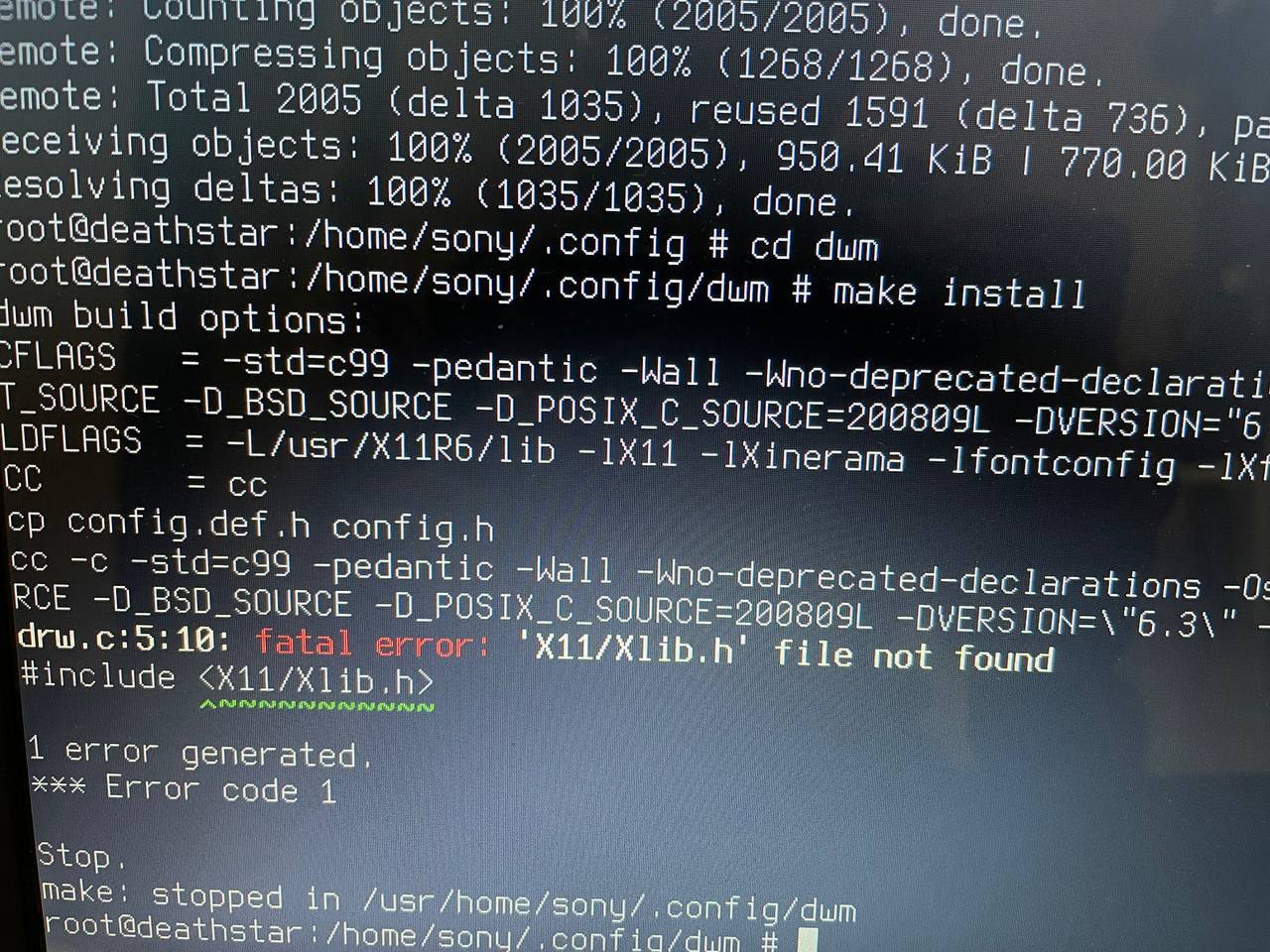
Also, from where are you trying to build dwm? From suckless repo or from the FreeBSD port?
Alexander
Alexander
Also, please read https://docs.freebsd.org/en/books/handbook/ports/
Anonymous
Anonymous
https://horodistea.wordpress.com/2020/02/06/compiling-suckless-tools-on-freebsd/
Thank youuu 🙌
ɴꙩᴍᴀᴅ
From suckless repo
Then take in consideration what Alexander said to you. FreeBSD has different path for libraries than Linux (:
Jackie
I am experiencing a lot of sudden reboot with my laptop running FreeBSD 13.0 RELEASE with Xfce4 DE. How do I track down this issue?
Jackie
It happened when I unplugged the HDMI cable for my second monitor, when I logged out of a Xfce4 session, or when I woke laptop up from suspend (S3)
Jackie
One time it even happened when I quit mpv player.
Anonymous
i'm having a race type condition with memory
Anonymous
 Wintermute
is the freebsd forum down for you guys too?
Jackie
My touchpad vertical scroll works in Xfce4 but not in openbox session, what do I do?
ɴꙩᴍᴀᴅ
My touchpad vertical scroll works in Xfce4 but not in openbox session, what do I do?
Do you have any xorg logs?
Jackie
I saw in /var/log/Xorg.0.log that libinput was used for touchpad, so I may have to tweak with libinput options I think.
ɴꙩᴍᴀᴅ
That log yeah, I was afk
ɴꙩᴍᴀᴅ
You may need to configure a 40-libinput.conf file with some tweaks for the touchpad
Jaco
I miss running this system😔Linux just ain't the same...
Anonymous
has freebsd lock out the ports ?
Jackie
You may need to configure a 40-libinput.conf file with some tweaks for the touchpad
I looked up in the manual but didn't find anything to turn up vertical scroll. BTW, forums.freebsd.org is down and I can't go through related threads there.
Anonymous
ɴꙩᴍᴀᴅ
I looked up in the manual but didn't find anything to turn up vertical scroll. BTW, forums.freebsd.org is down and I can't go through related threads there.
For libinput, try readin the features you have in your touchpad via $ xinput list-props touchpadID. It should show scroll since you have it working on the other DE/WM. Also, do you have evdev installed? Maybe that can help too
Jackie
ɴꙩᴍᴀᴅ
Regarding the forum, admins are on it (:
https://bugs.freebsd.org/bugzilla/show_bug.cgi?id=261248
Jackie
For libinput, try readin the features you have in your touchpad via $ xinput list-props touchpadID. It should show scroll since you have it working on the other DE/WM. Also, do you have evdev installed? Maybe that can help too
get it working by xinput set-prop 10 267 0 1 0. The document is really ambiguous. Found it in a Arch Linux forum thread here.
https://bbs.archlinux.org/viewtopic.php?id=210096
ɴꙩᴍᴀᴅ
Jackie
Adding it to my 40-libinput.conf to see if it'll work permanently.
Jackie
though I am still curious why it worked in Xfce4 without any manual config
ɴꙩᴍᴀᴅ
though I am still curious why it worked in Xfce4 without any manual config
Indeed, that's a good question. Is it over the same OS installation you installed xfce4, or did you install a fresh FreeBSD and then Openbox?
Jackie
Indeed, that's a good question. Is it over the same OS installation you installed xfce4, or did you install a fresh FreeBSD and then Openbox?
Same system. I logged out of openbox yesterday and then into Xfce4 just to see if it worked in Xfce4 and it did work.
Jackie
Rebooted and seems `40-libinput.conf` is doing the trick for me. hooray
Jackie
Indeed, that's a good question. Is it over the same OS installation you installed xfce4, or did you install a fresh FreeBSD and then Openbox?
More of a problem is that I encountered many times of sudden reboot in Xfce4 session. That's the reason I am using openbox now.
Jackie
And it didn't seem to happen in the last several days in openbox, yet
ɴꙩᴍᴀᴅ
Interesting... I never used any of them over FreeBSD so I have no clue at all. Sudden reboots over Xfce4 is something I had eventually over a Debian installation, so might not be tied to FreeBSD
ɴꙩᴍᴀᴅ
But can also be a problem of something else and not Xfce4 itself
Jackie
really clueless. I've been using Debian sid plus Xfce4 on my work laptop for years and didn't recall this happened even once. but I may have see it on this FreeBSD system for over 10 time nows. And I've only used FreeBSD for less than 2 months now.
Jackie
it happened multiple times when I click "Logout" from Xfce4 menu. And also few times when I unplug a HDMI cable for a second monitor from the laptop. Also maybe 2 or 3 time when I am at lightDM login screen, didn't remember what I was doing though.
Jackie
It really annoys me and make me worry about data loss or hardware damage. drives me to abandon Xfce4 on this laptop, though I've been using it for year and it's my favorite.
Jackie
I hold my breath now every time I logout or use my second monitor. this REALLY sucks🤦🏻♂️
ɴꙩᴍᴀᴅ
I hold my breath now every time I logout or use my second monitor. this REALLY sucks🤦🏻♂️
I can feel that (: I've had similar situations
ɴꙩᴍᴀᴅ
To install CURRENT versions you need to fresh install them from image files. Only Release versions have integrated system upgrading
Anonymous
You're just too fast.
Anonymous
looks good to me
[][I/0][]
maybe that volume has another partition
Anonymous
i think that's dolphin being weird.. the drive is already mounted.
Anonymous
just ignore it
Anonymous
did you install the ports collection ?
Anonymous
ok can you tell me from the ports what is gxmms2
Anonymous
humm /usr/ports/multimedia/gxmms2 in there should be a pkg description
Anonymous
ok thx
Anonymous
ya planing on installing kde5 ?
Anonymous
yeah saw that
[][I/0][]
u can access those unmountable volume using linux live environment
[][I/0][]
actually i had encountered this while ago,because partition was ext4 n bsd unable to mount that volume
Anonymous
mount linux ext4 drives on Freebsd You can mount linux ext4 drives on Freebsd using fusefs-ext2 package Install fusefs-ext2 # pkg install fusefs-ext2 Enable the fuse kernel module To enable loading FUSE kernel module at boot add fuse_load=YES line to the /boot/loader.conf file Edit /boot/loader.conf # vi /boot/loader.conf.
Anonymous
diferent animal
Anonymous
like ya need fuse for mounting exfat and/or ntfs volumes
Anonymous
it show up w/ kldstat ?
Anonymous
your good here tho.