 Anonymous


Why is trusting someone with my DNS queries better than installing an adblocker extension?
Anonymous
Wait let's take this offtopic
Ihor
Привет, подскажите что делать, сервер через 20 секунд после включения выключается. Спасибо
 ɴꙩᴍᴀᴅ
ɴꙩᴍᴀᴅ
Привет, подскажите что делать, сервер через 20 секунд после включения выключается. Спасибо
У вас есть какие-нибудь log?
Ihor
У вас есть какие-нибудь log?
Зашёл с синг юзера, не знаю куда смотреть, тут есть что-то типа syslog?
ɴꙩᴍᴀᴅ
Привет, подскажите что делать, сервер через 20 секунд после включения выключается. Спасибо
Есть и русская группа
https://t.me/freebsd_ru
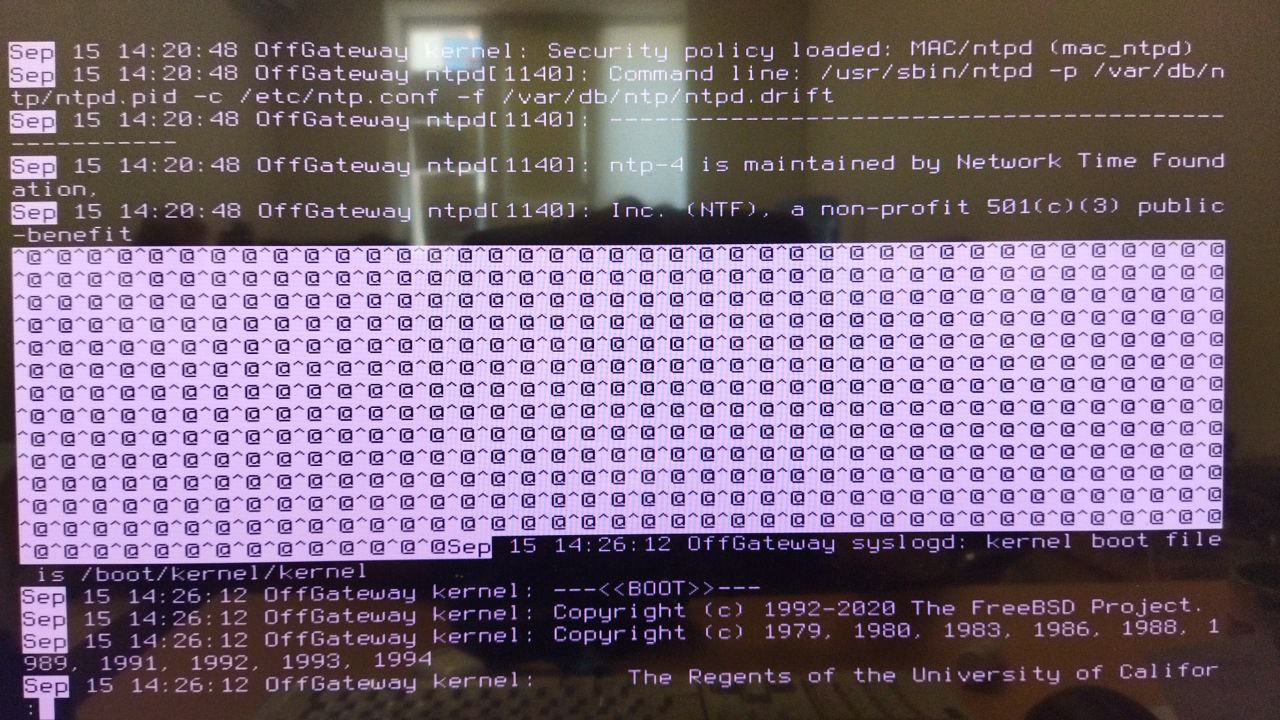 Ihor
Ihor
Hello, please, help. How to enable crash dumps? There is no files at all in my /var/crash at all
Ihor
Hello, please, help. How to enable crash dumps? There is no files at all in my /var/crash at all
Except minfree that is 5B in size
Rafa
1- CPU cycles and latency
2- mostly CPU intensive appilications
If you are talking about a workstation/PC ... You won't notice any improvement. If you NEED low latency (professional audio/video) you're better off tweaking the kernel with certain options ... But then again, latency might be due to the underlying HW (firmware, HW you've got) you've got.
Recompiling the kernel was a thing in the early 2000 when certain HPC vendors had "jitter free" kernels. That was good for very specific HUGE MPI workloads with A LOT of nodes and communication between them. But then again, you would need to also:
- have dual-rail IB network
- disable ALL unnecessary services that create noise on the network ... NOT kernel related ;)
- have really well optimized code
- have really well optimized job scheduler scripts
- have optimized math libraries
- ...
So, as you can see, there's a lot of user space tweaking also required
BTW, this is NOT real-time we are talking here. That's something else ;)
ɴꙩᴍᴀᴅ
Hello, please, help. How to enable crash dumps? There is no files at all in my /var/crash at all
Take a look at savecore(8)
https://www.freebsd.org/cgi/man.cgi?query=savecore&sektion=8&manpath=freebsd-release-ports
ɴꙩᴍᴀᴅ
/var/crash should hold dumps by default iirc
ɴꙩᴍᴀᴅ
Set
dumpdev="AUTO"
At your /etc/rc.conf to enable crash dumps.
Can you confirm the option is at the file?
ɴꙩᴍᴀᴅ
Hmm. How do you have Swap setup?
 ɴꙩᴍᴀᴅ
ɴꙩᴍᴀᴅ
Which architecture is the server running on? x86_64 or arm?
Ihor
I have swap partition
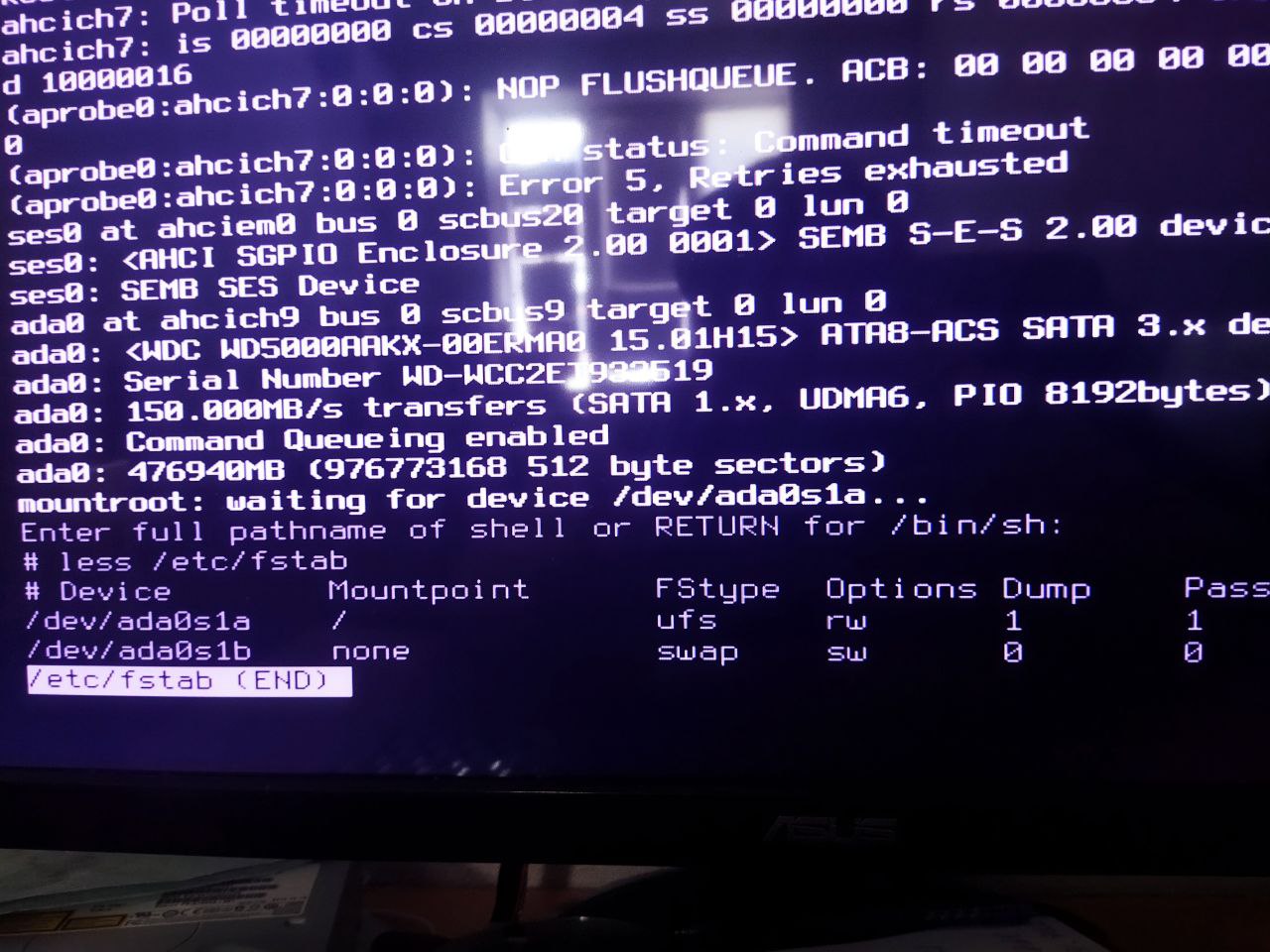 ɴꙩᴍᴀᴅ
ɴꙩᴍᴀᴅ
Alright. One last try hehe. Let's specify the path to dump at /etc/rc.conf add:
dumpdir="/var/crash"
 AMIR
AMIR
https://youtube.com/c/RoboNuggie
AMIR
idk if this is off or not , is there anyone look up to this channel? is it helpful?
AMIR
just curious of your comments
AMIR
thank you, but this one is a bit different
ɴꙩᴍᴀᴅ
idk if this is off or not , is there anyone look up to this channel? is it helpful?
RoboNuggie is one of the major FreeBSD youtube content creator out there
ɴꙩᴍᴀᴅ
Alright. One last try hehe. Let's specify the path to dump at /etc/rc.conf add:
dumpdir="/var/crash"
@nkfnml did it work?
I just found this. It may help:
https://forums.freebsd.org/threads/kernel-dumping-debugging-it.27613/
Ihor
@nkfnml did it work?
I just found this. It may help:
https://forums.freebsd.org/threads/kernel-dumping-debugging-it.27613/
Nope, but i just plug in my hard drive into another machine and it works witout crashes
Null
Unicorn Unix Magic Tricks | Thorsten Ball
We'll take a look at small snippets of the Unicorn source code and see that it isn't magic, but plain old Unix: forking, signal handling, pipes (even self-pipes), pre-spawning, master-worker architecture, file descriptor handling, system calls, the classic socket/bind/listen/accept sequence, Unix sockets, PID files and a lot more.
Unicorn is full of Unix. By studying its code we do not only learn how one of the most important pieces of Ruby infrastructure works, but also how Unix systems work. The talk will provide you with a foundation for programming in the Unix environment and show you how to leverage the powers of Unix.
Anonymous
Dude, this is a freebsd group, not a linux
Anonymous
thanks @n0madcoder
Anonymous
hello!
ɴꙩᴍᴀᴅ
Welcome @MA6669420 What brings you into FreeBSD? Daily driver?
Anonymous
thanks! yeah, i recently reinstalled FreeBSD and I'm planning to daily drive it from now on because i was curious about its state these days
Anonymous
last time I tried it was using GhostBSD which is a rather beautiful OS based on FBSD
ɴꙩᴍᴀᴅ
Cool!
ɴꙩᴍᴀᴅ
Unless you are on the newest hardware out there, you should be able to run FreeBSD without issues at all.
Organization's roadmap has been recently published here https://freebsdfoundation.org/blog/technology-roadmap/
So you can take a look at the project status and where is it looking at.
If you want to discuss and compare BSD with Linux, we have an offtopic room where you can ask freely https://t.me/freebsd_offtopics
ɴꙩᴍᴀᴅ
FreeBSD related questions and doubts are welcome here
Anonymous
ah, i see, thank you very much
Anonymous
right now im just having an issue where im trying to chroot to my original linux installation because when I installed FreeBSD, it overwrote the grub that I set up on it, and I dont want that
Anonymous
i think i may not need to chroot, but im unsure how else i'd tackle it
Anonymous
right now im just having an issue where im trying to chroot to my original linux installation because when I installed FreeBSD, it overwrote the grub that I set up on it, and I dont want that
are you chrooting from freebsd to a linux installation?
Anonymous
yeah, thats what I'm attempting
Anonymous
I've been unsuccessful though
Anonymous
I've been unsuccessful though
you can chroot, but in order for stuff like grub-install to work, you need to have a linux kernel running
Anonymous
you can chroot, but in order for stuff like grub-install to work, you need to have a linux kernel running
Or, thats what I think, since in order to fully make the linux distro workable while chrooting, you have to mount some filesystems from the host OS
Anonymous
like sysfs, procfs, devfs
Anonymous
you can chroot, but in order for stuff like grub-install to work, you need to have a linux kernel running
oh, so does that mean I'm unable to chroot or is it going to be an overcomplicated way to chroot? do you think there's some other way like somehow making grub higher than bsd or something?
Anonymous
oh, so does that mean I'm unable to chroot or is it going to be an overcomplicated way to chroot? do you think there's some other way like somehow making grub higher than bsd or something?
you can chroot from freebsd into linux, but the chrooted environment won't fully work as expected
Anonymous
let show you an example of chrooting from arch into gentoo, and making gentoo a fully working system
Anonymous
mount -v --types proc /proc /gentoo/proc && \
mount -v --rbind /sys /gentoo/sys && \
mount -v --make-rslave /gentoo/sys && \
mount -v --rbind /dev /gentoo/dev && \
mount -v --make-rslave /gentoo/dev
Anonymous
interesting
XADE
right now im just having an issue where im trying to chroot to my original linux installation because when I installed FreeBSD, it overwrote the grub that I set up on it, and I dont want that
better go for EFI boot entry (efistub)
it wont be affected by other installations
Jackie
why not just use a Linux liveCD for chroot and grub installation. try out Ventoy for liveCD, save a lot of time `dd`ing ISOs into flash drive, supports legacy Bios and UEFI and covers most Linux distros and BSDs.
Anonymous
wouldn't going there > to linux< from /compat/linux work ?
Anonymous
https://papers.freebsd.org/2010/rwatson-capsicum/
Anonymous
better go for EFI boot entry (efistub)
it wont be affected by other installations
ah, that makes more sense
 Q
Q
I am trying to install GhostBSD but when I get to the password step in the installer the X server freezes then crashes with those logs (I actually succeeded in passing the password step but it crashed right after, also note that the installer freezes before X does)
I am running it on my iGPU which is an Intel Iris Xe (so not supported according to the documentation) should I push those logs to FreeBSD devs?
Q
Forwarding this here since I guess the support on Intel iGPUs is the same
Anonymous
Forwarding this here since I guess the support on Intel iGPUs is the same
Are iGPUs different from Intel graphics?
Q
And the driver supports Iris and Iris Pro according to the manual, not Iris Xe
Anonymous
I am trying to install GhostBSD but when I get to the password step in the installer the X server freezes then crashes with those logs (I actually succeeded in passing the password step but it crashed right after, also note that the installer freezes before X does)
I am running it on my iGPU which is an Intel Iris Xe (so not supported according to the documentation) should I push those logs to FreeBSD devs?
Did you post this in the ghostbsd group? You might get better help there
Q
Did you post this in the ghostbsd group? You might get better help there
Yeah but no one answered, maybe everyone is watching euroBSDcon xD
Anonymous
It is an Intel Grapchics Iris Xe
I run Intel graphics i915 drivers, work great, never had an issue
Eliab/Andi
Yeah but no one answered, maybe everyone is watching euroBSDcon xD
Probably 😂😂
 Badugar
Not directly FreeBSD-related but maybe some REGEX-wizard might help me:
I wrote this command:
for f in *.mp4 ; do cp -v $f $(mediainfo ${f} | grep -i encoded | sed -e 's/`Encoded date \: UTC //g' -e s'/://g' -e 's/ /_/g').mp4 ; done
Now cp says cp: target '15:15:03.mp4' is not a directory (as an example)
And I'm confused about where the error hides...
Badugar
Or zsh complains about "bad pattern".
K
Never mind I’m stupid
 i686
i686
zsh is a bit picky about substitutions
Badugar
Ok, found the error. mediainfo shows "Encoded date" 3 times, "General", "Audio" and "Video". I have to use uniq 😅
Badugar
 Q
Q
 Eloi
Eloi
Hi! I installed xf86-video-intel-2.99.917.916_1,1 but i keep getting the error "no screens found(EE)" when starting xorg. Is there anything more I should do?