 Phil
Phil


Wtf oss isn't working 😭
Phil
It tells me to recompile kernel
Phil
What did I fucked up ?
Bedreddin
Hello.I have an rtl8723ae network card.Should I install firmware?I can't find it
check this page http://bsd-hardware.info/?view=search&vendor=Realtek&typeid=net%2Fwireless&busid=all#list
Bedreddin
i couldn't find rtl8723ae but rtl8723be here and not support.. http://bsd-hardware.info/?id=pci:10ec-b723-11ad-1723
 D.M
D.M
@bedreddinsahbaz
So I have no chance to install bsd due to network card incompatibility
Andriy
@bedreddinsahbaz
So I have no chance to install bsd due to network card incompatibility
You have a chance to use freebsd bhyve linux VM with pci-passthru!
D.M
You have a chance to use freebsd bhyve linux VM with pci-passthru!
Thanks for your advice, but I prefer to stick with debian as everything works.From what you tell me to use (vm) I understand that it is a virtual machine
 neb
neb
Thanks for your advice, but I prefer to stick with debian as everything works.From what you tell me to use (vm) I understand that it is a virtual machine
You can run the Linux driver for your card in a VM and "give" that to your FreeBSD system.
D.M
You can run the Linux driver for your card in a VM and "give" that to your FreeBSD system.
And how do you do that?
 ./pascal.sh
Hi, I get the error "Operation Not permitted" once I try to load a module with kldload
What could be causing that issue?
I am not running inside a jail
./pascal.sh
I wanted to load the cputl module to check my power usage
 Lee
Lee
 Sylvain
Hi folks
Sylvain
Anyone knows where I can find the correct dtb (device tree blob) to use with FreeBSD on my ARM card ?
Sylvain
Plus, the forums are down atm and I just crashed an install. But anyway...
Sylvain
(The installer crashes obviously because I am using the 14-current version)
Sylvain
Ok, so... where is that ?
Sylvain
I mean, which package, if any
Sylvain
In openbsd all the dtb's are in the dtb package
Sylvain
Well, I have searched this way without success
 Clay
Clay
https://github.com/raspberrypi/firmware/blob/master/boot/overlays/README
Clay
https://wiki.freebsd.org/arm/Raspberry%20Pi#DTB_Overlays
Clay
The
default location for DTS files in the FreeBSD source repos-
itory is sys/dts directory.
Clay
The textual device tree description (DTS file) is first
converted (compiled) into a binary object (the device tree
blob) i.e. the DTB, which is handed over to the final con-
sumer (typically kernel) for parsing and processing of its
contents.
Clay
https://www.freebsd.org/cgi/man.cgi?query=FDT
Clay
from my reading of the man page, looks like you take a DTS and compile it into a DTB?
Clay
https://wiki.freebsd.org/FlattenedDeviceTree
Sylvain
from my reading of the man page, looks like you take a DTS and compile it into a DTB?
Indeed that's how you do it. There is a dedicated tool. But then I'd have to find a dts...
Clay
Default locations
sys/dts
sys/gnu/dts
Clay
^ Of the FreeBSD source repo
Clay
https://github.com/freebsd/freebsd-src/tree/master/sys/gnu/dts
Clay
https://github.com/freebsd/freebsd-src/tree/master/sys/dts
Clay
Here you go...!
 The Uncle
Have your desktop with Nvidia GPU runing FreeBSD get slapped by a Gorilla when drivers start causing problems ... True Fix i call it
Dog
NomadBSD 1.4 Release Brings A New GUI to Easily Install Browsers & Other Important Improvements
https://news.itsfoss.com/nomadbsd-1-4-release/
Dog
😂
Sylvain
https://github.com/freebsd/freebsd-src/tree/master/sys/gnu/dts
Thanks ! Oh and I figured out dtc is the package I need
Sylvain
However, I don't really understand how I am supposed to get the dts from the directory you gave? Isn't there a more proper way than downloading it from github ?
Clay
 Clay
Clay
Yes there are other ways
Clay
I've found it for you, done lots of goggling for you. I'm not going to teach you how to download a file.... that's beyond basic.
Sylvain
Yeah, well, got it with lynx but dtc gives me an error... going to install 12.2-RELEASE
Clay
doh!
Clay
You were trying 14 or 13?
Sylvain
12.0 the only one I had atm
Sylvain
Same error with 12.2...
Sylvain
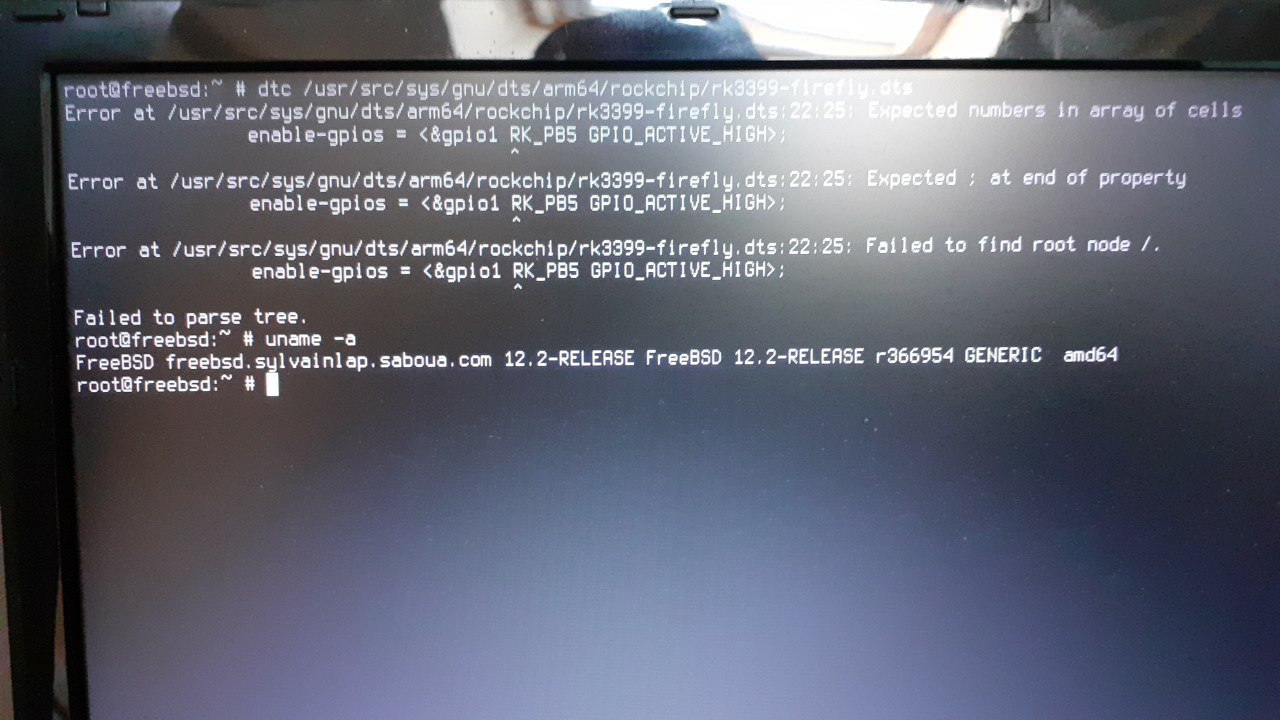 Sylvain
Isn't 13 still only beta ? Should I try it ?
Clay
I don't know if it will help you at all. 13 is nearly released as stable. It's pretty stable here on my daily driver workstation. I upgraded a few weeks ago. (Actually GhostBSD, but based on 13 instead of 12.2 of FreeBSD)
Sylvain
Actually I don't see why I couldn't use the dtb from openbsd. But yet another problem is that FreeBSD doesn't seem to recognize my sd card.
Clay
:( Are you just testing FreeBSD, since OpenBSD works?
Sylvain
:( Are you just testing FreeBSD, since OpenBSD works?
Well, I am interested in both... I want to use FreeBSD on my arm board for now
Sylvain
And indeed seems the sd card reader isn't yet supported :( http://bsd-hardware.info/?probe=17ed006376
Clay
I haven't even tried it on my pi 3 yet. :O
Clay
I have a little usb adapter for my sd cards, works fine.
Sylvain
I am gonna have to try force-writing it from Linux... I don't like that. Anyway. Cross fingers for me 😝
Clay
🤞
Sylvain
Oh, no, just figured a safer way
Sylvain
I can edit the img by mounting it locally from the filesystem :)
Sylvain
All this because Xubuntu kernel is compiled with ufs read only haha
Sylvain
Hmmm, can't access that ufs2 slice yet, using mdconfig(8). Seeking further
Sylvain
Yeah sorry, I forgot smh I'm not on the forum where messages/contributions can be useful and read as messages later... anyway, carrying on
Sylvain
I opened a thread here : https://forums.freebsd.org/threads/using-booting-freebsd-on-the-firefly-rk-3399-soc.79180
Anonymous
Anyone up?
Nameful
yes
Anonymous
I'm confused which ISO to download. In amd64 there are many ISOs
Anonymous
I want to boot using USB stick
Anonymous
Anyone who can tell?
neb
There's 12.2, 13 and 14. and 11.x. Depends on how on/off the dev edge you wanna live.
neb
neb
↑ is —CURRENT
Anonymous
There's 12.2, 13 and 14. and 11.x. Depends on how on/off the dev edge you wanna live.
In 12.2,there are cd,dvd,memstick and more. Which one should I go for
 dapit
dapit
Go retro!... Chose CD!