 Сергей


Блин, ну как бы общение заключается не только в механической передаче информации через текст. Голос всегда будет богаче текста на информацию, потому что ты слышишь интонации собеседника, тембр, скорость его разговора
 Арсен 🤝
 ᛞᛁᛉᛗᛟᚱᚨᛚ
Сергей
ᛞᛁᛉᛗᛟᚱᚨᛚ
Сергей
Общение ирл и общение в сети — разные вещи
Разные, конечно. Но ты общение в интернете сводишь к написанию письма, исключая другие способы коммуникации
ᛞᛁᛉᛗᛟᚱᚨᛚ
Сергей
Ненужные ограничения 👍
 You
Сергей
You
Сергей
Как мне читать войсы с часов?
Не читай, слушай. Если не хочешь слушать, ну не заставляет тебя никто. Если что-то срочное, то написали бы
You
Как мне слушать войсы с часов?
Сергей
Телефон к уху подносишь и слушаешь
Сергей
You
Часы
You
На руке которые
Сергей
Телефон возьми
Сергей
Что часы
You
На часах уведомления
You
Либо полезные с текстом, либо бесполезные с "Voice message"
Сергей
Не слушай, кто заставляет? Опять вопрос этот
You
Нет, бывают конечно нормальные войсы на 30+ секунд
You
Но общение превращается непонятно во что
ᛞᛁᛉᛗᛟᚱᚨᛚ
Я угораю, когда тупые девки кидают голосовые на 2 секунды, где говорят "да" или "нет"
Сергей
Ну тупые девки это терминальная стадия, про это я не говорю
Сергей
А вот про общение с часов как-то тоже глупый пример. Ты с них и отвечаешь ещё?
Сергей
You
Иногда
Сергей
Ты тупо читаешь уведомления, какое это общение?
You
Я всегда отвечаю
Сергей
С часов
You
С часов иногда
Сергей
Третий раз ту же гифку присылать не буду, извини
 𝕊𝕒𝕚𝕟𝕥𝔻𝕖𝕧𝕚𝕝
Сергей
𝕊𝕒𝕚𝕟𝕥𝔻𝕖𝕧𝕚𝕝
Сергей
Спасибо
Сергей
Записать гс с объяснением?)
You
Через бота не забудь потом прогнать)
Anonymous
Сергей
Сидят в чатах с экранчиков 2х2 см и возмущаются, что голосовые шлют
Сергей
Что что?
You
Ты как будто не читаешь что я тебе пишу
 Antonio
Короче, гс - охуенно. Кому неудобно - не пользуйтесь
You
А кому удобно - пользуйтесь
Antonio
 Groosha
Thank you for joining us! We will be testing a new mode for quizzes on Monday, August 9 at 18:00 UTC.
For the test, you will be taking a quiz on quiz.directory, preferably on desktop. We will post the quiz link here.
If possible, please record your screen during the quiz. You can use default options from your device or other software – or more easily, simply use your smartphone to take a video of your screen.
Please also record the logs of your web browser if you can. You need to enable logging before taking the quiz, the following steps should work:
• Chrome:
1. Open dev tools: Upper-right-hand corner of the browser window > More Tools > Developer Tools.
2. Before the quiz, switch to Network > enable Preserve log.
3. Keep Developer Tools open during the quiz. When you're done, click the Export icon ("Export HAR…") and save the file.
• Safari:
1. Open dev tools: Preferences > Advanced > enable "Show Develop menu in menu bar”, choose Develop > Show Web Inspector.
2. Before the quiz, switch to Network > enable Preserve log.
3. Keep Developer Tools open during the quiz. When you're done, click the Export icon on the far right of the network tab and save the HAR file.
• Opera:
1. Open dev tools: Press Alt key on keyboard and select Developer > Developer tools.
2. Before the quiz, switch to Network > select Preserve log.
3. Keep Developer Tools open during the quiz. When you're done, select Export and save the HAR file.
• Firefox
1. Open dev tools: the Firefox menu (three horizontal lines) at the top-right > Web Developer > Network.
2. Before the quiz, switch to Network > enable Persist logs.
3. Keep Developer Tools open during the quiz. When you're done, select Save all as HAR. (It may take Firefox a while to prepare the download.)
If you are unable to screenrecord or take logs, don’t worry – please still participate by taking the quiz. We are looking to have the highest possible number of participants at the same time, so every extra participant helps.
Before the test, we will post again with the quiz link and instructions regarding where to send your reports, screencasts and logs if you encounter any errors. Talk to you soon 💪
 Zix
Zix
Я слишком пьян, чтобы переводить, какие ещё викторины?
Anonymous
 Anonymous
А как сделать чтобы гомункулы не из контактов не могли добавлять в спам чаты
Anonymous
 𝕊𝕒𝕚𝕟𝕥𝔻𝕖𝕧𝕚𝕝
А как сделать чтобы гомункулы не из контактов не могли добавлять в спам чаты
настройки-приватность и безопасность - группы
Groosha
https://tjournal.ru/internet/421892
Я надеюсь, до телеги такая хуйня не дойдёт
 Anonymous
https://tjournal.ru/internet/421892
Я надеюсь, до телеги такая хуйня не дойдёт
Еее стикеры под сообщениями
Anonymous
Тупо кайф
 Azer
Azer
https://tjournal.ru/internet/421892
Я надеюсь, до телеги такая хуйня не дойдёт
На серверсайд она уже реализована, так что ждём статьи "тг украла фичу вк".
Groosha
На серверсайд она уже реализована, так что ждём статьи "тг украла фичу вк".
Реализована, но, к счастью, не включена
Groosha
М.б. ещё передумают, как с комментами в каналах году в 2016
 Ikrám
Azer
Ikrám
Azer
Реализована, но, к счастью, не включена
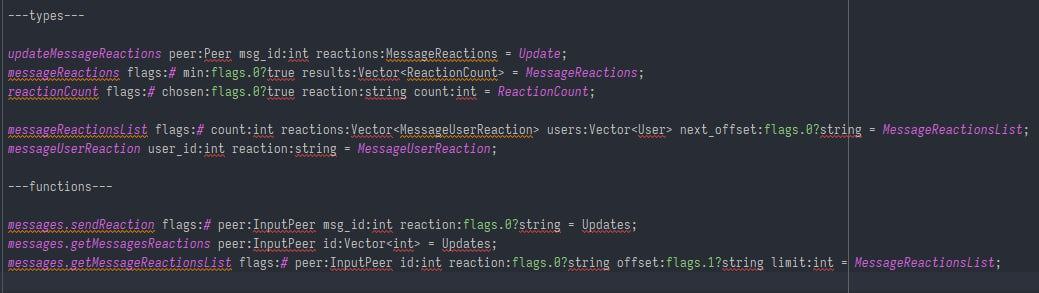
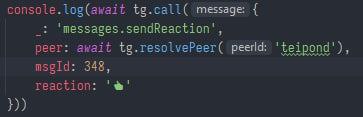
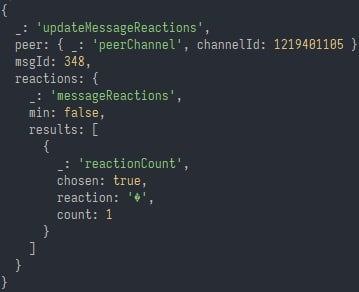
Знакомая делает обертку мтпрото на ноде, по приколу включила message.sendReaction, и запрос обратался👀
Azer
 Azer
Azer
 Azer
Azer
 Azer
Azer
Последняя фотка, как можно понять, это ответ тг
Groosha
А что тогда было?
Там было некоторое подобие комментов, под рукой нет скриншотов, к сожалению. Можно было заметить на канале "флажок"
 🐣
Azer
🐣
Azer
Пояснительная бригада 📞
Со стороны сервера нативные лайки уже существуют. Просто на официальных клиентах они не отображаются.
Azer
Да и я не видел ещё клиент, который обрабатывает эти лайки, но в целом это уже давно как возможно.
Groosha
Знакомая делает обертку мтпрото на ноде, по приколу включила message.sendReaction, и запрос обратался👀
то, что он "обработался", не значит вообще ничего) м.б. эта инфа потом очищается через час/сутки
Azer
то, что он "обработался", не значит вообще ничего) м.б. эта инфа потом очищается через час/сутки
Не отрицаю, надо потыкать побольше👀