Anonymous
Не
Anonymous
Работает
Anonymous
Scrolllllll
Anonymous
Ну да)
Anonymous
import React from 'react' import { Image, View, Text, FlatList, StyleSheet } from 'react-native' import { useState } from 'react' import img from '../../../../assets/photo.png' import heartIcon from '../../../../assets/heart.png' export default function Data(props) { const [image, setImage]=useState([ {src:img, price:'1255$', title:'Аренда авто, под залог',addres:'Лиговский проспект 11', time:'Сегодня в 12:00', id:${Math.random()}}, {src:img, price:'1255$', title:'Аренда авто, под залог',addres:'Лиговский проспект 11', time:'Сегодня в 12:00', id:${Math.random()}}, {src:img, price:'1255$', title:'Аренда авто, под залог',addres:'Лиговский проспект 11', time:'Сегодня в 12:00', id:${Math.random()}}, {src:img, price:'1255$', title:'Аренда авто, под залог',addres:'Лиговский проспект 11', time:'Сегодня в 12:00', id:${Math.random()}}, {src:img, price:'1255$', title:'Аренда авто, под залог',addres:'Лиговский проспект 11', time:'Сегодня в 12:00', id:${Math.random()}}, {src:img, price:'1255$', title:'Аренда авто, под залог',addres:'Лиговский проспект 11', time:'Сегодня в 12:00', id:${Math.random()}}, {src:img, price:'1255$', title:'Аренда авто, под залог',addres:'Лиговский проспект 11', time:'Сегодня в 12:00', id:${Math.random()}}, {src:img, price:'1255$', title:'Аренда авто, под залог',addres:'Лиговский проспект 11', time:'Сегодня в 12:00', id:${Math.random()}}, {src:img, price:'1255$', title:'Аренда авто, под залог',addres:'Лиговский проспект 11', time:'Сегодня в 12:00', id:${Math.random()}}, {src:img, price:'1255$', title:'Аренда авто, под залог',addres:'Лиговский проспект 11', time:'Сегодня в 12:00', id:${Math.random()}}, {src:img, price:'1255$', title:'Аренда авто, под залог',addres:'Лиговский проспект 11', time:'Сегодня в 12:00', id:${Math.random()}}, {src:img, price:'1255$', title:'Аренда авто, под залог',addres:'Лиговский проспект 11', time:'Сегодня в 12:00', id:${Math.random()}}, ]) return ( <> <FlatList showsHorizontalScrollIndicator={false} data={image} renderItem={({ item }) => ( <View style={{flex:1, width:'98%', height:125, marginTop:30}}> <View style={{ flex:1,justifyContent:'flex-start',flexDirection:'row'}}> <Image source={img} style={{ width:150, height:125,}}/> <View style={{position:'absolute', left:112, bottom:10, width:28, height:28, backgroundColor:'#000000', opacity:0.4, borderRadius:8 }}> <Image style={{ width:15, height:15, alignContent:'center', justifyContent:'center', alignItems:'center', marginLeft:6, marginTop:7}} source={heartIcon}/> </View> <View style={{flex:1}}> <Text style={{fontSize:14, fontWeight:'700', lineHeight:16.1, margin:15, height:10,width:131, color:'#424A55', fontStyle:'normal'}}> Аренда авто, под залог </Text> <Text style={{margin:15, fontSize:14,height:10, color:'#8B94A3', width:'100%'}}> 1 290 ₽{'\n'} Лиговский проспект 11{'\n'} Сегодня в 12:00 </Text> </View> </View> </View> )} /> </> ) }
Anonymous
Это дата который должен рендерить с скролом
Anonymous
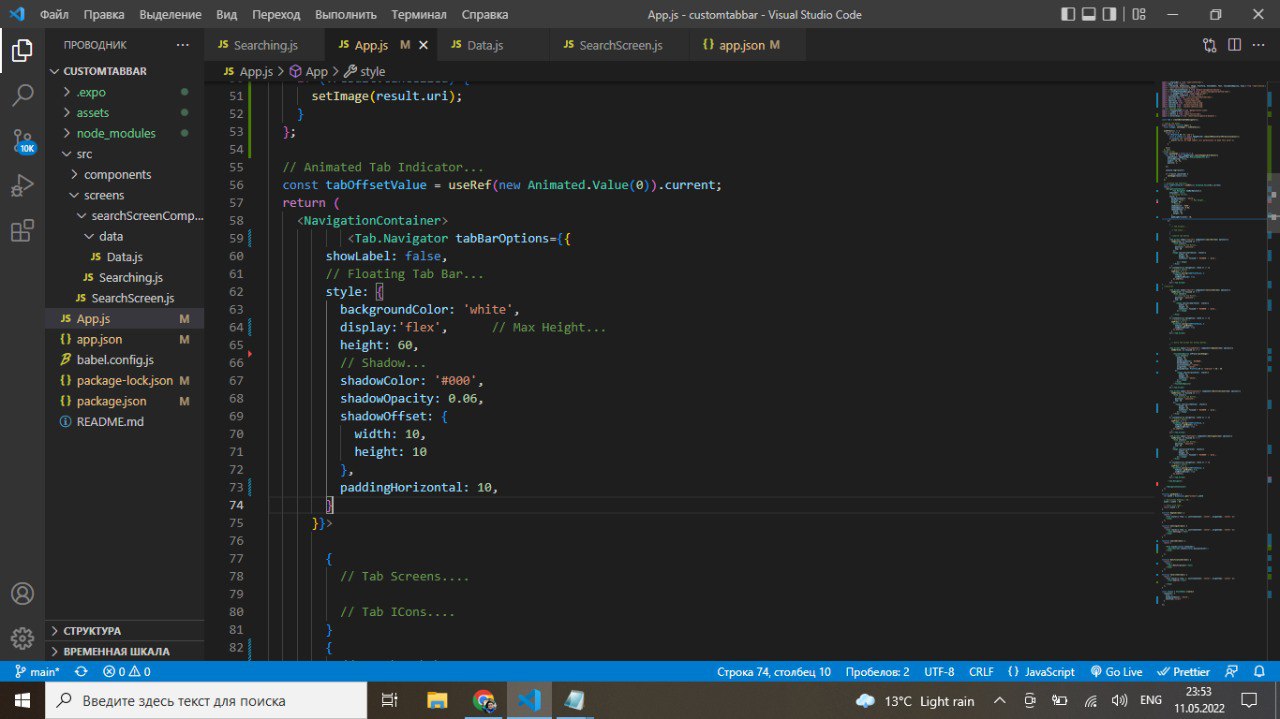
import { StatusBar } from 'expo-status-bar'; import React from 'react'; import { Animated, Dimensions, Image, Platform, StyleSheet, Text, TouchableOpacity, View } from 'react-native'; import 'react-native-gesture-handler'; import { NavigationContainer } from '@react-navigation/native'; import { createBottomTabNavigator } from '@react-navigation/bottom-tabs'; import * as ImagePicker from 'expo-image-picker'; import { useState, useEffect } from 'react'; import SearchScreen from './src/screens/SearchScreen'; import plusIcon from './assets/plus.png' import heartIcon from './assets/heart.png' import searchIcon from './assets/search.png' import userIcon from './assets/userIcon.png' import chatIcon from './assets/chatIcon.png' // Font Awesome Icons... import { FontAwesome5 } from '@expo/vector-icons' import { useRef } from 'react'; import { Button } from 'react-native-web'; import { ScrollView } from 'react-native-gesture-handler'; const Tab = createBottomTabNavigator(); // Hiding Tab Names... export default function App() { const [image, setImage] = useState([]); useEffect(() => { (async () => { if (Platform.OS !== 'web') { const { status } = await ImagePicker.requestMediaLibraryPermissionsAsync(); if (status !== 'granted') { alert('Sorry, we need camera roll permissions to make this work!'); } } })(); }, []); //image picker const pickImage = async () => { let result = await ImagePicker.launchImageLibraryAsync({ mediaTypes: ImagePicker.MediaTypeOptions.All, allowsEditing: false, aspect: [4, 3], quality: 1, }); console.log(result); if (!result.cancelled) { setImage(result.uri); } }; // Animated Tab Indicator... const tabOffsetValue = useRef(new Animated.Value(0)).current; return ( <NavigationContainer> <Tab.Navigator tabBarOptions={{ showLabel: false, // Floating Tab Bar... style: { backgroundColor: 'white', // Max Height... height: 60, // Shadow... shadowColor: '#000', shadowOpacity: 0.06, shadowOffset: { width: 10, height: 10 }, paddingHorizontal: 0, } }}> { // Tab Screens.... // Tab ICons.... } { //search tab button } <Tab.Screen name={"search"} component={searchScreen} options={{ tabBarIcon: ({ focused }) => ( <View style={{ // centring Tab Button... position: 'absolute', top: 20 }}> <Image source={searchIcon} style={{ width: 22, height: 22, tintColor: focused ? '#32BB8B' : 'gray', }}></Image> </View> ) }} listeners={({ navigation, route }) => ({ // Onpress Update.... tabPress: e => { Animated.spring(tabOffsetValue, { toValue: 0, useNativeDriver: true }).start(); } })}></Tab.Screen> { //favorite } <Tab.Screen name={"Search"} component={favoriteScreen} options={{ tabBarIcon: ({ focused }) => ( <View style={{ // centring Tab Button... position: 'absolute', top: 20 }}> <Image source={heartIcon} style={{ width: 22, height: 22, tintColor: focused ? '#32BB8B' : 'gray', }}></Image> </View> ) }} listeners={({ navigation, route }) => ({ // Onpress Update.... tabPress: e => { Animated.spring(tabOffsetValue, { toValue: getWidth(), useNativeDriver: true }).start();
Anonymous
А это app.js
GeorgeGr
Понятно не надо так скидывать скринов хватит, попробуйте flatlist обернуть во view и добавить к view стиль flex:1
Anonymous
Щас
Anonymous
Тоже самое
Aleksey
По идее flex наследуется по цепочке. Надо проверить на компоненте-родителе, что там с flex
Anonymous
Весь код я скинул
Anonymous
import { StatusBar } from 'expo-status-bar'; import React from 'react'; import { Animated, Dimensions, Image, Platform, StyleSheet, Text, TouchableOpacity, View } from 'react-native'; import 'react-native-gesture-handler'; import { NavigationContainer } from '@react-navigation/native'; import { createBottomTabNavigator } from '@react-navigation/bottom-tabs'; import * as ImagePicker from 'expo-image-picker'; import { useState, useEffect } from 'react'; import SearchScreen from './src/screens/SearchScreen'; import plusIcon from './assets/plus.png' import heartIcon from './assets/heart.png' import searchIcon from './assets/search.png' import userIcon from './assets/userIcon.png' import chatIcon from './assets/chatIcon.png' // Font Awesome Icons... import { FontAwesome5 } from '@expo/vector-icons' import { useRef } from 'react'; import { Button } from 'react-native-web'; import { ScrollView } from 'react-native-gesture-handler'; const Tab = createBottomTabNavigator(); // Hiding Tab Names... export default function App() { const [image, setImage] = useState([]); useEffect(() => { (async () => { if (Platform.OS !== 'web') { const { status } = await ImagePicker.requestMediaLibraryPermissionsAsync(); if (status !== 'granted') { alert('Sorry, we need camera roll permissions to make this work!'); } } })(); }, []); //image picker const pickImage = async () => { let result = await ImagePicker.launchImageLibraryAsync({ mediaTypes: ImagePicker.MediaTypeOptions.All, allowsEditing: false, aspect: [4, 3], quality: 1, }); console.log(result); if (!result.cancelled) { setImage(result.uri); } }; // Animated Tab Indicator... const tabOffsetValue = useRef(new Animated.Value(0)).current; return ( <NavigationContainer> <Tab.Navigator tabBarOptions={{ showLabel: false, // Floating Tab Bar... style: { backgroundColor: 'white', // Max Height... height: 60, // Shadow... shadowColor: '#000', shadowOpacity: 0.06, shadowOffset: { width: 10, height: 10 }, paddingHorizontal: 0, } }}> { // Tab Screens.... // Tab ICons.... } { //search tab button } <Tab.Screen name={"search"} component={searchScreen} options={{ tabBarIcon: ({ focused }) => ( <View style={{ // centring Tab Button... position: 'absolute', top: 20 }}> <Image source={searchIcon} style={{ width: 22, height: 22, tintColor: focused ? '#32BB8B' : 'gray', }}></Image> </View> ) }} listeners={({ navigation, route }) => ({ // Onpress Update.... tabPress: e => { Animated.spring(tabOffsetValue, { toValue: 0, useNativeDriver: true }).start(); } })}></Tab.Screen> { //favorite } <Tab.Screen name={"Search"} component={favoriteScreen} options={{ tabBarIcon: ({ focused }) => ( <View style={{ // centring Tab Button... position: 'absolute', top: 20 }}> <Image source={heartIcon} style={{ width: 22, height: 22, tintColor: focused ? '#32BB8B' : 'gray', }}></Image> </View> ) }} listeners={({ navigation, route }) => ({ // Onpress Update.... tabPress: e => { Animated.spring(tabOffsetValue, { toValue: getWidth(), useNativeDriver: true }).start();
App
Anonymous
import React from 'react' import { Image, View, Text, FlatList, StyleSheet } from 'react-native' import { useState } from 'react' import img from '../../../../assets/photo.png' import heartIcon from '../../../../assets/heart.png' export default function Data(props) { const [image, setImage]=useState([ {src:img, price:'1255$', title:'Аренда авто, под залог',addres:'Лиговский проспект 11', time:'Сегодня в 12:00', id:${Math.random()}}, {src:img, price:'1255$', title:'Аренда авто, под залог',addres:'Лиговский проспект 11', time:'Сегодня в 12:00', id:${Math.random()}}, {src:img, price:'1255$', title:'Аренда авто, под залог',addres:'Лиговский проспект 11', time:'Сегодня в 12:00', id:${Math.random()}}, {src:img, price:'1255$', title:'Аренда авто, под залог',addres:'Лиговский проспект 11', time:'Сегодня в 12:00', id:${Math.random()}}, {src:img, price:'1255$', title:'Аренда авто, под залог',addres:'Лиговский проспект 11', time:'Сегодня в 12:00', id:${Math.random()}}, {src:img, price:'1255$', title:'Аренда авто, под залог',addres:'Лиговский проспект 11', time:'Сегодня в 12:00', id:${Math.random()}}, {src:img, price:'1255$', title:'Аренда авто, под залог',addres:'Лиговский проспект 11', time:'Сегодня в 12:00', id:${Math.random()}}, {src:img, price:'1255$', title:'Аренда авто, под залог',addres:'Лиговский проспект 11', time:'Сегодня в 12:00', id:${Math.random()}}, {src:img, price:'1255$', title:'Аренда авто, под залог',addres:'Лиговский проспект 11', time:'Сегодня в 12:00', id:${Math.random()}}, {src:img, price:'1255$', title:'Аренда авто, под залог',addres:'Лиговский проспект 11', time:'Сегодня в 12:00', id:${Math.random()}}, {src:img, price:'1255$', title:'Аренда авто, под залог',addres:'Лиговский проспект 11', time:'Сегодня в 12:00', id:${Math.random()}}, {src:img, price:'1255$', title:'Аренда авто, под залог',addres:'Лиговский проспект 11', time:'Сегодня в 12:00', id:${Math.random()}}, ]) return ( <> <FlatList showsHorizontalScrollIndicator={false} data={image} renderItem={({ item }) => ( <View style={{flex:1, width:'98%', height:125, marginTop:30}}> <View style={{ flex:1,justifyContent:'flex-start',flexDirection:'row'}}> <Image source={img} style={{ width:150, height:125,}}/> <View style={{position:'absolute', left:112, bottom:10, width:28, height:28, backgroundColor:'#000000', opacity:0.4, borderRadius:8 }}> <Image style={{ width:15, height:15, alignContent:'center', justifyContent:'center', alignItems:'center', marginLeft:6, marginTop:7}} source={heartIcon}/> </View> <View style={{flex:1}}> <Text style={{fontSize:14, fontWeight:'700', lineHeight:16.1, margin:15, height:10,width:131, color:'#424A55', fontStyle:'normal'}}> Аренда авто, под залог </Text> <Text style={{margin:15, fontSize:14,height:10, color:'#8B94A3', width:'100%'}}> 1 290 ₽{'\n'} Лиговский проспект 11{'\n'} Сегодня в 12:00 </Text> </View> </View> </View> )} /> </> ) }
Data
Aleksey
Весь код я скинул
Тут пишут наводки, где копать. А ты сам проверяешь
Anonymous
Блиииннн
Anonymous
Flex1
Anonymous
В таб навигейтре
Anonymous
Я его ротственник!!!!
Anonymous
С утра мучает
Aleksey
Anonymous
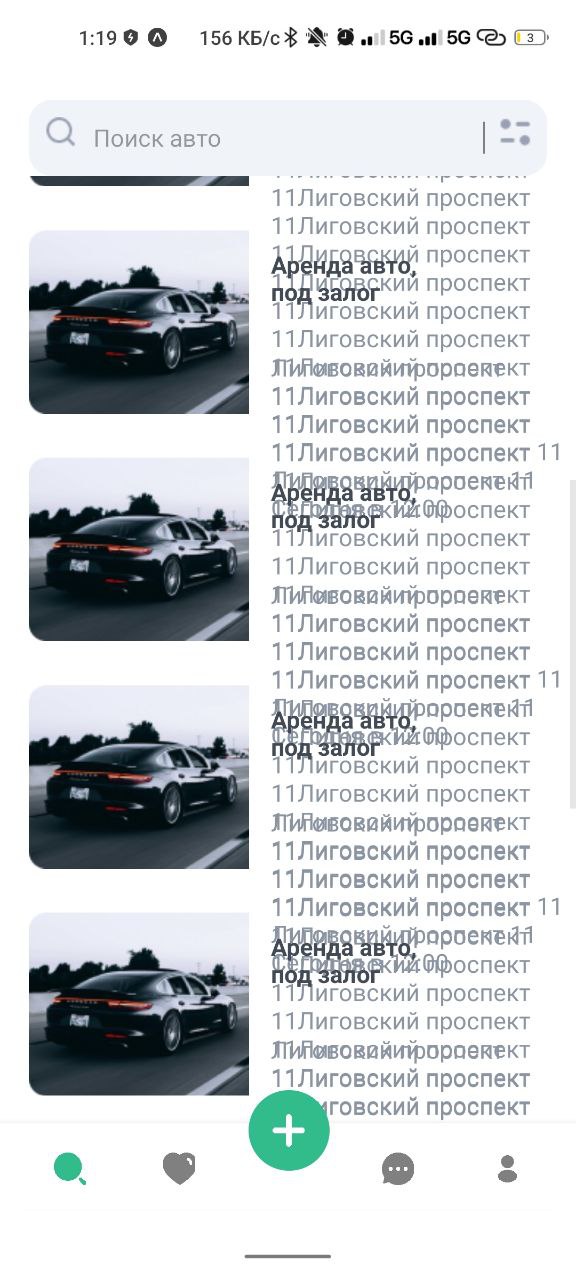
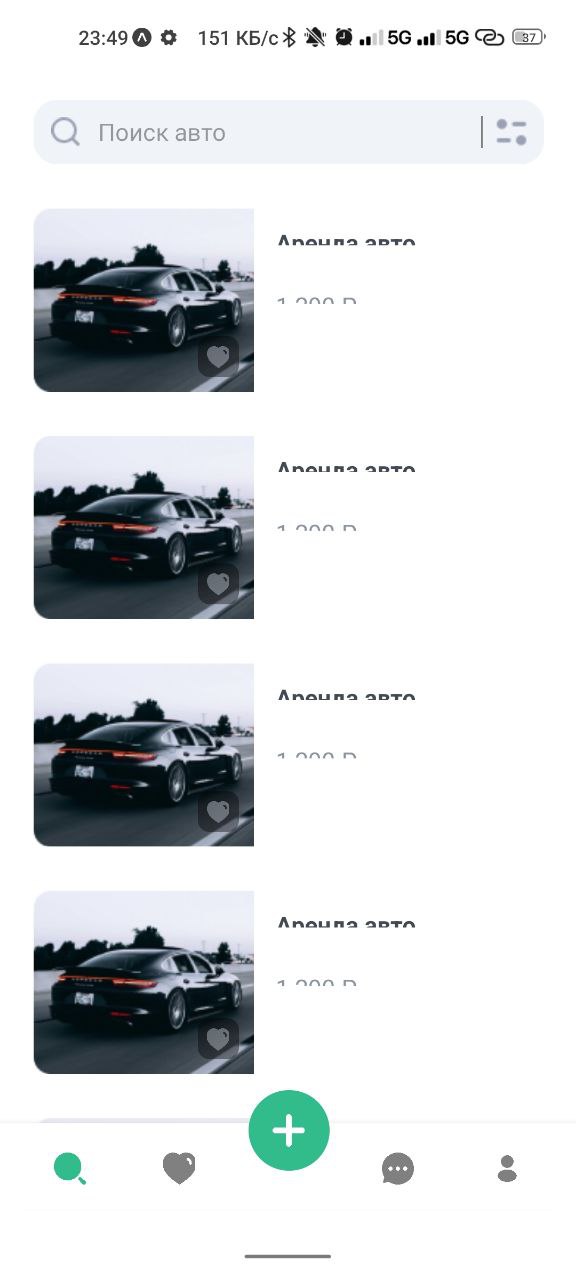
Вот тепер левл дракона- работает на браузере но не работает в экспо
Anonymous
Почему?
Aleksey
Вот тепер левл дракона- работает на браузере но не работает в экспо
Чем хуже сформулирован вопрос, тем меньше вероятность получить на него ответ.
Anonymous
Смотрите
Anonymous
Работает как должно
Anonymous
Anonymous
А вот в приложении нет
Anonymous
Hethal
Тут с флексами намудрил чот
Anonymous
import { StatusBar } from 'expo-status-bar'; import React from 'react'; import { Animated, Dimensions, Image, Platform, StyleSheet, Text, TouchableOpacity, View } from 'react-native'; import 'react-native-gesture-handler'; import { NavigationContainer } from '@react-navigation/native'; import { createBottomTabNavigator } from '@react-navigation/bottom-tabs'; import * as ImagePicker from 'expo-image-picker'; import { useState, useEffect } from 'react'; import SearchScreen from './src/screens/SearchScreen'; import plusIcon from './assets/plus.png' import heartIcon from './assets/heart.png' import searchIcon from './assets/search.png' import userIcon from './assets/userIcon.png' import chatIcon from './assets/chatIcon.png' // Font Awesome Icons... import { FontAwesome5 } from '@expo/vector-icons' import { useRef } from 'react'; import { Button } from 'react-native-web'; import { ScrollView } from 'react-native-gesture-handler'; const Tab = createBottomTabNavigator(); // Hiding Tab Names... export default function App() { const [image, setImage] = useState([]); useEffect(() => { (async () => { if (Platform.OS !== 'web') { const { status } = await ImagePicker.requestMediaLibraryPermissionsAsync(); if (status !== 'granted') { alert('Sorry, we need camera roll permissions to make this work!'); } } })(); }, []); //image picker const pickImage = async () => { let result = await ImagePicker.launchImageLibraryAsync({ mediaTypes: ImagePicker.MediaTypeOptions.All, allowsEditing: false, aspect: [4, 3], quality: 1, }); console.log(result); if (!result.cancelled) { setImage(result.uri); } }; // Animated Tab Indicator... const tabOffsetValue = useRef(new Animated.Value(0)).current; return ( <NavigationContainer> <Tab.Navigator tabBarOptions={{ showLabel: false, // Floating Tab Bar... style: { backgroundColor: 'white', // Max Height... height: 60, // Shadow... shadowColor: '#000', shadowOpacity: 0.06, shadowOffset: { width: 10, height: 10 }, paddingHorizontal: 0, } }}> { // Tab Screens.... // Tab ICons.... } { //search tab button } <Tab.Screen name={"search"} component={searchScreen} options={{ tabBarIcon: ({ focused }) => ( <View style={{ // centring Tab Button... position: 'absolute', top: 20 }}> <Image source={searchIcon} style={{ width: 22, height: 22, tintColor: focused ? '#32BB8B' : 'gray', }}></Image> </View> ) }} listeners={({ navigation, route }) => ({ // Onpress Update.... tabPress: e => { Animated.spring(tabOffsetValue, { toValue: 0, useNativeDriver: true }).start(); } })}></Tab.Screen> { //favorite } <Tab.Screen name={"Search"} component={favoriteScreen} options={{ tabBarIcon: ({ focused }) => ( <View style={{ // centring Tab Button... position: 'absolute', top: 20 }}> <Image source={heartIcon} style={{ width: 22, height: 22, tintColor: focused ? '#32BB8B' : 'gray', }}></Image> </View> ) }} listeners={({ navigation, route }) => ({ // Onpress Update.... tabPress: e => { Animated.spring(tabOffsetValue, { toValue: getWidth(), useNativeDriver: true }).start();
.
Anonymous
Тут с флексами намудрил чот
Вот код если можете подскажите с чего это так
Hethal
Скринами плиз
Anonymous
Anonymous
После того как добавил display flex начал работать на браузере
Anonymous
Но в приложении экспо не работает
Anonymous
И flex:1 попробовал тоже самое
Hethal
Ща в лс отпишу чтоб чат не засирать
Anonymous
Хорошо спасибо

Eugene
То есть про https://codesandbox.io/ или github не слашали?
Eugene
Спасибо.
Anonymous
Это случилось случайно, извеняюсь

Max
Добрый вечер, подскажите пожалуйста, может ли из-за того, что запрос идет не по https, а по http ошибка падать ?
Anonymous
Да
Anonymous
По идеи
Anonymous
Потому что ios не допускает http
Anonymous
Добрый вечер, подскажите пожалуйста, может ли из-за того, что запрос идет не по https, а по http ошибка падать ?
<key>NSAppTransportSecurity</key> <dict> <key>NSAllowsArbitraryLoads</key> <true/> </dict>
Anonymous
Поставь это в файле info.plist
Anonymous
Сработало?

Mykhail
Скажите плиз, как можно решить проблему то что не все элементы видны при скроле у флатлиста?
Mykhail
Задолбали с этой темой 😂 Вечно пишу сюда а вместо ответа - какая тема Bearded Theme
Anonymous
Попробуй overflow: "scroll"
Anonymous
Flex:1
Max
Сработало?
Ещё не проверил, отпишу как попробую
Max
Я маржином делал и забивал болт
А может и нет, не помню))
Anonymous
😎
Anonymous
Anonymous
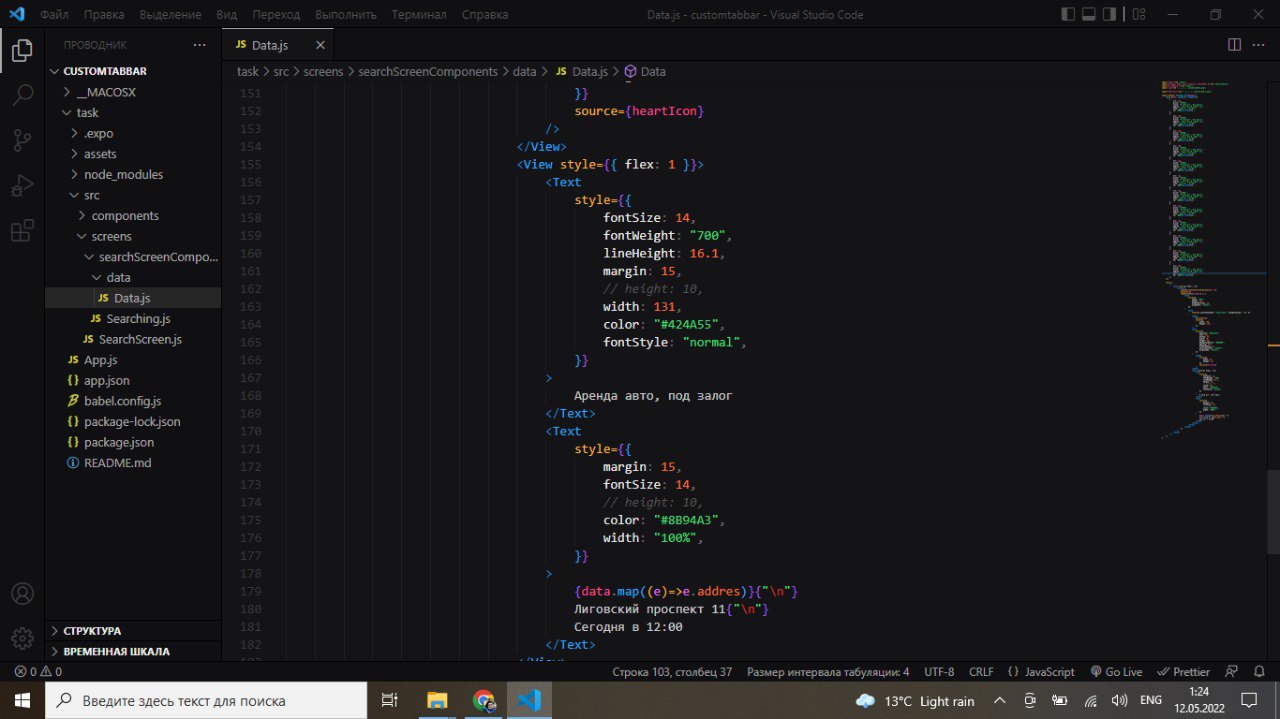
Почему получаю такое чудо?
Anonymous
Max
Почему получаю такое чудо?
Потому что так написал
Max
Ну в каждом блоке получается мапится массив
Anonymous
Как правильно сделать?
Anonymous
Чтобы из даты взять например title

Ilya
Как правильно сделать?
https://reactnative.dev/docs/flatlist
Ilya
Очень полезная вещь
Anonymous
Спасибо
Hethal
на 179 строчке ты циклом выводишь все адреса в каждом элементе
Anonymous
Надо было item.title брать