 מנחם
מנחם


while(true){
if(cin >> num)
cout << num;
if(cin.eof())
break;
if(MAX_INT || MIN_INT)
cout << "invali input, try again\n";
}
============
How do I correctly define the second and third condition?
If I do 'ctrl + d' or eof, it will exit the loop.
If I'm an unsuitable number for int, it will detect and alert
In the second and third condition, which will identify the "cin" of the first condition
 Anonymous
Hello guys
מנחם
Full code ? So we can find .
How do I distinguish between different cases of input?
I have 3 cases,
1. input of a number
2. ctrl+d
3. input are too big
(num is int)
Anonymous
Can you help me out in c task ?
Anonymous
Base task
Create a function named cartesian1() which produces the Cartesian product of sets. The sets are represented by arrays, The Cartesian product of sets A and B is the set of all pairs where the irst component comes from A and the second one comes from B: A⨯B = { (a,b) | a∊A ∧ b∊B }. For example for sets {1,2} and {4,5} the Cartesian product is {(1,4), (1,5), (2,4), (2,5)}.
The function should have two input and one output parameter: the input parameters should be 10 element integer arrays, and the output parameter is a 100 element array containing pair objects. pair type is a record which contains two integers. You may assume that the input array elements are unique.
Create three arrays in main() function with correct sizes and call the function. Test your program by printing the result.
Anonymous
Who can help me? Please
 Pavel
Pavel
 \Device\NUL
Your logic is wrong, check EOF first, that check if std::cin is receive valid input using std::cin.good
Anonymous
I am afraid you won't get this kind of cheating help here
no i did task . maybe can you check my code
 klimi
klimi
#howtoask
Anonymous
Hello, does any know how to enable module support using import keyword for C++20, gcc compiler (v12.1) in codeblocks?
When trying to build my project, I keep getting the error message, "import only available with -fmodules-ts."
\Device\NUL
Anonymous
Set compiler flags
In the compiler settings, I don't see the option for selecting c++20 or -fmodules-ts support.
\Device\NUL
In the compiler settings, I don't see the option for selecting c++20 or -fmodules-ts support.
Manually set compiler flags
\Device\NUL
For example -fno-pie isn't available on the option
Anonymous
For example -fno-pie isn't available on the option
I added -fmodules-ts to other compiler options under the compiler settings and now I get the error message, "failed to compile module, no such file directory."
I am running a simple hello world program which includes the import <iostream> directive only.
Anonymous
||note: compiled module file is ‘gcm.cache/./usr/include/c++/11.3.0/iostream.gcm’|
Anonymous
||note: imports must be built before being imported|
Anonymous
Those are the warnings I get
Anonymous
while(true){
if(cin >> num)
cout << num;
if(cin.eof())
break;
if(MAX_INT || MIN_INT)
cout << "invali input, try again\n";
}
============
How do I correctly define the second and third condition?
If I do 'ctrl + d' or eof, it will exit the loop.
If I'm an unsuitable number for int, it will detect and alert
In the second and third condition, which will identify the "cin" of the first condition
while(true){
if(cin >> num)
cout << num << endl;
else if (cin.eof()){
cin.clear();
break;
}
else {
cout << "Invalid Input" << endl;
cin.clear();
}
}
מנחם
while(true){
if(cin >> num)
cout << num << endl;
else if (cin.eof()){
cin.clear();
break;
}
else {
cout << "Invalid Input" << endl;
cin.clear();
}
}
Ctrl+d is print "invalid..." in loop. not break.
Anonymous
I added -fmodules-ts to other compiler options under the compiler settings and now I get the error message, "failed to compile module, no such file directory."
I am running a simple hello world program which includes the import <iostream> directive only.
The support for standard libraries importing as modules in GCC is still lacking. There is a meta bug related to this : https://gcc.gnu.org/bugzilla/show_bug.cgi?id=99227
Follow the instructions there
Anonymous
Ctrl+d is print "invalid..." in loop. not break.
Maybe on your system Ctrl+C or Ctrl+Z is EOF and not Ctrl+D
Anonymous
מנחם
Maybe on your system Ctrl+C or Ctrl+Z is EOF and not Ctrl+D
and why is loops?
There cin.clear().
Need read new input
Anonymous
and why is loops?
There cin.clear().
Need read new input
Didn't get you...can you clarify your question?
מנחם
Didn't get you...can you clarify your question?
When set ctrl+d, is print:
invalid... Invalid.... Invalid.... Invalid....
When input INT_MAX is print only one time.
Loops.
Anonymous
When set ctrl+d, is print:
invalid... Invalid.... Invalid.... Invalid....
When input INT_MAX is print only one time.
Loops.
When you input a number greater than INT_MAX, cin.fail() will be set and that should print Invalid Input
מנחם
When you input a number greater than INT_MAX, cin.fail() will be set and that should print Invalid Input
But cin.clear not stop the print
Anonymous
But cin.clear not stop the print
cin.clear is not for clearing cin buffer. It is for clearing the error flags and restore cin to a valid state for further inputs.
מנחם
Anonymous
So what I need?
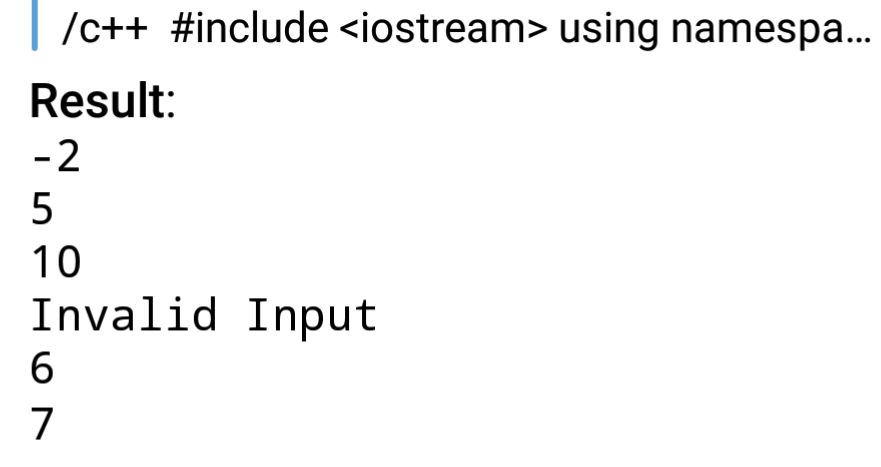
I don't understand. In your original question, you wanted to print Invalid Input if user enters a value out of range. Is the code that I gave not doing that?
Anonymous
 מנחם
מנחם
I don't understand. In your original question, you wanted to print Invalid Input if user enters a value out of range. Is the code that I gave not doing that?
no.
1. If get 'a', is break, not print "invalid".
2. If print "invalid", is print in loop. (Invalid, invalid, invalid....).
מנחם
Anonymous
1 my mistake, sory
Check your code again to see if it matches this code. If you don't call cin.clear() in the else condition, it will loop infinitely because cin cant accept any input if it is in error state.
Maybe that is why you are seeing "Invalid Input" printed in a loop.
https://t.me/programminginc/454556
מנחם
Check your code again to see if it matches this code. If you don't call cin.clear() in the else condition, it will loop infinitely because cin cant accept any input if it is in error state.
Maybe that is why you are seeing "Invalid Input" printed in a loop.
https://t.me/programminginc/454556
Yes, is was mistake.
But 2 is loop infinity.
Anonymous
Yes, is was mistake.
But 2 is loop infinity.
I showed you the output from Rextester bot. It is not looping infinitely.
מנחם
I showed you the output from Rextester bot. It is not looping infinitely.
Indeed, I saw. It's weird for me.
But thanks so far. I think I bothered you enough...
Anonymous
Indeed, I saw. It's weird for me.
But thanks so far. I think I bothered you enough...
Oh. I just understood what you are saying. Are you trying to input a character?
klimi
klimi
To my understanding EOF is not a symbol, it is just the fact that the file has ended
klimi
so if you put /dev/null as stdin you are efectively just sending "EOF"
Anonymous
To my understanding EOF is not a symbol, it is just the fact that the file has ended
I know that. But on Rextester bot, i wasn't sure.
Anonymous
To my understanding EOF is not a symbol, it is just the fact that the file has ended
On a real system, where you are reading from stdin (without redirecting input), you can't simulate EOF unless you enter the OS designated EOF character. So I thought Rextester would have the same issue as well. But you are right. Rextester assumes EOF after the last input possibly because it treats the input as a file.
klimi
On real system it is just a file
klimi
and you signaling the end of stdin is just terminal thing, you could write your input to a file and pass that as stdin. Signaling to your terminal to close the stdin is just saying that there is no more data
Anonymous
no... no
Try this code on your system
int main(){
int num;
while(cin>>num);
}
It will wait for an input until it encounters an invalid input or if you enter the designated EOF character.
klimi
Try this code on your system
int main(){
int num;
while(cin>>num);
}
It will wait for an input until it encounters an invalid input or if you enter the designated EOF character.
i don't agree... there is no such EOF character
Anonymous
i don't agree... there is no such EOF character
https://stackoverflow.com/questions/11968558/how-to-enter-the-value-of-eof-in-the-terminal
EOF is infact a macro in C and C++ that is used to specify end of input. In files, there is an implicit EOF sent after the file is completely read. When you are reading from the terminal, you have to manually send the EOF character
klimi
no... this is just the how you use it in C (the EOF macro), but in fact this is not what actually happens under the hood
klimi
if you have a file, you don't have "EOF" character at the end of the file
Anonymous
 Michel
Is there any library to add command line options easily to a C++ program?
 Alfredo
Is there any library to add command line options easily to a C++ program?
There are a lot, you can search online.
I used this once, however I migrated the app to Qt and I no longer needed.
https://github.com/jarro2783/cxxopts
Manish
Plz recommend book for.. HOW PROGRAM IN C LANGUAGE WORKS INTERNALLY.... ( means how variable are stored in stack... Memory in heap....)
Thanks 🙏
Anonymous
if you have a file, you don't have "EOF" character at the end of the file
Read again what I said. I am talking about input from the terminal and not from a file. I never said there is a EOF character at the end of a file. The EOF is sent when the file marker reaches the end. This EoF is not present in the file. The kernel can automatically send this when it detects that file read has reached the end
For terminal input, you have to specify EOF using a OS designated Ctrl+<> key combination. This must be done manually because a kernel can't detect this case. It is true that the terminal driver handles this key combination and then signals the kernel saying end of input is reached. The kernel interprets this and sends a specific return value to the read system call made after the end of input. This is then changed into the EOF macro that C uses. In the case of a read call on a file, there is no interrupt mechanism required to signal end if input as the kernel knows when the file end is reached and it repeats exactly the same process it did for the terminal (minus the manually sending the EoF part).
EOF is not a C specification btw but is infact a POSIX specification.
Anonymous
Is there any library to add command line options easily to a C++ program?
The resources channel already answers some questions commonly asked here.
https://t.me/cpp20programming/202
Please avoid asking questions that are already answered there.
 ● Igor
klimi
● Igor
klimi
Read again what I said. I am talking about input from the terminal and not from a file. I never said there is a EOF character at the end of a file. The EOF is sent when the file marker reaches the end. This EoF is not present in the file. The kernel can automatically send this when it detects that file read has reached the end
For terminal input, you have to specify EOF using a OS designated Ctrl+<> key combination. This must be done manually because a kernel can't detect this case. It is true that the terminal driver handles this key combination and then signals the kernel saying end of input is reached. The kernel interprets this and sends a specific return value to the read system call made after the end of input. This is then changed into the EOF macro that C uses. In the case of a read call on a file, there is no interrupt mechanism required to signal end if input as the kernel knows when the file end is reached and it repeats exactly the same process it did for the terminal (minus the manually sending the EoF part).
EOF is not a C specification btw but is infact a POSIX specification.
Well what I am saying that input from a terminal or input from a file is the same. Both of these mechanism use the same syscall (at least in Linux).
And the terminal shortcut for sending EOF is not OS designated, that depends just on the terminal settings. Also there is nothing for kernel to "detect" in this case.
Anonymous
Well what I am saying that input from a terminal or input from a file is the same. Both of these mechanism use the same syscall (at least in Linux).
And the terminal shortcut for sending EOF is not OS designated, that depends just on the terminal settings. Also there is nothing for kernel to "detect" in this case.
They are the same with respect to the fact that Unix systems treat them as files underneath. But the behavior is different.
The read system call is the same (this is obvously so because POSIX aims to provide a common interface to all devices) but the underlying implementation is different. The actual driver calls made by these system calls differ in the case of a file being read from the file system and a read from the terminal.
I am pointing to Linux source code here. I guess other OSes would do something similar as well. I haven't gone through them.
Here is the definition for system call read - https://elixir.bootlin.com/linux/latest/source/fs/read_write.c#L609
This ends up calling this function:
https://elixir.bootlin.com/linux/latest/source/fs/read_write.c#L462
This is a function in the virtual file system function that Linux set up for providing a filesystem interface for user space programs. From here the call is diverted to a read call specific to the file being read. This is where Linux diverts the read to the actual device drivers.
Here is the corresponding line of code:
https://elixir.bootlin.com/linux/latest/source/fs/read_write.c#L479
To see how the read variable is set up you can look at the code here : https://elixir.bootlin.com/linux/latest/source/fs/open.c#L1005
and
https://elixir.bootlin.com/linux/latest/source/fs/open.c#L1197 and https://elixir.bootlin.com/linux/latest/source/fs/namei.c#L3628 and https://elixir.bootlin.com/linux/latest/source/fs/namei.c#L3589
This is where open files are populated in task struct corresponding to your process or in simpler cases like being discussed here (it is copied from our parent process). You can see how the settings for a terminal and for files opened point to different functions.
Now look at the man page for sys call read. The system call is supposed to return 0 in the cases where a read call is made after end of file is reached and errno must not be set for this case. How is the kernel supposed to know this? How does the tty driver inform the kernel about this? The driver handles the Ctrl+<> signal from us and then informs the kernel that end of file is reached. This is what the kernel uses to signal the C standard library or the C++ standard library. The part where the EoF is handled is different for reads from the terminal and reads from a regular file.
 SUJAY
SUJAY
Anyone help me
Restaurant management systems report for Final Year Student
Anonymous
I am sorry but i don't see anything related to the terminal in the codes you have send
do_filp_open function ???? You will have to trace through the calls. If I provide all the links there will be 30 odd links without any coherence. Trace through the do_filp_open function and it will lead you there.
klimi
do_filp_open function ???? You will have to trace through the calls. If I provide all the links there will be 30 odd links without any coherence. Trace through the do_filp_open function and it will lead you there.
I don't think i know that well how to find information in the kernel :D sorry
klimi
I really thought that everything is file and therefore stdin has to be a file
klimi
There even is a fd for it ls -al /proc/self/fd
Anonymous
I don't think i know that well how to find information in the kernel :D sorry
The links are clickable. You can click on a function name and it will take you directly to that function's definition. Hold on. I will send you the actual links where read is being set. But the problem is that you won't know how I got there. I can send you two links where read is set to different functions. That wont help you.
klimi
well yeah, that won't help me... :D i didn't want to read the kernel at the first place