 V01D
V01D


But I am curious.
This is a penetration testing company, right?
 olli
olli
I am trying to use vs code
yes, you said that... Are you pressing "F5" to compile? Are you using the built-in console? Are you using the build command?
 Tatuck
yes, you said that... Are you pressing "F5" to compile? Are you using the built-in console? Are you using the build command?
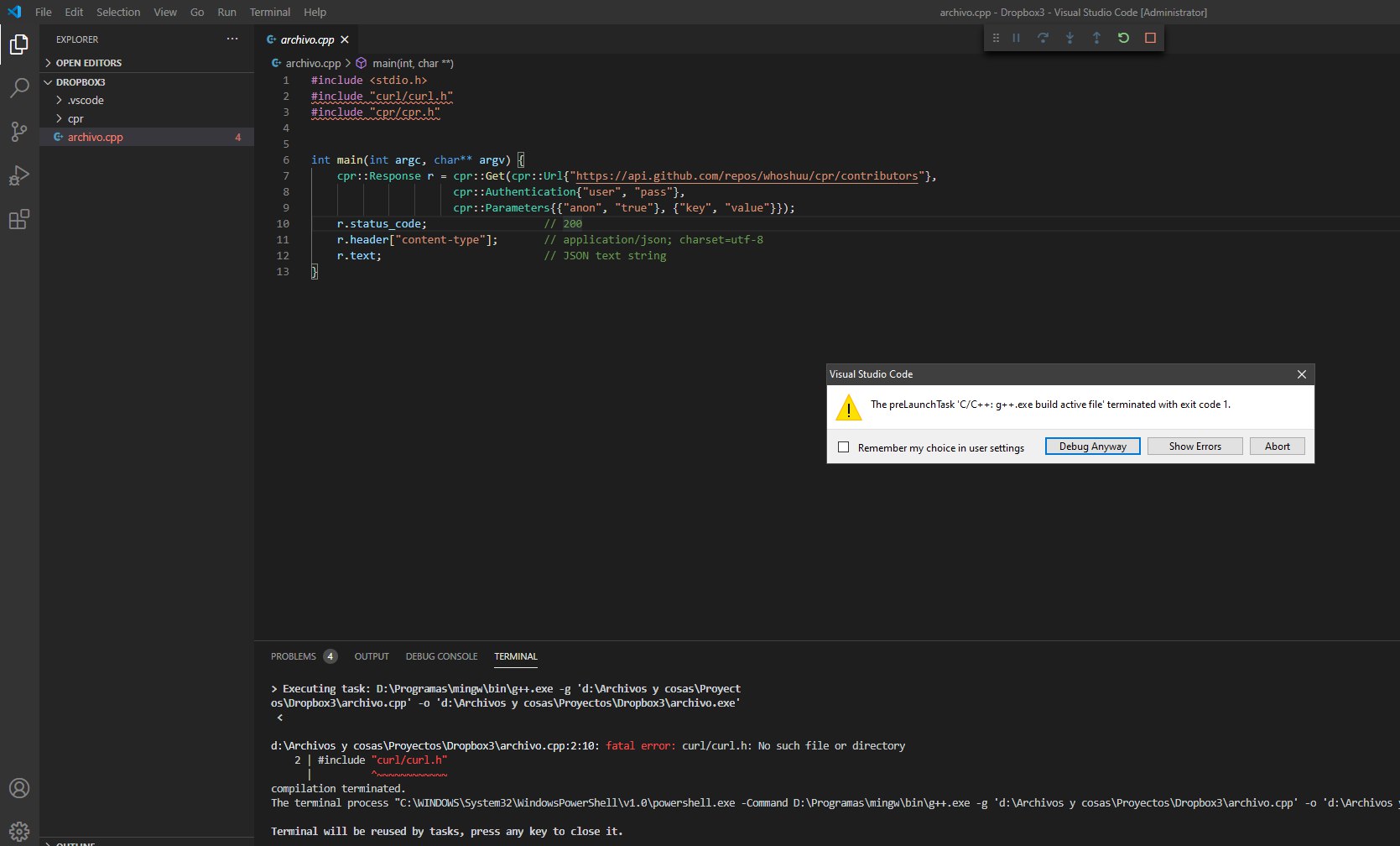
Yes, I am pressing f5, after I click it it shows me this error: error exist after running prelaunchtask c/c++ cpp.exe build active file. When I click it in the terminal shows: executing task: ... \bin\cpp.exe -g 'd:\path to file\file.cpp' -o 'd:\path to file\file.exe'
Tatuck
How?
 Harsh
Harsh
g++ -o file.exe file.cpp
Tatuck
yes
don't specify any
The terminal process "C:\WINDOWS\System32\WindowsPowerShell\v1.0\powershell.exe -Command D:\Programas\mingw\bin\cpp.exe -g 'd:\path to file\file.cpp' -o 'd:\path to file\file.exe'" terminated with exit code: 1.
Harsh
olli
Yes, I am pressing f5, after I click it it shows me this error: error exist after running prelaunchtask c/c++ cpp.exe build active file. When I click it in the terminal shows: executing task: ... \bin\cpp.exe -g 'd:\path to file\file.cpp' -o 'd:\path to file\file.exe'
The thing is, I can't really help you without know more context. To use #include <> you probably need to modify your compilers include path. I assume you use g++ and have it in your path.
Inside the .vscode folder create a tasks.json with the following content
{
// See https://go.microsoft.com/fwlink/?LinkId=733558
// for the documentation about the tasks.json format
"version": "2.0.0",
"tasks": [
{
"label": "buildCustomIncludePath",
"type": "shell",
"command": "<your command, see below>",
"problemMatcher": [],
"group": {
"kind": "build",
"isDefault": true
}
}
]
}
To make sure this works you can use "g++ *.cpp -I <your include path> -o output.exe" as your command.
———————————-
Assuming you have .vscode/launch.json, change the preLaunchTask to the name of your build config (buildCustomIncludePath in the example above)
Tatuck
the error is above (if exists)
scroll up
is the same error as if I compile without specify in the c_cpp_properties.json In file included from d:\path to file\file.cpp:3:
d:\path to file\cpr/cpr.h:4:10: fatal error: cpr/api.h: No such file or directory
4 | #include "cpr/api.h"
Harsh
is the same error as if I compile without specify in the c_cpp_properties.json In file included from d:\path to file\file.cpp:3:
d:\path to file\cpr/cpr.h:4:10: fatal error: cpr/api.h: No such file or directory
4 | #include "cpr/api.h"
u r using 2 different types of slashes '/' and '\'
Harsh
windows can't process /
Tatuck
The thing is, I can't really help you without know more context. To use #include <> you probably need to modify your compilers include path. I assume you use g++ and have it in your path.
Inside the .vscode folder create a tasks.json with the following content
{
// See https://go.microsoft.com/fwlink/?LinkId=733558
// for the documentation about the tasks.json format
"version": "2.0.0",
"tasks": [
{
"label": "buildCustomIncludePath",
"type": "shell",
"command": "<your command, see below>",
"problemMatcher": [],
"group": {
"kind": "build",
"isDefault": true
}
}
]
}
To make sure this works you can use "g++ *.cpp -I <your include path> -o output.exe" as your command.
———————————-
Assuming you have .vscode/launch.json, change the preLaunchTask to the name of your build config (buildCustomIncludePath in the example above)
I have already a code written: {
"tasks": [
{
"type": "shell",
"label": "C/C++: cpp.exe build active file",
"command": "D:\\Programas\\mingw\\bin\\cpp.exe",
"args": [
"-g",
"${file}",
"-o",
"${fileDirname}\\${fileBasenameNoExtension}.exe"
],
"options": {
"cwd": "${workspaceFolder}"
},
"problemMatcher": [
"$gcc"
],
"group": {
"kind": "build",
"isDefault": true
}
}
],
"version": "2.0.0"
}
olli
isn't source code directory included by default?
using #include "cpr should do the trick if cpr is in the same folder, yes.
Harsh
using #include "cpr should do the trick if cpr is in the same folder, yes.
he has it in cpr folder
problem is windows won't accept '/' as directory
olli
he has it in cpr folder
problem is windows won't accept '/' as directory
the cpp_properties.json should be completely unrelated to the compilation, it's basically only for intellisense
Tatuck
I changed my tasks.json to: {
"tasks": [
{
"type": "shell",
"label": "C/C++: cpp.exe build active file",
"command": "g++ *.cpp -I cpr/ -o output.exe",
"options": {
"cwd": "${workspaceFolder}"
},
"problemMatcher": [
"$gcc"
],
"group": {
"kind": "build",
"isDefault": true
}
}
],
"version": "2.0.0"
}
Harsh
the cpp_properties.json should be completely unrelated to the compilation, it's basically only for intellisense
i'm telling about terminal output
Tatuck
I don't know what did I change but now it shows me this error: cpr/cpr.h:4:10: fatal error: cpr/api.h: No such file or directory
4 | #include "cpr/api.h"
| ^~~~~~~~~~~
compilation terminated.
Tatuck
api.h????? That is also in the cpr folder
 Ибраги́м
/ban JET TO THE VOID!
Tatuck
Simplify life. Switch to CMake
I tried to use it with the visual studio 2019 but it so difficult, it also shows me errors!!!!
 Anonymous
/ban JET TO THE VOID!
Rose doesn't delete the message in this group. Probably some setting.
Anonymous
 Rashu
Rashu
Why my codeblock can not suggest Auto complete. Although code completion is marked
Anonymous
Why my codeblock can not suggest Auto complete. Although code completion is marked
Switch to vscode (or clion if you are a student/rich)
Tatuck
THis should be EASYYY why it is so difficult to me to compile!
Anonymous
It tells me this error: Could NOT find CURL (missing: CURL_LIBRARY CURL_INCLUDE_DIR)
You need to install libcurl
Tatuck
I already did that
Anonymous
:/
Tatuck
I can use curl commands in cmd
olli
THis should be EASYYY why it is so difficult to me to compile!
I don't know how your setup looks like and what you're doing. Can you compile from the command line?
Anonymous
It tells me this error: Could NOT find CURL (missing: CURL_LIBRARY CURL_INCLUDE_DIR)
Provide the two variables manually
Tatuck
I don't know how your setup looks like and what you're doing. Can you compile from the command line?
With: g++ *.cpp -I cpr/ -o output.exe ??
Anonymous
With: g++ *.cpp -I cpr/ -o output.exe ??
Compilation of a project shouldn't look like this
Tatuck
Provide the two variables manually
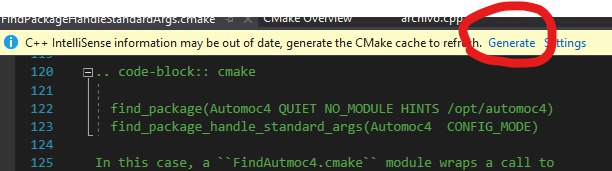
What two variables?? I opened vs code 2019, select my folder and click here:
 M.Khorram
Why my codeblock can not suggest Auto complete. Although code completion is marked
I suggest you switch to Qt creator (which is free) if you need auto completion.
Tatuck
 Anonymous
What two variables?? I opened vs code 2019, select my folder and click here:
CURL_LIBRARY and CURL_INCLUDE_DIR
olli
 Tatuck
are you able to compile the project from a command line?
with this command g++ *.cpp -I cpr/ -o output.exe It shows me the same error
Tatuck
But how?
Tatuck
I am going to try to copy the file.cpp and the cpr folder to other directory
Tatuck
Should I use vs code in administrator or user?
Tatuck
 Tatuck
still doesn't work
olli
 Stanislav
Tatuck
Stanislav
Tatuck
Oh true, let me put the curl folder that I have downloaded from github in that folder.
Tatuck
user mode is fine. your compiler complains about curl tho. are the curl header installed on your system?
I can use curl in cmd, I don't know if that is what you mean. I downloaded a folder with .h files from github, that should work?
olli
I can use curl in cmd, I don't know if that is what you mean. I downloaded a folder with .h files from github, that should work?
no, that's not what I meant. Depending on your system you might be able to install the curl dev library and it's headers so you can do #include <curl/curl.h>
olli
use cmake & cmake tools for vsc
that extension is awesome, if you know how to use and write cmake
Tatuck
When I put the curl folder now the error is: no such file or directory #include "cpr/api.h"
olli
When I put the curl folder now the error is: no such file or directory #include "cpr/api.h"
so you just downloaded whoshuu/cpr and placed it there?
Anonymous
Who has tried termux on android before?
Tatuck
I downloaded the github repository, unzipped, and put the cpr folder which is inside the include folder.
Tatuck
The same with curl
olli
I downloaded the github repository, unzipped, and put the cpr folder which is inside the include folder.
that's unfortunately not how this works, your path to cpr is probably cpr/include/cpr/api.h but even then you would need to build these libraries first.
Tatuck
I copied the cpr folder to the same directory which contains the file.cpp
olli
I copied the cpr folder to the same directory which contains the file.cpp
but that's not how you get the library built, this might enough to include the header but once you want to use these functions you might get linker errors
Tatuck
And how should I use the library???
Tatuck
It says something of adding some text to CMakeList.txt, but I don't have that file
olli
https://cmake.org/cmake/help/latest/guide/tutorial/index.html#cmake-tutorial
Tatuck
configure_file(TutorialConfig.h.in TutorialConfig.h) What should I put instead of the TutorialConfig.h?
Tatuck
