 ꧁🦔
꧁🦔


ok, thx!
 Anonymous
 Anonymous
 Anonymous
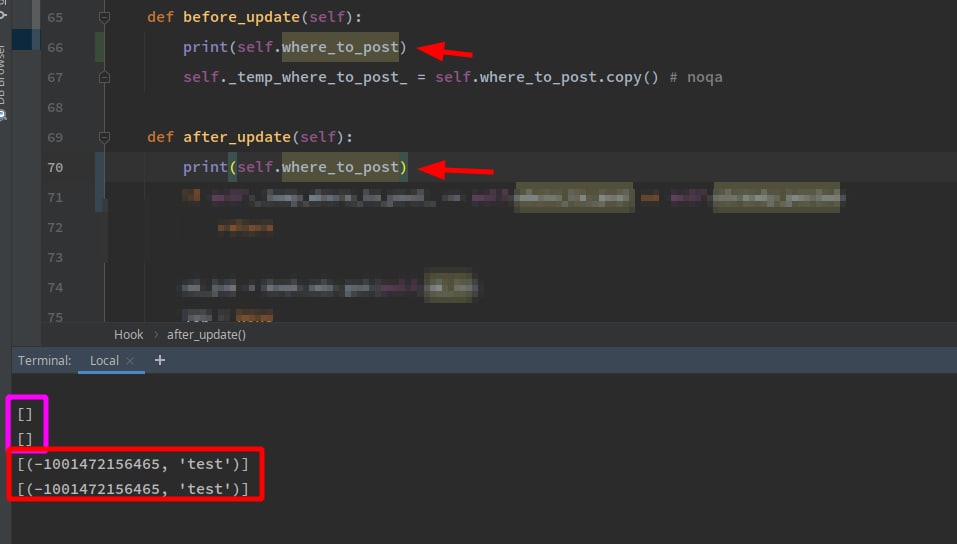
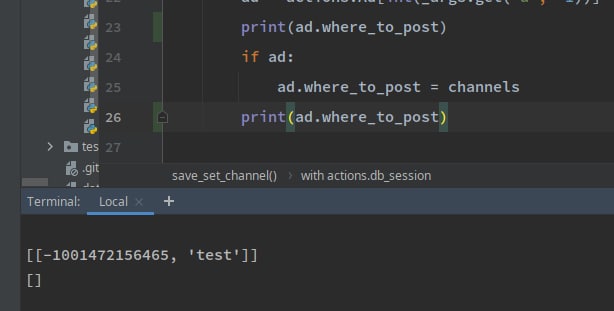
i made some test, as far as i noticed, somehow before_update get called after the object has updated
Anonymous
@metaprogrammer
i found an error, i don't know whether it's intended or not but:
from pony.orm import *
db = Database()
class Entity(db.Entity):
id = PrimaryKey(int, auto=True)
num = Optional(int)
db.bind('sqlite', 'b', create_db=True)
db.generate_mapping(create_tables=True)
en = Entity()
gives error
-> if entity._database_.schema is None:
AttributeError: 'NoneType' object has no attribute 'schema'
but when i rename the class [for any other name] it works fine.
the issue is when the entity name is "Entity"
 Alexander
You cannot name an Entity subclass as Entity, this is a special reserved name
Anonymous
Ah ok. nice
Alexander
In usual Python programming, when you inherit one class from another, you typically also give it a different name
Anonymous
i get an issues with hooks again :(
from pony.orm import *
db = Database()
class E(db.Entity):
id = PrimaryKey(int, auto=True)
num = Optional(int, default=10)
def before_update(self):
print(self.num)
def after_update(self):
print(self.num)
db.bind('sqlite', 'b', create_db=True)
db.generate_mapping(create_tables=True)
with db_session:
en = E()
print(en.num)
en.num = 1
print(en.num)
although en.num get changed, the functions after/before_update doesn't get called
Alexander
Let me check it...
Anonymous
thanks
Alexander
So:
* before_update - is called before "UPDATE" SQL command execution (not directly before executing UPDATE command, but some time before it)
* after_update - is called after "UPDATE" SQL command was executed (not directly after it, but some time after)
* before_insert, after_insert - the same for "INSERT" command
* before_delete, after_delete - the same for "DELETE" command
In this specific example you create a new object
en = E()
It will be added to the database with "INSERT" command. If you add before_insert or after_insert hook it will be called
Note that when you perform
en.num = 1
it does not generate any direct SQL command. The change is accumulated into object and will be saved when performing implicit or explicit flush().
When your code exits from the db_session, it causes implicit commit(), commit causes flush(), flush causes a single INSERT, and before/after this insert the before_insert/after_insert hooks will be called
Alexander
> somehow before_update get called after the object has updated
If you mean that you do obj.foo = "bar" and before_update hook is called somewhere after this line, it is the correct behavior, because before_update calls before "UPDATE" sql command, not before assigning a new value to an object attribute
Anonymous
ok, got you. Thanks.
something like
def before_update(self):
self._temp_change_ = self.to_dict()
def after_update(self):
print("before:", self._temp_change_, "after:", self.to_dict())
would be cool, so i can see the difference before/after change,
as far as i understood you, i can't do that :/
Alexander
You can add some function which uses internal Pony structures to get this information:
def get_diff(self):
result = {}
for attr in self._attrs_with_bit_(self._attrs_with_columns_, self._wbits_):
old_val = self._dbvals_[attr]
new_val = self._vals_[attr]
result[attr.name] = old_val, new_val
return result
Note that obj._dbvals_ stores values in form as they were read from the database, and obj._vals_ stores values in form as suitable for Python. In most cases they are the same, but for some types they may be different. For example, JSON data will be in serialized form in obj._dbvals_ (as a string), while in obj._vals_ JSON data will be represented as a TrackedDict instance (a sublcass of Python dict class)
Anonymous
Language:
py3
Source:
class A:
a = lambda self: print('before:', self.__dict__)
b = lambda self: print('after:', self.__dict__)
def __setattr__(self, k, v):
self.a()
self.__dict__[k] = v
self.b()
a = A()
a.a = 2
Result:
before: {}
after: {'a': 2}
Anonymous
i guess something like that is okay as well, thanks Alex
Anonymous
[with super()]
Alexander
If you want to combine it with Pony entities, it may be too brittle, and doesn't catch all changes. Like
class Student(db.Entity):
name = Required(str)
group = Optional("Group")
class Group(db.Entity):
number = PrimaryKey(int)
students = Set("Student")
group1 = Group(number=123)
student1 = Student(name='John', group=group1)
print(student1.group) # Group[123]
group1.delete()
print(student1.group) # None
As objects are interrelated, sometimes attribute changes happen implicitly, due to changes in another objects
Alexander
Maybe it is better not to mix additional magic to Pony entities (as they already contain pretty big amount of magic), but build a separate layer above it
Anonymous
ah, thanks!
Anonymous
 Karsten
Hi there,
I use pony and now have a problem with the Python-Installer. The following error is displayed in the console when starting:
C:\PythonDevelopment\Projects\blz_db\setup\dist\main_blz_db>main_blz_db.exe
Traceback (most recent call last):
File "main_blz_db.py", line 15, in <module>
File "main_blz_db.py", line 9, in main
File "gui\main_wnd.py", line 24, in __init__
File "common\user.py", line 77, in __init__
File "common\user.py", line 106, in __bind_db
File "pony\orm\core.py", line 774, in bind
File "pony\orm\core.py", line 793, in _bind
File "pony\utils\utils.py", line 219, in import_module
ModuleNotFoundError: No module named 'pony.orm.dbproviders'
[17492] Failed to execute script main_blz_db
What must be entered in "hiddenimport" for the pyinstaller script?
Alexander
Hi there,
I use pony and now have a problem with the Python-Installer. The following error is displayed in the console when starting:
C:\PythonDevelopment\Projects\blz_db\setup\dist\main_blz_db>main_blz_db.exe
Traceback (most recent call last):
File "main_blz_db.py", line 15, in <module>
File "main_blz_db.py", line 9, in main
File "gui\main_wnd.py", line 24, in __init__
File "common\user.py", line 77, in __init__
File "common\user.py", line 106, in __bind_db
File "pony\orm\core.py", line 774, in bind
File "pony\orm\core.py", line 793, in _bind
File "pony\utils\utils.py", line 219, in import_module
ModuleNotFoundError: No module named 'pony.orm.dbproviders'
[17492] Failed to execute script main_blz_db
What must be entered in "hiddenimport" for the pyinstaller script?
You need to explicitly import database module from pony.orm.dbproviders which you use in your program, like pony.orm.dbproviders.sqlite
Karsten
Good Morning,
I now explicitly imported the module. First in my program:
from pony.orm.dbproviders.sqlite import *
Then in the Pyinstaller script:
class PYENV(IntEnum):
LOCAL = 0,
VIRTUAL = auto()
def run_installer(env: PYENV = PYENV.VIRTUAL):
installer_path: str = ''
if env == PYENV.VIRTUAL:
installer_path = "C:/PythonDevelopment/Projects/blz_db/venv/Scripts/pyinstaller.exe"
else:
installer_path: str = "C:/PythonDevelopment/Python380_32/Scripts/pyinstaller.exe"
script_path: str = "C:/PythonDevelopment/Projects/blz_db/src/main_blz_db.py"
# list for commandline parameters
args: List[str] = list()
args.append(installer_path)
# option -y clear output-dir
args.append("-y")
# args.append("--windowed")
args.append("--onedir")
args.append("--hidden-import=pony.orm.dbproviders.sqlite")
# args.append("--noconsole")
args.append("--distpath=C:/PythonDevelopment/Projects/blz_db/setup/dist")
args.append("--workpath=C:/PythonDevelopment/Projects/blz_db/setup/build")
# call pyinstaller.exe with commandline parameters
args.append(script_path)
subprocess.call(args)
And here the error message in the console:
C:\PythonDevelopment\Projects\blz_db\setup\dist\main_blz_db>main_blz_db.exe
Traceback (most recent call last):
File "main_blz_db.py", line 15, in <module>
File "main_blz_db.py", line 9, in main
File "gui\main_wnd.py", line 24, in __init__
File "common\user.py", line 78, in __init__
File "common\user.py", line 107, in __bind_db
File "pony\orm\core.py", line 774, in bind
File "pony\orm\core.py", line 796, in _bind
File "pony\orm\dbproviders\sqlite.py", line 344, in __init__
File "pony\orm\dbapiprovider.py", line 129, in __init__
File "pony\orm\dbproviders\sqlite.py", line 455, in get_pool
File "pony\utils\utils.py", line 232, in absolutize_path
File "pony\utils\utils.py", line 229, in is_absolute_path
TypeError: expected string or bytes-like object
[11952] Failed to execute script
😭
Alexander
File "common\user.py", line 107, in __bind_db
It seems you pass some incorrect filename here
Karsten
Not really, the _bind method is in user.py.
Alexander
Check what options you pass to db.bind()
Karsten
Maybe we get on wrong! My program works. But the pyinstaller does not include the pony module in the package.
Here is part of the script. Everything works very well!
def __bind_db(self, db_path: str = None) -> None:
if db_path is None:
db.bind(provider='sqlite', filename=':memory')
else:
db.bind(provider='sqlite', filename=db_path, create_db=True)
db.generate_mapping(create_tables=True)
self.__is_init = True
Alexander
The last exception that you show:
TypeError: expected string or bytes-like object
Happens in this function, which expect filename as a string or bytes-like object:
def is_absolute_path(filename):
return bool(_absolute_re.match(filename))
It seems that db_path value that you pass into __bid_db is not actually a str. You can add a debug print to check what is the actual type of db_path value
Karsten
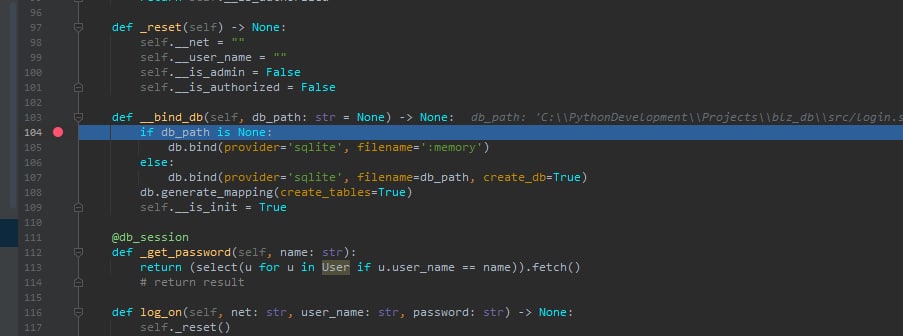
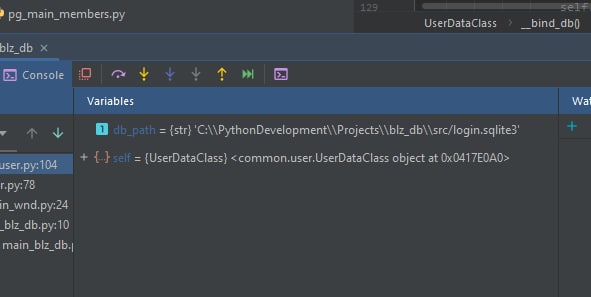
The value is a string. But had, following your advice, the following explicitly imported:
from pony.orm import *
from pony.orm.dbproviders.sqlite import * < new !
After that, my script stopped working. I have now removed the second line again. Works again.
I'll look at that with the parameter again.
Alexander
> After that, my script stopped working
When you run it with PyInstaller or without?
Karsten
 Karsten
 Alexander
This is without PyInstaller, as I understand it?
And the error happens when you run it with PyInstaller?
Alexander
If yes, I assume that with PyInstaller you have different value for db_path
Karsten
The error occurs with the package that PyInstaller has created.
Alexander
But in debug you test it without PyInstaller
Alexander
Can you add print(repr(db_path)) to __bind_db so you can see the result of it with PyInstaller
Karsten
C:\PythonDevelopment\Projects\blz_db\setup\dist>cd main_blz_db
C:\PythonDevelopment\Projects\blz_db\setup\dist\main_blz_db>main_blz_db.exe
'C:\\PythonDevelopment\\Projects\\blz_db\\setup\\dist\\main_blz_db/login.sqlite3'
Traceback (most recent call last):
File "pony\orm\dbapiprovider.py", line 55, in wrap_dbapi_exceptions
File "pony\orm\dbapiprovider.py", line 230, in connect
File "pony\orm\dbapiprovider.py", line 351, in connect
File "pony\orm\dbproviders\sqlite.py", line 660, in _connect
sqlite3.OperationalError: unable to open database file
During handling of the above exception, another exception occurred:
Traceback (most recent call last):
File "main_blz_db.py", line 16, in <module>
File "main_blz_db.py", line 10, in main
File "gui\main_wnd.py", line 26, in __init__
File "gui\stack_pages\pg_main\pg_main.py", line 33, in __init__
File "dal_component\dal.py", line 37, in connect
File "pony\orm\core.py", line 774, in bind
File "pony\orm\core.py", line 796, in _bind
File "pony\orm\dbproviders\sqlite.py", line 344, in __init__
File "pony\orm\dbapiprovider.py", line 130, in __init__
File "<string>", line 2, in connect
File "pony\orm\dbapiprovider.py", line 72, in wrap_dbapi_exceptions
pony.orm.dbapiprovider.OperationalError: unable to open database file
[14152] Failed to execute script main_blz_db
Alexander
You show some different traceback now. Previously the last frame of user code was
File "common\user.py", line 107, in __bind_db
and not it is
File "dal_component\dal.py", line 37, in connect
Karsten
Yes, I just changed something. I had created db_path with join (path and name). I do that now with path + / name. Join had created a list. For whatever reason.
Alexander
Probably you still need to add print(repr(db_path)) to your code to see what exactly you pass to Pony as a filename
Karsten
line 37 : db.bind(provider='sqlite', filename=db_path, create_db=True)
I'll debug that right now!
Karsten
filename is 'blz_db.sqlite3' . it's okay !
Alexander
No, it is not ok. Pass an absolute path if you run it from exe
Karsten
Doesn't the database have to be recreated in the current directory?
Alexander
It determines absolute path relative to the python module __filename__, and I suspect that with PyInstaller you don't have correct __filename__ for each included Python source file
Karsten
You're right !!!! I would never have thought of that. It works now . Many Thanks !
Alexander
Sure
Santosh
userlist = select (u for u in User)
userlist=userlist.where(lambda u: contact (u.first_name, " ", u.last_name) = "test user")
Santosh
Will this work
Santosh
Basically I need to use concat in where condition
Alexander
If you have a limited number of items, you can use +
Santosh
userlist = select (u for u in User)
userlist=userlist.where(lambda u: u.first_name+" "+ u.last_name = "test user")
Santosh
Like this?
Alexander
yes
Alexander
It may be inefficient, as such a query cannot use indexes, even if you define index for first_name and last_name. But it should work
 Dañiel
Hi. The link to docs in https://blog.ponyorm.org/ is broken
Dañiel
there is a 's' missing http://doc.ponyorm.com/
 Alexander
https://docs.ponyorm.org/
Anonymous
my entity:
class Message(database.Entity):
id = orm.PrimaryKey(int, default=generator)
i create instance by Message() since i don't need to supply id, generator does it.
but i get
TypeError: The first positional argument must be lambda function or its text source. Got: 9836765217163256848074682327137247327874400116519830960375032
9836765217163256848074682327137247327874400116519830960375032 is the value that generator() returns
 Lucky
Lucky
Technically a function isn't a lambda.
Maybe default=lambda: generator() could work?
Anonymous
i have tried this too. doesn't work
 Volbil
my entity:
class Message(database.Entity):
id = orm.PrimaryKey(int, default=generator)
i create instance by Message() since i don't need to supply id, generator does it.
but i get
TypeError: The first positional argument must be lambda function or its text source. Got: 9836765217163256848074682327137247327874400116519830960375032
9836765217163256848074682327137247327874400116519830960375032 is the value that generator() returns
Can I ask why would you need something like that :) ?
Alexander
I don't know what is the reason for the error, but the value looks too big for int (even for int64), maybe you should use str instead of int
Matthew
how about lambda: next(generator())
Anonymous
well, my goal is just storing things in DB but ID doesn't matter, do i just use random id and i used a large number to avoid duplicated-primary-key
Alexander
Note you can use uid = PrimaryKey(UUID, default=uuid4)
Matthew
just use an auto increment primary key, don't generate random IDs
Matthew
or UUID as Alexander says 🙂
Anonymous
ok, i forgot about auto=True 🙈
Matthew
misread, since I saw generator I thought it was a generator 🙂
Anonymous
works now
Anonymous
misread, since I saw generator I thought it was a generator 🙂
right, it is confusing, thanks