 Santosh


No order is not important
 Alexander
In that case I think it is better not to use JSON here, and implement metadata items as another entity. The query will be more efficient, and the syntax will be more clear
Santosh
In that case I think it is better not to use JSON here, and implement metadata items as another entity. The query will be more efficient, and the syntax will be more clear
Metadata is JSON structure with array size can be high
Santosh
Each metadata will be result of one process, and there would be multiple process
Alexander
The query that you want to perform for this JSON field will be inefficient. With separate metadata table you can use indexes to make query efficient
Santosh
Any other changes you suggest, other than JSon structure?
Santosh
I am okay with db redesign but taking out JSOn structure, may completely chang the requirement itself
Alexander
Other details looks ok, not sure about direction of relationships though (for example, is MediaDetail-Service relationship really should be 1:m)
I think JSON field for metadata looks like inefficient design
Santosh
AWS supports celebrity face recognition, from video so JSOn structure would be output AWS recognition and this json structure will have huge data
Alexander
So I suggest to use Metadata entity instead:
class Metadata(db.Entity):
id = PrimaryKey(int, auto=True)
service = Required(lambda: Service)
name = Required(str)
confidence = Required(float)
# not sure about that Id JSON field
Alexander
So, this JSON is generated by AWS
Santosh
After processing one video it give a json output that will be stored in service table, and video details will be stored in media table and job table will job status
Santosh
So I suggest to use Metadata entity instead:
class Metadata(db.Entity):
id = PrimaryKey(int, auto=True)
service = Required(lambda: Service)
name = Required(str)
confidence = Required(float)
# not sure about that Id JSON field
If the video is big like a movie, then I would get metadata of length few thousands
Alexander
Probably you can add a second JSON field with a structure more suitable for querying
field2 = {"names" : ["name1", "name2", "name3"]}
Alexander
and then check
some_name in metadata.field2["names"]
Alexander
When you receive that huge JSON you can parse it and extract some parts that are useful for querying
Santosh
Okay
Santosh
Will try as suggested
 Lucky
Lucky
The second query should be written as
query.order_by(lambda: random())
And it is what the string-based query is parsed into
I'm getting
TypeError: order_by() method receive an argument of invalid type: <function FooClass.fooDef.<locals>.<lambda> at 0x7f6918696950>
Lucky
if pony_fetch_order_random:
from random import random
order = (lambda: random(),)
else:
order = (primary_key,)
# end if
if last_synced:
# last sync takes precedence over the usual ordering.
order = (table_clazz.last_synced,) + order
# end if
and later
query.order_by(*order)
Alexander
order_by arguments may be:
1) individual number: -2
2) tuple of numbers: (1, 2, -3)
3) individual attribute: Person.name
4) tuple of attributes: (Person.name, desc(Person.age))
5) lambda with expression: lambda p: p.name
6) lambda with tuple of expressions: lambda p: (p.name, desc(p.age))
You pass to order_by a tuple of attr and lambda:
(TableClass.last_synced, lambda: random())
this is not supported
You can add order_by incrementally, from right to left:
query = query.order_by(lambda: random())
query = query.order_by(TableClass.last_synced)
etc.
Lucky
order_by arguments may be:
1) individual number: -2
2) tuple of numbers: (1, 2, -3)
3) individual attribute: Person.name
4) tuple of attributes: (Person.name, desc(Person.age))
5) lambda with expression: lambda p: p.name
6) lambda with tuple of expressions: lambda p: (p.name, desc(p.age))
You pass to order_by a tuple of attr and lambda:
(TableClass.last_synced, lambda: random())
this is not supported
You can add order_by incrementally, from right to left:
query = query.order_by(lambda: random())
query = query.order_by(TableClass.last_synced)
etc.
Why is
query.order_by(A).order_by(B)
different to
query.order_by(A, B)
?
Lucky
Wait, would that be query.order_by(B).order_by(A) now?
Alexander
query.order_by(A, B) is equivalent to
query.order_by(B).order_by(A)
Lucky
Why is it the other way around?
Alexander
because
items = [{'a':1, 'b':3}, {'a':5, 'b':2}, {'a': 2, 'b': 1}]
items.sort(key=lambda item: (item['a'], item['b']))
is equivalent to
items = [{'a':1, 'b':3}, {'a':5, 'b':2}, {'a': 2, 'b': 1}]
items.sort(key=lambda item: item['b'])
items.sort(key=lambda item: item['a'])
the last sort is the most important (and in SQL the most important order goes first)
Alexander
Consider it like each order_by does stable sort of elements
Lucky
When Pony performs an update of position to some value it should not be another row with the same combination of (Array, position)
You can perform operations like (move item from pos 7 to pos 3) in three steps:
1) assign all items with positions 3-7 temporary negative numbers -3 ... -7
2) perform flush()
3) assign correct new values
This way you will never have two rows with the same positions when performing an update
Would using a db.execute for that 1st step work, even if I already used the models to set it?
And setting pack_position afterwards with the models after I used db.execute?
for sticker in Sticker.select(…):
sticker.deleted = False
# or
sticker = Sticker(…)
# end for
db.execute('UPDATE "sticker" SET pack_position = ABS(pack_position) * -1 WHERE pack_position IS NOT NULL AND pack = $pack', dict(pack=db_pack.id))
orm.flush()
for i, odered_id in enumerate(odered_ids):
Sticker.get(id=odered_id).pack_position = i + 1
# end for
Alexander
For that to work, you can mark position attribute with volatile=True
Alexander
So Pony will not be surprised it was changed in the database
Alexander
and maybe optimistic=False as well
Santosh
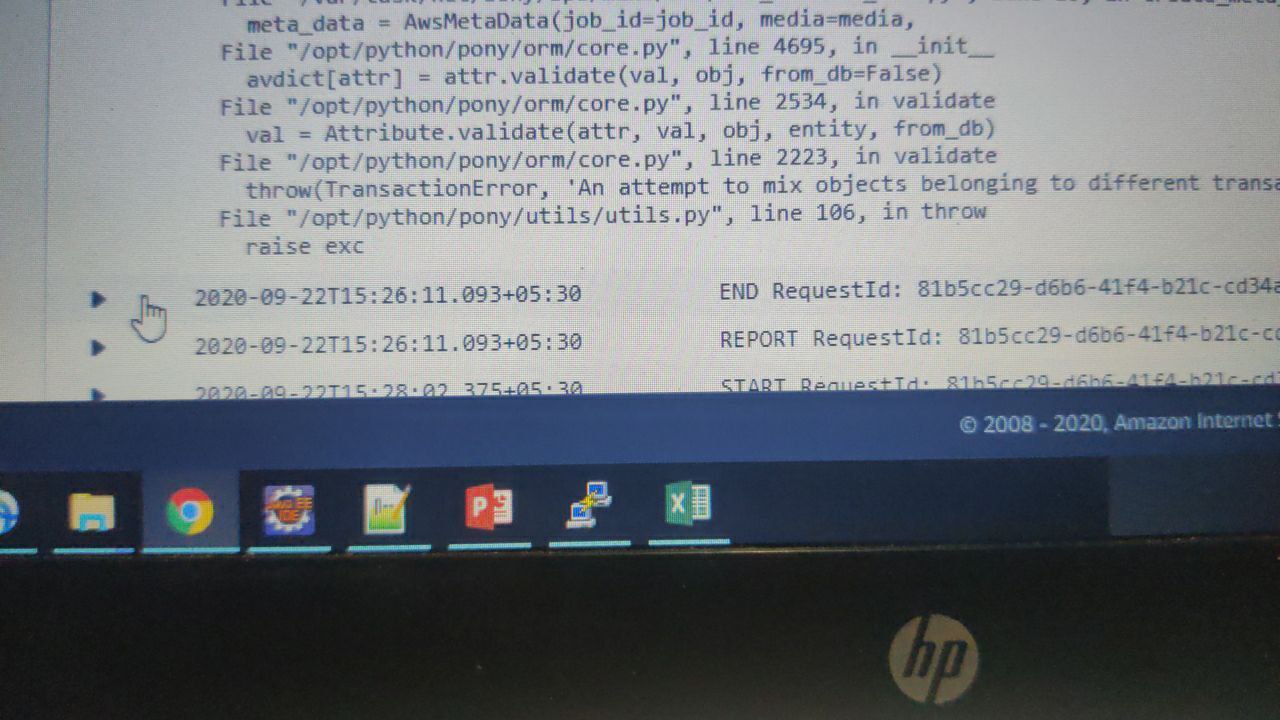
When don get error An attempt to mix objects belonging to different transactions
Santosh
To my best I am not mixing any transaction
Santosh
How do I get rid of this
Alexander
If you do
with db_session:
obj1 = MyObject[123]
with db_session:
obj2 = MyObject[456]
obj2.items.add(obj1)
In the last line we have two objects belonging to different db_sessions, which cannot be linked together
Alexander
All objects should be retrieved within the same db_session
Santosh
I am using single db session
Alexander
Maybe you have rollback inside the db_session?
Santosh
But I have set optimistic=False
Alexander
optimistic=False should not affect this thing
Santosh
All objects should be retrieved within the same db_session
But we can have db session from different origin rite?
Santosh
Like two different machine
Alexander
You can have multiple db_sessions, but each in-memory object should belong to a single db_session
Santosh
Alexander
Than it is strange, may be you can show a traceback
Santosh
 Alexander
When you create that AwsMetaData object you pass some other objects as arguments, like media. You need to check where you create them
Alexander
it should be created (or selected) within the same db_session
Santosh
Yes
Santosh
Db_session is created at the begin itself
Santosh
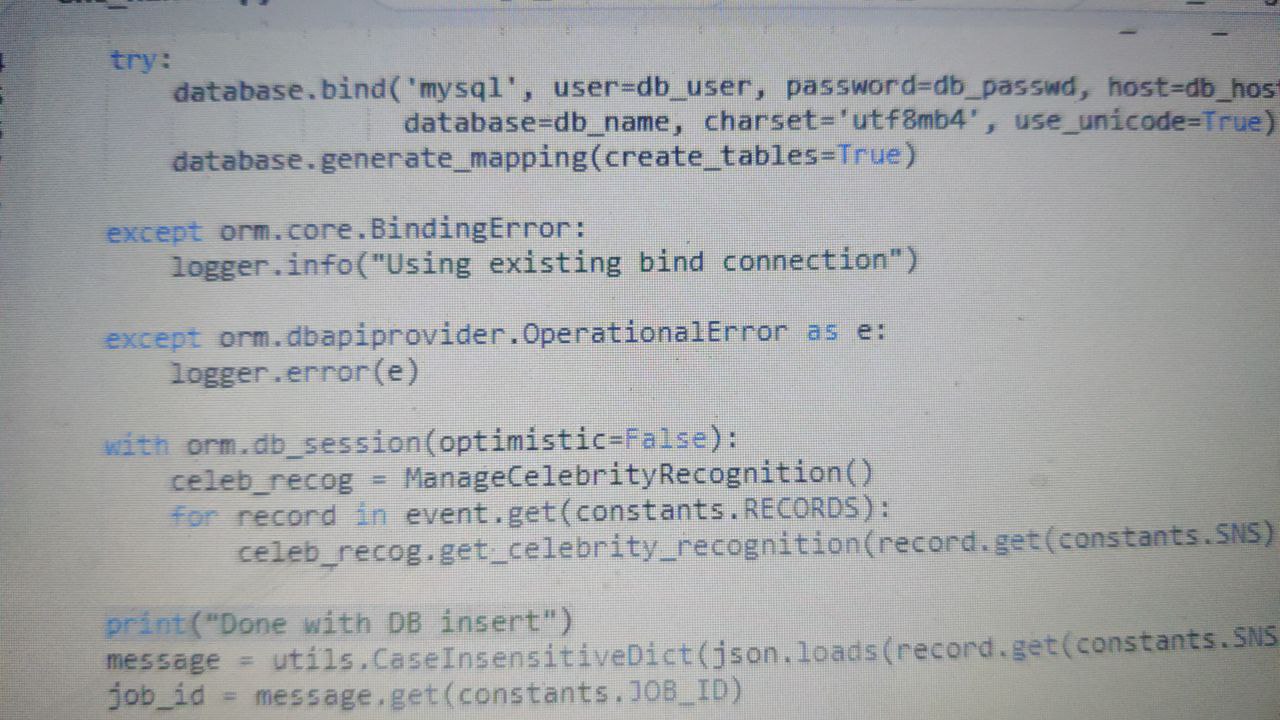 Santosh
This is the only place I have set
Santosh
Db session
Santosh
Okay i got the issue
Santosh
But need support in fixing
Santosh
If the existing bind connection is available I am using it
Jim
you should use telegram DEsktop or web.telegram.org to copy pas your code. It's better than sreenshot
Santosh
you should use telegram DEsktop or web.telegram.org to copy pas your code. It's better than sreenshot
Unfortunately I have restrictions in accessing telegram on desktop
Alexander
It shouldn't
Santosh
Okay the code actually runs on AWS lambda
Santosh
So the previous session may be still available
Alexander
So your code is in this ManageCelebrityRecognition function?
I think you need to check its code, something is wrong here.
Maybe you store some object to global variable and use it later, for example
Alexander
Sorry, can answer you in a few hours
Santosh
Okay
Santosh
Santosh
I suspect with AWS lambda itself, as previous bind connection is used, similarly previous db session also may be used
Santosh
I will just wait for your time
Lucky
and maybe optimistic=False as well
Thank you.
What exactly is the difference between optimistic=False and viotile=True?
Lucky
I couldn't quite understand it from the docs...
Alexander
optimistic and volatile options were initially introduced for two different use-cases, but they are actually pretty similar (but not equivalent)
optimistic=False means that Pony should not check the previous attribute value during update
volatile=True means that Pony should not raise an exception when the value was re-read from the database during select, and it differs from the previous value
I think in most cases you should use the combination of volatile=True, optimistic=False, and in the future we probably should combine these two options together
Santosh
How can we use LIKE in filter
Santosh
It's pretty easy in select. But how do we get this in filter
Alexander
in simple cases you can use "substring in string"
in more complex you can use raw_sql(""" table1.column1 LIKE 'pattern' """)
Santosh
Either in filter or I. Where
Alexander
Person.select().filter(lambda p: "x" in p.name) # translates to LIKE
Santosh
Basically in filter I need to check for case insensitive value
Alexander
is it PostgreSQL?