 []
[]


😹🍻
 Jekyll
It's not possible to do it on during installation?
Out of curiosity, I tried it myself. The "Manual" option is enough for your setup.
 Eliphaz
Eliphaz
Eliphaz
can you give to me some more information about that ?
Jekyll
One moment.
Jekyll
can you give to me some more information about that ?
It looks like there's something wrong here. I used "Manual" to do the partitioning, added efi and freebsd-zfs (mountpoint /) partitions on disk 1, added swap and freebsd-zfs (mountpoint /home) on disk 2, and check there are 2 separate zpools (root and home) during installation.
Jekyll
But after rebooting, the home zpool is missing. Sorry to disappoint you.
Eliphaz
But after rebooting, the home zpool is missing. Sorry to disappoint you.
I have the same issue 😄
Eliphaz
I don't know why this happen 🤔
Eliphaz
perhaps cause by missing in fstab ? 🤔
Jekyll
No, zfs info is not stored in fstab.
Eliphaz
㊙️㊙️🈺 translation please 🫠
Eliphaz
or subtitle
Jekyll
Weird, zfs info was written to disk 2, but not loaded by kernel.
Jekyll
First of all, use zdb -l /dev/<home_partition> to check whether zfs info exists.
 Krond
Krond
Russians using dirty words.
 Maxim
Maxim
basically, two Russians fighting a bit, yes
Jekyll
Unfortunately I can't make it work... The zpool info is stored on disk 2, but the kernel just doesn't load it at boot.
Eliphaz
ah
Eliphaz
[]
[]
If you try to zpool import 'pool_name' the pool is gonna get loaded, try that If it works tell me and I show you the next steps
[]
perhaps cause by missing in fstab ? 🤔
Zfs works without fstab, try 'zfs get mountpoint dataset_name'
Jekyll
If you try to zpool import 'pool_name' the pool is gonna get loaded, try that If it works tell me and I show you the next steps
It can be imported but for the first time -f is required.
 Neruq
Neruq
Zfs works without fstab, try 'zfs get mountpoint dataset_name'
For older machines with low resources, doesn't zfs swallow a lot of memory and machine resources rendering it useless ?
Jekyll
Zfs works without fstab, try 'zfs get mountpoint dataset_name'
Per my configuration, mountpoint was not set for zpool 'home', and no other dataset on it.
Jekyll
I tried to set it to /home but it's still not loaded at boot.
 ɴꙩᴍᴀᴅ
ɴꙩᴍᴀᴅ
For older machines with low resources, doesn't zfs swallow a lot of memory and machine resources rendering it useless ?
I think so, at least back in the day
[]
For older machines with low resources, doesn't zfs swallow a lot of memory and machine resources rendering it useless ?
The ARC can be reduced to minimal usage so the cache doesn't eat the whole* wired mem
[]
I tried to set it to /home but it's still not loaded at boot.
Check if zfs service is enabled in RC, if the pool is healthy and mentioned in the zfs cache file it should work, I will be at home in some hours to help you, google about zfs pool config for boot meanwhile, is a recurrent freebsd issue when starting with zfs
Jekyll
 トミ
Eliphaz
トミ
Eliphaz
Hi there
Still no solution found?
Eliphaz
sure, just drop a shell and do it :)
I have a question During install filesystem initialisation if I create a zroot with option alroot=/mnt where mount my homepool at his creation?
X
https://doublepulsar.com/recall-stealing-everything-youve-ever-typed-or-viewed-on-your-own-windows-pc-is-now-possible-da3e12e9465e
Jekyll
Hi there
Still no solution found?
Finally I got it working, BUT, the default zfs datasets which are created during normal installation were not created with my configuration. Steps follows:
Jekyll
1. Partitioning with "Manual" options, details below:
Jekyll
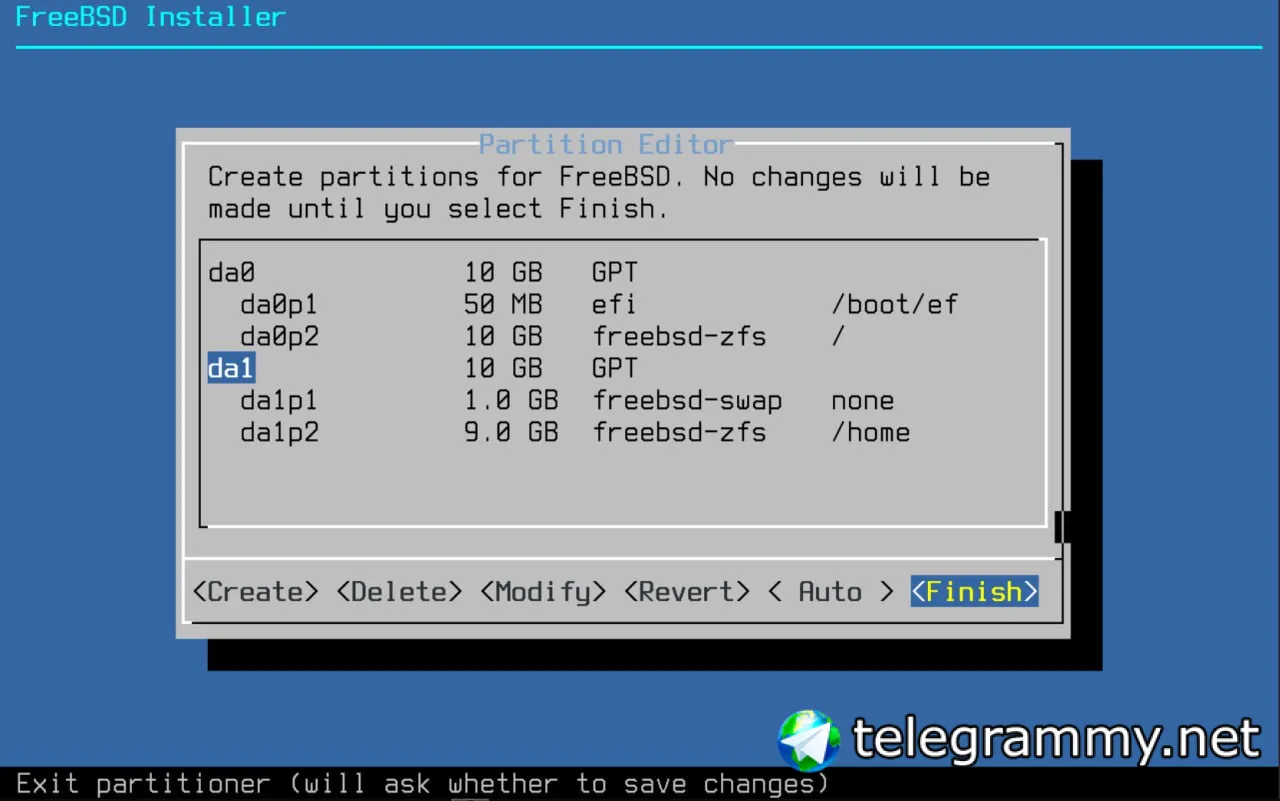 Jekyll
I'm using two 10GB virtual disks, da0 and da1.
Jekyll
2. Install system as normal. After reboot the startup will stuck, enter sh and do the following:
Jekyll
zdb -l /dev/da1p2
Which makes zfs find zfs info stored on /dev/da1p2
Jekyll
zpool import -f home
Force import zpool "home"
Jekyll
zfs set mountpoint=/home home
Set mountpoint for zpool "home" to "/home".
Jekyll
sysrc zfs_enable=YES
Load zfs module during boot.
Jekyll
Then you can reboot, system should boot normally now.
Jekyll
Check if zfs service is enabled in RC, if the pool is healthy and mentioned in the zfs cache file it should work, I will be at home in some hours to help you, google about zfs pool config for boot meanwhile, is a recurrent freebsd issue when starting with zfs
Thank you for your hint about the RC part.
Eliphaz
Great 😃 thank you @jekyll530
Eliphaz
Damn 😯🥰🥰🥰
Eliphaz
All works fine now❤️😊😭
Eliphaz
🥹
Eliphaz
Thank you ❤️ guys 🥰
 polyduekes
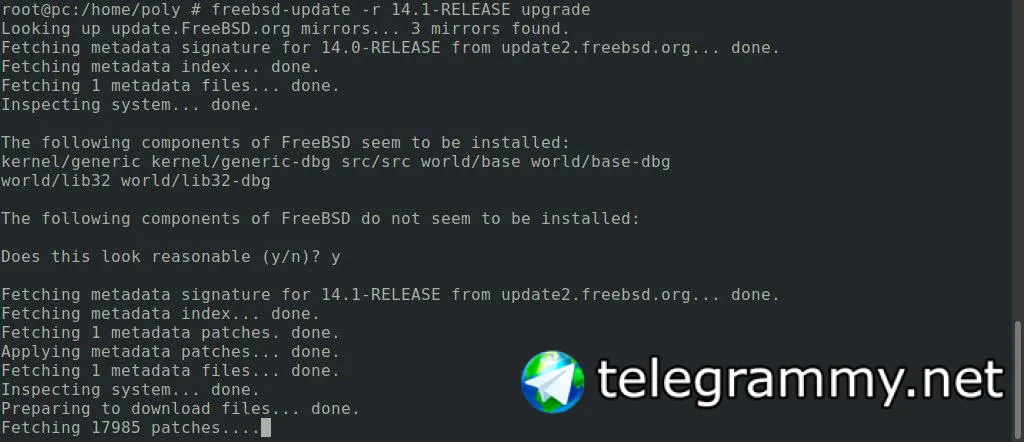
 bittin-
early German Canada BSDCan edition of BSD Now today: https://www.bsdnow.tv/562
.
Has anyone tips for good documentation (websites or books) describing a stepwise progression on troubleshooting a failed FreeBSD upgrade?
I performed an upgrade of an ancient i386-laptop (Dell Latitude D520) from 14.0-RELEASE-p6 to 14.1-RELEASE and it seems the new kernel is not working on this old hardware.
I would like to make this a leaning experience and try to troubleshoot the problem myself before downgrading again to the working release.
Any information on this topic is much appreciated. 👍🏻
Rincewind
Test with rollback
 Woody
Woody
any news on bsdmag? is it coming back or gets replaced by anything?
.
Test with rollback
The kernel.old is working and I plan on rolling back after troubleshooting. I suspect that some hardware might no longer be supported.
During early boot I always saw some [GIANT-LOCKED] messages and maybe something important is finally no longer supported... if so, I would like to know what.
I guess before upgrading in the future it is better to first download the new release and see if my old system can still boot from it before upgrading it... 🤔
I was hoping someone has good information on troubleshooting these kind of things on FreeBSD.
Jekyll
The kernel.old is working and I plan on rolling back after troubleshooting. I suspect that some hardware might no longer be supported.
During early boot I always saw some [GIANT-LOCKED] messages and maybe something important is finally no longer supported... if so, I would like to know what.
I guess before upgrading in the future it is better to first download the new release and see if my old system can still boot from it before upgrading it... 🤔
I was hoping someone has good information on troubleshooting these kind of things on FreeBSD.
I'm curious about where did the 14.1 kernel stuck during boot?
Jay
The kernel.old is working and I plan on rolling back after troubleshooting. I suspect that some hardware might no longer be supported.
During early boot I always saw some [GIANT-LOCKED] messages and maybe something important is finally no longer supported... if so, I would like to know what.
I guess before upgrading in the future it is better to first download the new release and see if my old system can still boot from it before upgrading it... 🤔
I was hoping someone has good information on troubleshooting these kind of things on FreeBSD.
Check all *-kmod packages. I had problems with booting new kernel with old kernel modules
.
I'm curious about where did the 14.1 kernel stuck during boot?
I don’t know yet, because I didn’t have time to investigate... I’ve only tried if I could boot in rescue mode and if the kernel.old was working (which it did).
.
Check all *-kmod packages. I had problems with booting new kernel with old kernel modules
Thank you for the tip I’ll investigate all kmod packages. 👍🏻
.
Test with rollback
Rolling back worked like a charm. 👍🏻 Thank you for suggesting it. My system was rolled back to 14.0-RELEASE-p5 instead of 14.0-RELEASE-p6 and I don’t know why that is, but performing another upgrade brought it back to the original level from before the failed update. I don’t have enough time right now to hunt for documentation on troubleshooting so I’ll leave that exercise for another day.
M4x
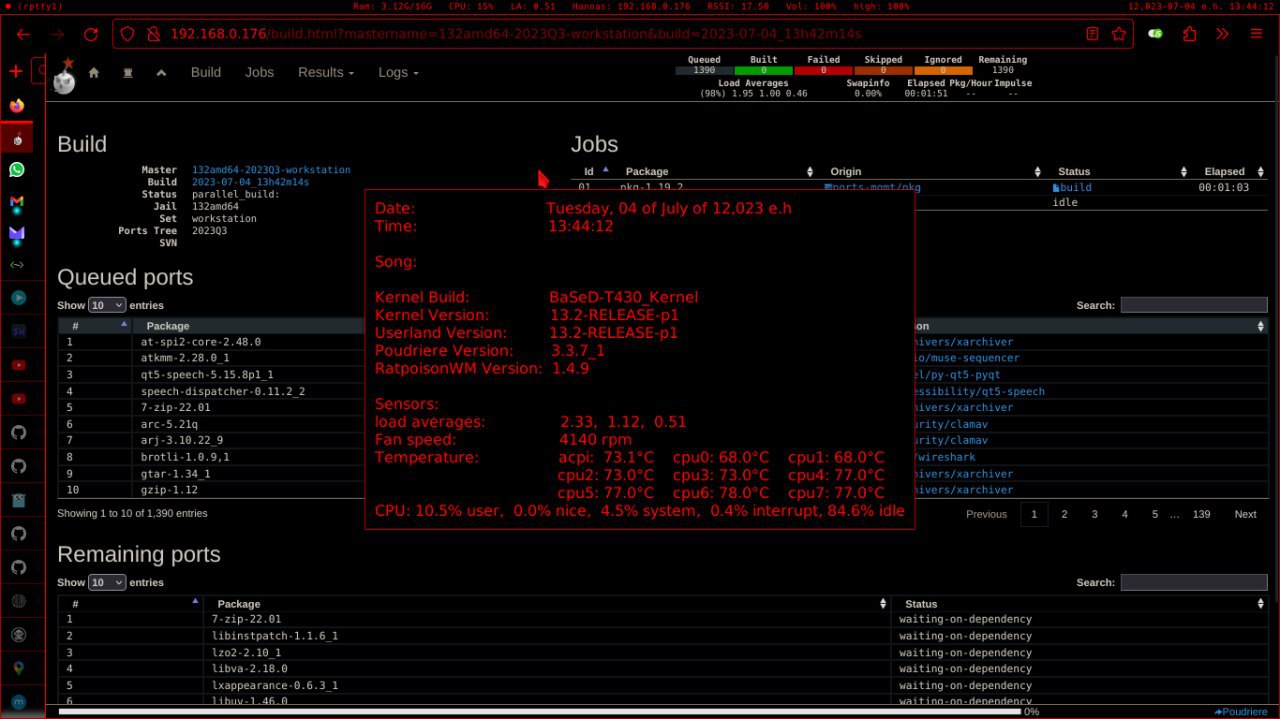
 Baron
Baron
Who so red dude?
wow, thats old. The redness comes from FBSD colors, in OBSD I use yellow 😉
I miss this setup. By coincidence, I just boot this old t430 to get some config files for a new FreeBSD installation
M4x
Great
.
Does anyone have recommendations on good documentation for installing and maintaining a source based FreeBSD using Git and Poudriere?
X
Does anyone know if signal is running on fbsd 13.3 and 14.0/1? Last time when i tried it said that the used version is obsolete(6.42)
Maxim
Does anyone know if signal is running on fbsd 13.3 and 14.0/1? Last time when i tried it said that the used version is obsolete(6.42)
% pkg search signal-desktop
signal-desktop-6.48.1_6 Cross-platform centralized encrypted messaging service
Maxim
that's with the quarterly branch, anyway
 Vedrovid
does freecad work for you guys?
Vedrovid
im on freebad 14 release
Vedrovid
installed by pkg quarterly. after instalation I dont even have binary called freecad in /usr/local/bin. I only have freecad-thumbnailer
John
Look for "FreeCAD" instead.
John
Or /usr/local/FreeCAD. I ran grep /bin /usr/ports/cad/freecad/pkg-plist and got back FreeCAD/bin/FreeCAD.