 Стас
Стас


Or custom uninstall script
Стас
"build": {
"nsis": {
"include": "uninstaller.nsh"
}
}
Стас
!macro customInstall
RMDir /r "$APPDATA\${APP_PACKAGE_NAME}"
!macroend
 Grigorii K.
Есть какая-то живая альтернатива electron-notification-state для проверки, включен ли DND?
 Denis
Denis
мб кто-то недавно работал с созданием некольких окон в electron + react?
Если у тебя приложение electron с несколькими окнами, то зачем тебе использовать react? react для SPA приложений.
Если тебе не нужно открывать несколько окон одновременно, то можешь воспользоваться модальными окнами
Стас
Если у тебя приложение electron с несколькими окнами, то зачем тебе использовать react? react для SPA приложений.
Если тебе не нужно открывать несколько окон одновременно, то можешь воспользоваться модальными окнами
Да и BrowserWindow плодить в принципе никто не запрещает, просто не очень хорошая практика, но возможность существует
Denis
Там я с большим количеством проблем столкнулся.
Новое окно должно отрываться на своем хосте
плюс при сборке для каждого окна нужен свой html
еще и через webpack нужно парсить фалы jsx, потому что он не понимает этот формат.
Но это я нашел такие решения, может там все проще
 Rustam
Там я с большим количеством проблем столкнулся.
Новое окно должно отрываться на своем хосте
плюс при сборке для каждого окна нужен свой html
еще и через webpack нужно парсить фалы jsx, потому что он не понимает этот формат.
Но это я нашел такие решения, может там все проще
замени реакт на веб компоненты и не будет проблем с jsx
No
но стартануть с 0 гораздо проще, это факт
Стас
не панацея, если честно. своих приколов у него тоже много
Я и не говорю что панацея, но вариант
 🅰️nimeCoder
Там я с большим количеством проблем столкнулся.
Новое окно должно отрываться на своем хосте
плюс при сборке для каждого окна нужен свой html
еще и через webpack нужно парсить фалы jsx, потому что он не понимает этот формат.
Но это я нашел такие решения, может там все проще
А зачем новый хост, на уровне роутинга все можно решить в пределах одного spa приложения
Denis
А зачем новый хост, на уровне роутинга все можно решить в пределах одного spa приложения
учитывая то, что у нас появились новые окна, это больше не spa приложение
No
Реакт не обязательно для спа приложений. С большинством количеством окон он тоже отлично мапится
Denis
Хм, интересно, значит надо углубиться в эту тему. все-таки очень хотелось бы хорошо их подружить, а не костылями
Андрей
Всем привет народ
Извиняюсь сразу за возможный спам
Жена пишет ВКР на тему учебного стресса. Нужна статистическая выборка
Кому не сложно, кто учится бакалавриат/магистратура то пройдите, или поделитесь со знакомыми кто учится
https://docs.google.com/forms/d/e/1FAIpQLSeMN3c4HUEeP12oDhmfxxf2G0F05wMH19ZBmkOSI-Dihrm3Zg/viewform?usp=sf_link
Ash
ребят, всем привет, я так рад наконец-то найти место где я смогу найти помощь по электрону... У менян проблема такая, которая не решается уже пару месяцев, я пишу проэкт по типу караоке где можно создать слайды с текстом песни и сохранять в отдельные файлы. Для 'того мен нужен доступ к к файловой системе node. я пробовал это через nodeIntegrations = true но мъкак оказалось это не безопасно и нужно юзать preload файл а в prelaod-e как только я вставляю строку публикуя fs система крашится. Есть какие то догадки как это исправить?
No
ребят, всем привет, я так рад наконец-то найти место где я смогу найти помощь по электрону... У менян проблема такая, которая не решается уже пару месяцев, я пишу проэкт по типу караоке где можно создать слайды с текстом песни и сохранять в отдельные файлы. Для 'того мен нужен доступ к к файловой системе node. я пробовал это через nodeIntegrations = true но мъкак оказалось это не безопасно и нужно юзать preload файл а в prelaod-e как только я вставляю строку публикуя fs система крашится. Есть какие то догадки как это исправить?
Работу с фс ты делаешь в мейне. А прелоад - это прослойка между твои юаем и мейном
Ash
то есть елси у меня условно есть рендерер js, мейн и прелоад, я в мейне создаю функцию для фс, через прелоад по айпици рендерер отправляю информацию и получаю ответ?
Ash
спасибо за пояснение, я столъко искал в интернете ответ и нигде не находил ответ на простом человеческом языке, спасибо
No
спасибо за пояснение, я столъко искал в интернете ответ и нигде не находил ответ на простом человеческом языке, спасибо
Есть такая штука - Electron Fiddler. Там куча примеров. Лучше не найдешь
Ash
классно, посмотрю. Спасибо
🅰️nimeCoder
🅰️nimeCoder
От того что у тебя две вкладки в браузере открыто с разными роутам приложение не меняется же)
Siva
Hi can some one help me please that how to control system volume with electron in all mac, windows, linux os?
Sergey
Hi can some one help me please that how to control system volume with electron in all mac, windows, linux os?
To control the system volume across different operating systems like macOS, Windows, and Linux using Electron, you will need to interact with each system's native APIs or use a node module that abstracts this for you. Here’s a step-by-step approach to achieve this:
1. Choose a Node.js Module: One common module used for controlling system volume is node-audiomixer. This module supports multiple platforms and can adjust the volume, mute, and more.
2. Install the Module: You can install this module using npm. Open your terminal in your Electron project directory and run:
npm install node-audiomixer
3. Integration with Electron: Once installed, you can use it within your Electron app. Here’s a basic example of how to integrate it into your Electron main process:
const { app, BrowserWindow } = require('electron');
const audioMixer = require('node-audiomixer');
app.on('ready', () => {
let mainWindow = new BrowserWindow({ width: 800, height: 600 });
mainWindow.loadURL('your-app-url-here');
// Example: Set volume to 50%
audioMixer.setVolume(50).then(() => {
console.log('Volume set to 50%');
}).catch(err => {
console.error('Error setting volume:', err);
});
});
4. Handling Different OS Specifics: The node-audiomixer module should handle most of the OS-specific differences under the hood. However, if you encounter any issues specific to an OS, you might need to look into OS-specific APIs or configurations.
5. Testing: Test your application on all target operating systems to ensure the volume control works as expected. This is crucial because system-level interactions can behave differently across environments.
6. Permissions: Make sure your application has the necessary permissions to modify system settings on all target operating systems.
By using a module like node-audiomixer, you simplify the process of working with hardware-level controls across different operating systems, allowing you to focus more on other parts of your Electron application.
Sergey
Какой вопрос, такой ответ))))
 Георгий
Всем привет, такой вопрос, не могу отловить причину, по которой не запускается прил на маке у части пользователей. Прокатило запустить на 2015, 2017 и 2018, не прокатило на 2020,2019, 2021. Есть ли какая то связь с тем, что при билде на старом маке, на новых запускаться не будет?
Георгий
Вдруг кто-то сталкивался с подобной проблемой 🗿
 Rewrite
Всем привет, такой вопрос, не могу отловить причину, по которой не запускается прил на маке у части пользователей. Прокатило запустить на 2015, 2017 и 2018, не прокатило на 2020,2019, 2021. Есть ли какая то связь с тем, что при билде на старом маке, на новых запускаться не будет?
Разве скорее важна не модель, а версия макоси?
Георгий
Разве скорее важна не модель, а версия макоси?
Написал про модель, потому что энивей всё к ней привязано. А так, мейби версия ос, мейби вообще версия xcode и его компилятора (хотя сомнительно)
Denis
Всем привет. Нужна хелпа по авто обнове (
Я пытаюсь организовать обновление не через git, а через файловый сервер обычный и встроенный autoUpters
Как мне нужно организовать сервер для хранения установщиков ? ((
Denis
app.on('ready', async () => {
setInterval(() => {
setStoreState('version', app.getVersion());
}, 5000)
autoUpdater.autoDownload = true;
autoUpdater.updateAvailable = true;
autoUpdater.setFeedURL({
provider: 'generic',
url: 'https://api.cloud-checkout.smartblax.uz/upload/apps/latest.yml'
});
autoUpdater.checkForUpdates();
console.log(autoUpdater);
setTimeout(() => {
autoUpdater.checkForUpdates();
}, 1000 * 60 * 60)
session.defaultSession.allowNTLMCredentialsForDomains('*');
createLogsFolder();
await createWindow();
});
autoUpdater.on('update-available', () => {
console.log('available');
setLog('autoUpdater', 'update-downloaded' ,{}, 'request');
});
autoUpdater.on('download-progress', ProgressEvent => {
console.log('progress');
setLog('autoUpdater', 'download-progress', ProgressEvent, 'request');
});
autoUpdater.on('update-downloaded', (info) => {
console.log('downloaded');
setLog('autoUpdater', 'update-downloaded', info, 'request');
autoUpdater.quitAndInstall();
});
autoUpdater.on('error', (err) => {
console.log('err', err);
setLog('autoUpdater', 'error', err, 'request');
});
Георгий
app.on('ready', async () => {
setInterval(() => {
setStoreState('version', app.getVersion());
}, 5000)
autoUpdater.autoDownload = true;
autoUpdater.updateAvailable = true;
autoUpdater.setFeedURL({
provider: 'generic',
url: 'https://api.cloud-checkout.smartblax.uz/upload/apps/latest.yml'
});
autoUpdater.checkForUpdates();
console.log(autoUpdater);
setTimeout(() => {
autoUpdater.checkForUpdates();
}, 1000 * 60 * 60)
session.defaultSession.allowNTLMCredentialsForDomains('*');
createLogsFolder();
await createWindow();
});
autoUpdater.on('update-available', () => {
console.log('available');
setLog('autoUpdater', 'update-downloaded' ,{}, 'request');
});
autoUpdater.on('download-progress', ProgressEvent => {
console.log('progress');
setLog('autoUpdater', 'download-progress', ProgressEvent, 'request');
});
autoUpdater.on('update-downloaded', (info) => {
console.log('downloaded');
setLog('autoUpdater', 'update-downloaded', info, 'request');
autoUpdater.quitAndInstall();
});
autoUpdater.on('error', (err) => {
console.log('err', err);
setLog('autoUpdater', 'error', err, 'request');
});
Что именно организовать? Сервер должен уметь выдавать application/octet-stream по файлам .exe/.blockmap/.yml, которые ты получаешь после успешного билда
Георгий
Ну или .dmg в случае мака
Denis
Ну он выдает
Denis
Только не тянуться в электрон почему то(
Георгий
Только не тянуться в электрон почему то(
У тебя как минимум неверно указана ссылка https://api.cloud-checkout.smartblax.uz/upload/apps/latest.yml
Георгий
Только не тянуться в электрон почему то(
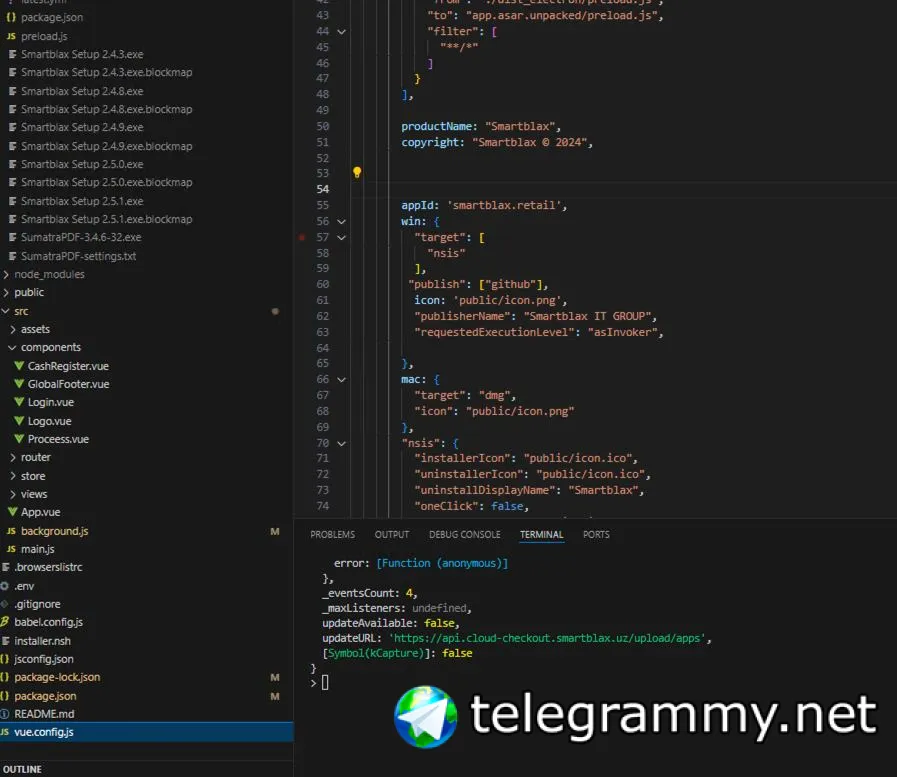
Тебе нужно указать ссылку до папки с 3 файлами, а не .yml непосредственно, то есть верным должно быть https://api.cloud-checkout.smartblax.uz/upload/apps
Denis
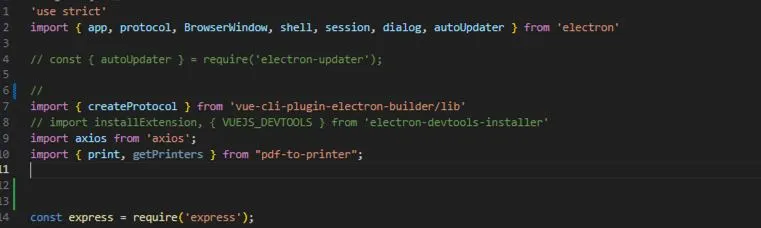 Георгий
Я бы еще кое-чего убрал из метода автообновления, но к самому обновлению прила это не относится
Denis
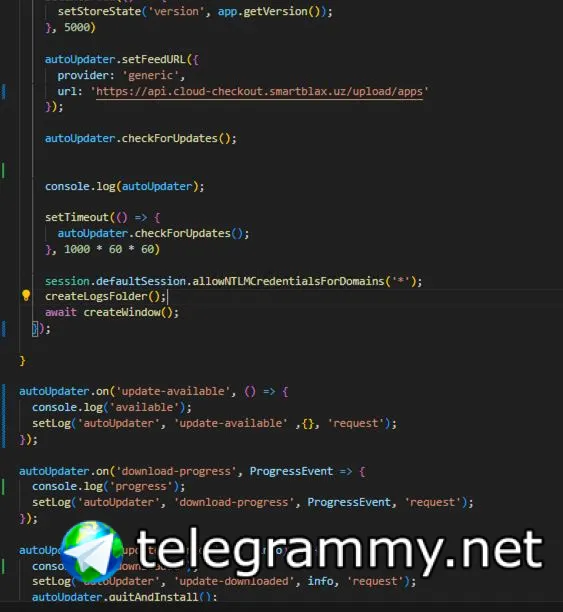 Denis
Denis
у меня почему -то не срабатывает события
Георгий
Denis
ни одно(
Denis
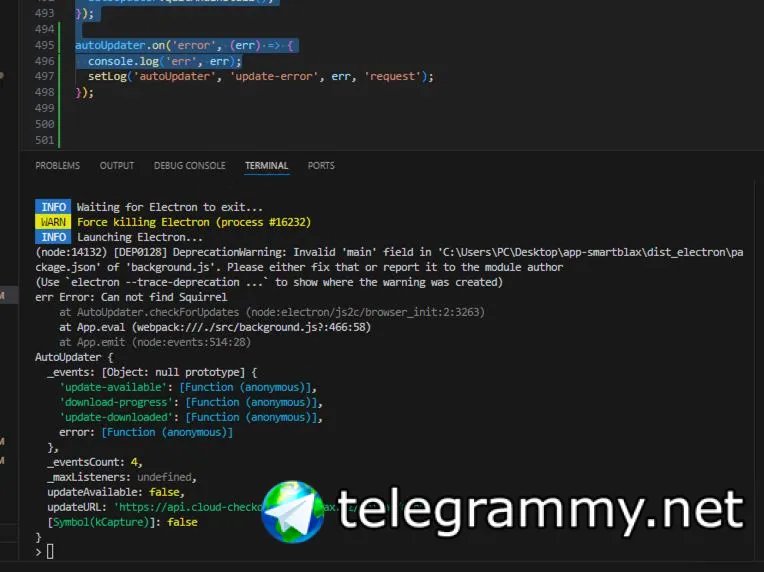 Denis
Denis
а вот на error сработал
Denis
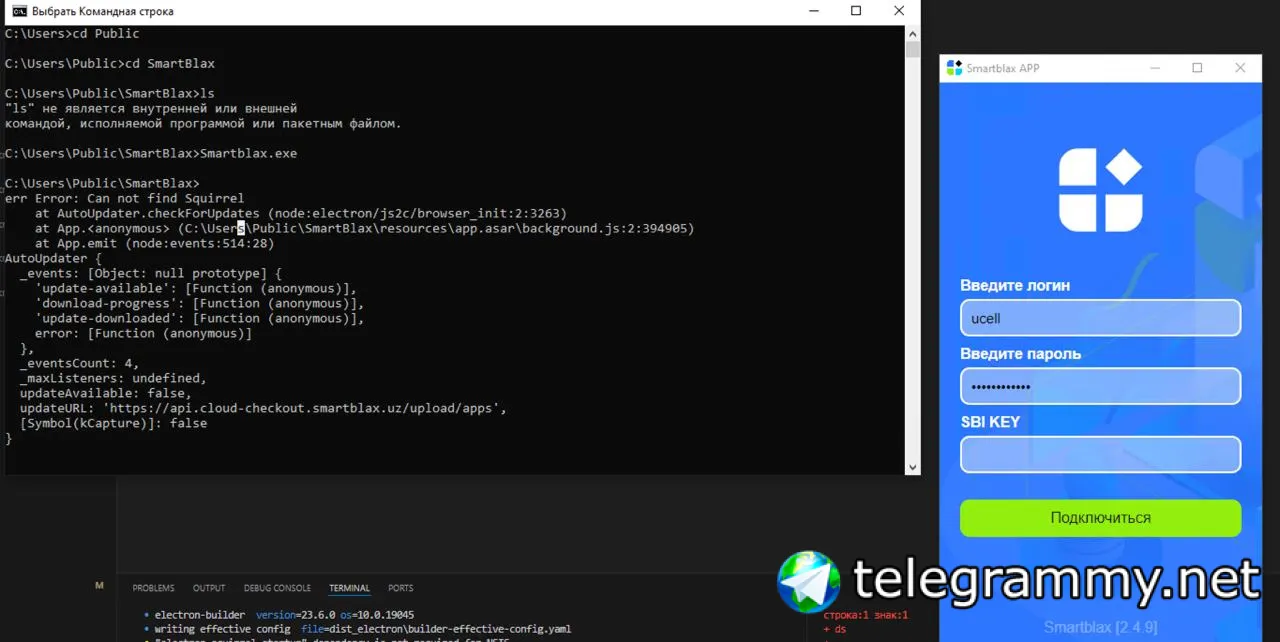
err Error: Can not find Squirrel
Георгий
В условном app.whenReady?
Denis
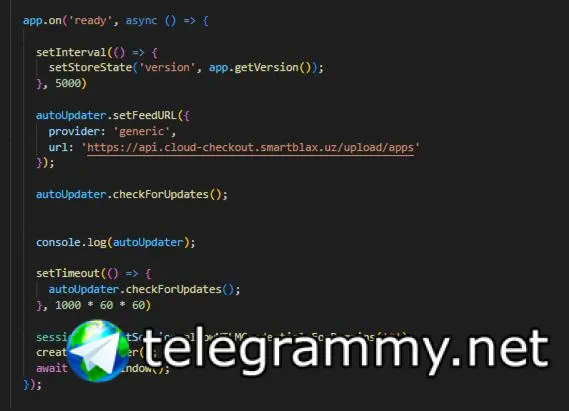 Георгий
Denis
Георгий
Denis
 Георгий
No
Георгий
Георгий
No
я не уверен, но вроде такая ошибка стреляет, если ты пытаешь из девелопа проверить
No
попробуй собери билд и проверь в нем
Георгий
попробуй собери билд и проверь в нем
Вот только начал писать, что нужно попробовать сбилдить и установить
Denis
сейча попробую
Георгий
Плюс, я не уверен, но по моему в update-available нужно вызвать autoUpdater.downloadUpdate()
Георгий
По крайней мере у себя в приле я его вызываю
Denis
собтиые ошибки сработало
No
Плюс, я не уверен, но по моему в update-available нужно вызвать autoUpdater.downloadUpdate()
100% =)
у него в update-available и download-progress только логи сейчас)
Denis
через cmd ща запущу)
Георгий
100% =)
у него в update-available и download-progress только логи сейчас)
По download-progress не в курсе, не смотрел как этот листенер работает
Denis
 Denis
Denis
squirrel (
Георгий
Denis
да, это установщик
Denis
т.е, я установил, потом запустил
Denis
err Error: Can not find Squirrel
может мне нужно что-то установить надо?)
Георгий
err Error: Can not find Squirrel
может мне нужно что-то установить надо?)
Сомнительно, я тут нашел в гите баг зарепорченный этот, чисто для интереса, попробуй создать свой экземпляр autoUpdater
Георгий
По типу такого
const autoUpdater = new NsisUpdater({
provider: 'generic',
url: 'https://api.cloud-checkout.smartblax.uz/upload/apps'
});
Георгий
По типу такого
const autoUpdater = new NsisUpdater({
provider: 'generic',
url: 'https://api.cloud-checkout.smartblax.uz/upload/apps'
});
При такой записи setFeedURL не нужен