 Phil
Phil


wait the partition or zfs ?
Anonymous
idk dead is dead to me.
Phil
excuse me, I meant did the hardware die or is it only the software part ?
Anonymous
it wouldn't boot back up
Anonymous
there been so many updates, upgrades, depends changes. me » back up all my stuff. install 13 clean
Anonymous
on udf unless ya got some reason for zfs
 Fred
Fred
i Tried Fdisk from Shell but it says Some Unrelated Errors
ill try again and Send The Errors with parted and fdisk
For FreeBSD, you might use tools
gpart show
gpart status
gpart list
geom disk list
camcontrol dev list
man gpart
man geom
Fred
there is a command sequence to write boot0 to the MBR and then a boot1. Read the FreeBSD handbook for more details.
In GhostBSD, we use rEFInd boot manager to boot the GhostBSD kernel.
 #ʍʀ.Áʟɨ
I Figured out whats my problem
Fred
I Figured out whats my problem
Go ahead and explain. I like to learn. Glad you are learning about FreeBSD.
#ʍʀ.Áʟɨ
 #ʍʀ.Áʟɨ
#ʍʀ.Áʟɨ
#ʍʀ.Áʟɨ
But i can modify stuff on the upper side
#ʍʀ.Áʟɨ
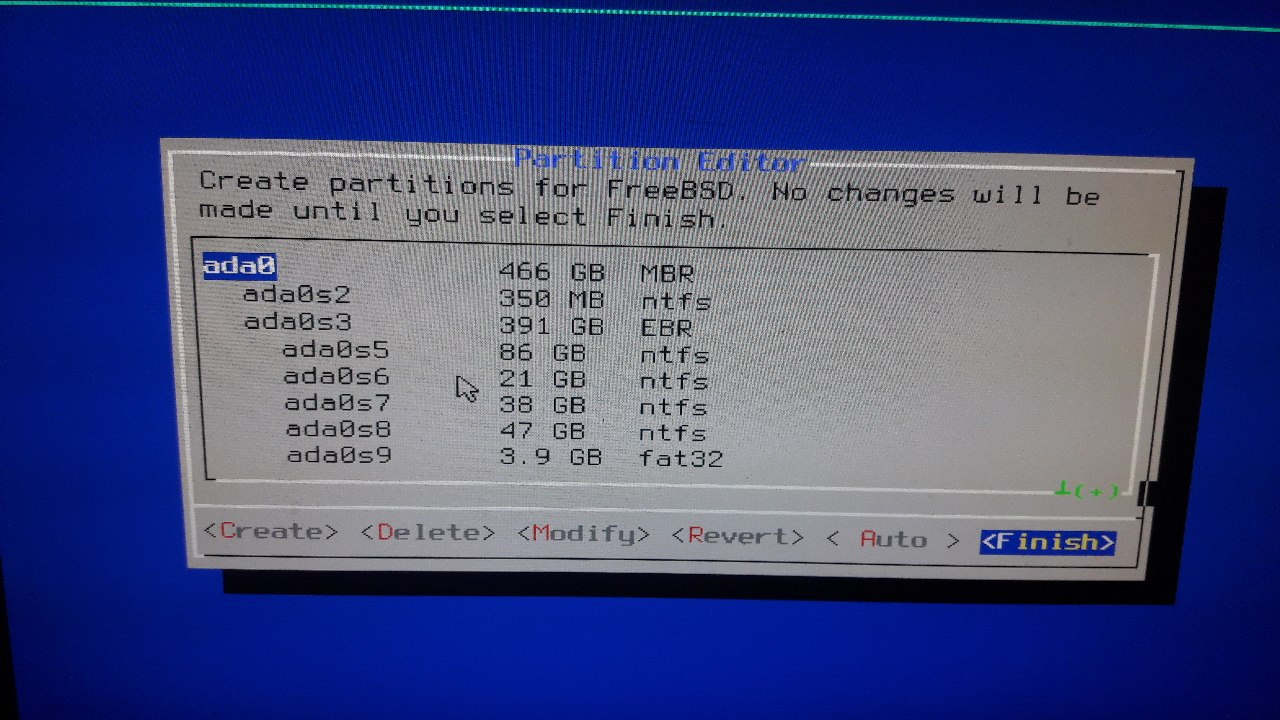
It makes logical partitions
Fred
I read some where that FreeBSD supports 4 primary partitions, and NO logical partitions. So, GPT and UEFI are better . GPT supports 128 partitions, UEFI needs one FAT32 partition 50 MegaBytes or larger in size. for ESP .
you could buy a 64 or 128 GB USB 3.0 and install your FreeBSD to that and boot from that device.
Fred
I did this with GhostSBD 13.0. Which I am using on a 128 GB usb 3.0 flash drive.
 Lee
Lee
who kowns if i add log to zroot ,kernel will panic
Lee
this must be a bug
𝚂𝚑𝚊𝚢𝚊𝚗
hey guys, how can I create a bootable windows usb from FreeBSD ?
dd doesn't work.
Anonymous
hey guys, how can I create a bootable windows usb from FreeBSD ?
dd doesn't work.
because the windows ISO is just a bunch of files, it doesnt contain any filesystem.
Anonymous
here's what you do:
Anonymous
create a usb with mbr parition table
make a primary fat32 partition
then mount the iso and copy all of it's files into the fat32 partition
𝚂𝚑𝚊𝚢𝚊𝚗
𝚂𝚑𝚊𝚢𝚊𝚗
create a usb with mbr parition table
make a primary fat32 partition
then mount the iso and copy all of it's files into the fat32 partition
This disc contains a "UDF" file system and requires an operating system
this is message of mounted windows iso.
Andriy
hey guys, how can I create a bootable windows usb from FreeBSD ?
dd doesn't work.
https://forums.freebsd.org/threads/creating-a-windows-10-bootable-usb-stick-using-freebsd.77429/
Anonymous
 Anonymous
I don't want to install
Anonymous
Like those raspberry pi images?
Anonymous
Anonymous
Both qcow2 and raw should - last I ran on 12.2 - run on a USB as a live-cd.
Anonymous
 Badugar
Both qcow2 and raw should - last I ran on 12.2 - run on a USB as a live-cd.
QCOW as a live-cd? I've only dd'ed the raw images to sticks so far
Anonymous
QCOW as a live-cd? I've only dd'ed the raw images to sticks so far
I think dd can detect and convert them. I used raw image and it worked
Null
Transfer files from Android using gmtp
In this short guide, kevometric shows how to connect an Android phone to a FreeBSD machine, and how to transfer files using gmtp.
—kevometric channel:
https://www.youtube.com/channel/UCNRj3XjDWfbw2DvIIpelUbQ
—gmtp project:
gmtp.sourceforge.io
Anonymous
Hey guys , is it a good idea to install FreeBSD on my main hardware and delete Linux ? 😅
I'm looking for a more secure operating system than Linux.
But i have never tried FreeBSD on my hardware (i tested FreeBSD, 3 times on Qemu)
Is Dell Inspiron N4030 compatible with FreeBSD ?
Anonymous
Hey guys , is it a good idea to install FreeBSD on my main hardware and delete Linux ? 😅
I'm looking for a more secure operating system than Linux.
But i have never tried FreeBSD on my hardware (i tested FreeBSD, 3 times on Qemu)
Is Dell Inspiron N4030 compatible with FreeBSD ?
be brave go forward ....... after back ups.
Anonymous
Hey guys , is it a good idea to install FreeBSD on my main hardware and delete Linux ? 😅
I'm looking for a more secure operating system than Linux.
But i have never tried FreeBSD on my hardware (i tested FreeBSD, 3 times on Qemu)
Is Dell Inspiron N4030 compatible with FreeBSD ?
If you're after security, go for openbsd
Anonymous
If you're after security, go for openbsd
I have tested openbsd but i prefer freebsd (but i have never tested them on my hardware) 😅
Anonymous
I have tested openbsd but i prefer freebsd (but i have never tested them on my hardware) 😅
then dd them to a flash drive and test drive them, qemu is not a good indicator if an OS will work on your machine
 Pouria
I think you can test FreeBSD in the live mode.
@Extensible_Matrix
Pouria
https://wiki.freebsd.org/Laptops
XADE
how to install pkgs in live cd ?
its read only
Anonymous
how to install pkgs in live cd ?
its read only
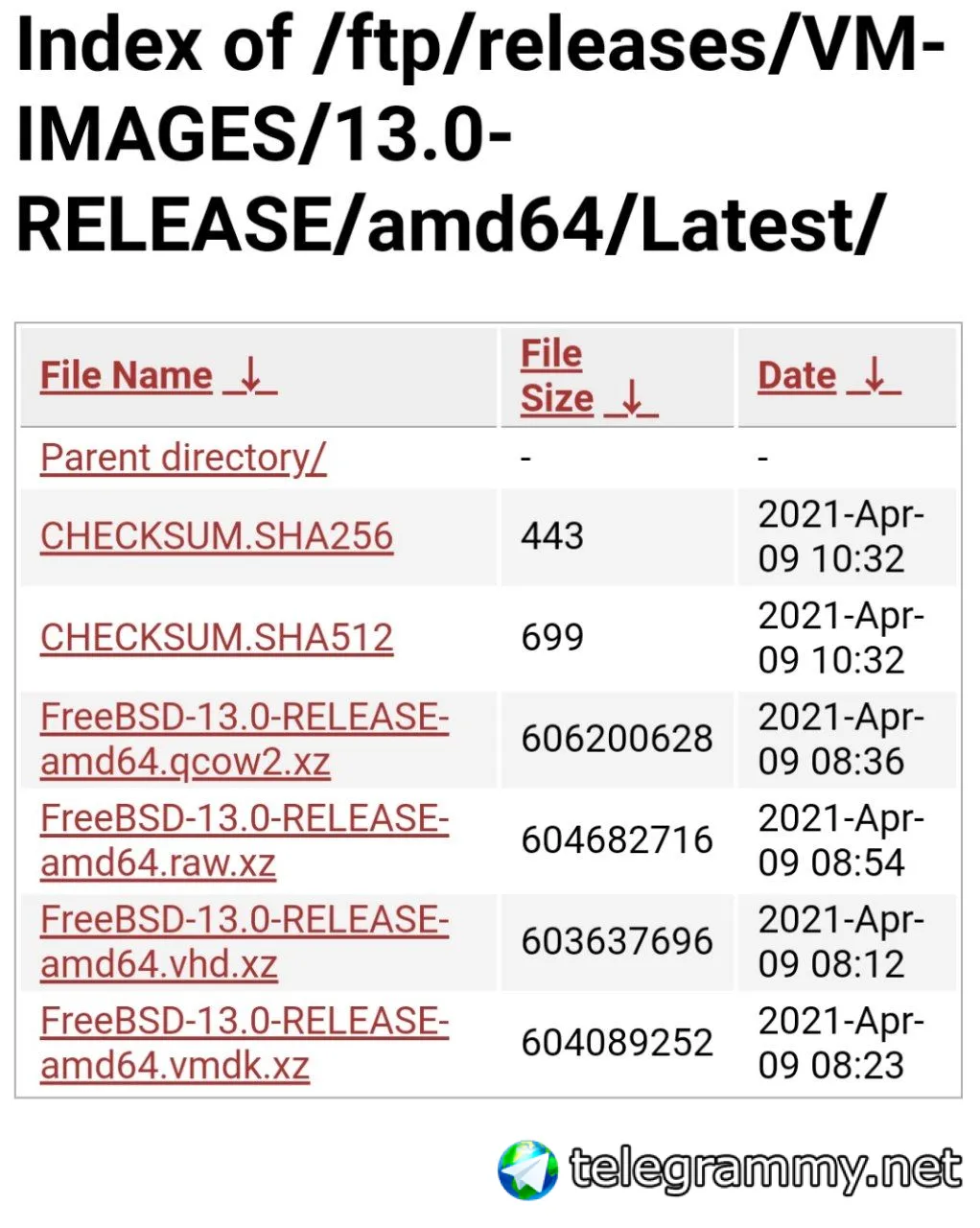
You can download "FreeBSD-13.0-RELEASE-amd64.raw.xz" and dd it to a usb
https://download.freebsd.org/ftp/releases/VM-IMAGES/13.0-RELEASE/amd64/Latest/
Anonymous
This one is better and it's not for vm https://download.freebsd.org/ftp/releases/CI-IMAGES/13.0-RELEASE/amd64/Latest/
XADE
 ɴꙩᴍᴀᴅ
ɴꙩᴍᴀᴅ
Hello and welcome @AhmadAlsamman
ɴꙩᴍᴀᴅ
Oh, it's weekend music sharing time?
I miss those days in the group
ɴꙩᴍᴀᴅ
https://www.youtube.com/watch?v=ZlZ_f1KIGGE
ɴꙩᴍᴀᴅ
https://www.youtube.com/watch?v=OCJi5hVdiZU
Anonymous
Hey guys is it possible to Dual boot Fedora Linux and FreeBSD on a MBR (non uefi/gpt) computer ??
I already have 3 partitions :
/dev/sda1 --> ext4 --> for storing my Fedora Linux backup files (40 GiB)
/dev/sda2 --> btrfs with Luks 2 --> Fedora Linux (100 GiB) (/)
/dev/sda3 --> ext4 (512 MiB) (/boot)
ɴꙩᴍᴀᴅ
I've always used separate disks for that. Maybe some guide like this dual-booting FreeBSD can help you @Extensible_Matrix
Anonymous
I've always used separate disks for that. Maybe some guide like this dual-booting FreeBSD can help you @Extensible_Matrix
Thank you 👌
Do i need to make a separate slice (partition) for /boot in FreeBSD or a single partition for everything is enough ?? (MBR has the 4 partition limit)
ɴꙩᴍᴀᴅ
One partition for FreeBSD should be fine. It may create separate partitions inside the one you specify for it
 Krond
Krond
Yeah, there was old boot0 block that allowed selecting which MBR partition to boot from.
ɴꙩᴍᴀᴅ
I'm trying to recover some data from a external disk that has FreeBSD installation on it.
So far I've managed to access the partition where zfs is located by doing:
$ doas zpool import -f zroot zroot02 -d /dev/da0p4 -R /mnt/tmp/
It mounts, but I can't locate /etc directory.
Is there a way to do so?
Andriy
I'm trying to recover some data from a external disk that has FreeBSD installation on it.
So far I've managed to access the partition where zfs is located by doing:
$ doas zpool import -f zroot zroot02 -d /dev/da0p4 -R /mnt/tmp/
It mounts, but I can't locate /etc directory.
Is there a way to do so?
Check zfs attributes, there was something like noautomount
Andriy
For root volume where etc is located
Andriy
Post in thread 'Trying to access root directory of another system's root disk'
https://forums.freebsd.org/threads/trying-to-access-root-directory-of-another-systems-root-disk.63453/post-366916
Andriy
The problem is that the installer sets the canmount option to false for the root filesystem and that results in the filesystem not being automatically mounted the very moment you import the ZFS pool.
ɴꙩᴍᴀᴅ
The problem is that the installer sets the canmount option to false for the root filesystem and that results in the filesystem not being automatically mounted the very moment you import the ZFS pool.
Oh, now I get it (kind of). I imported the pool but didn't mount it.
Doing
$ doas zfs mount zroot02/ROOT/default
completes the mounting. Now I can recover .conf and .rules from /etc.
Thank you so much