 Null
Null


Perl Programming Language | An introduction tutorial
Perl is a highly capable, feature-rich programming language with over 30 years of development, present in most (if not all) *nix systems.
In this video, Derek Banas will teach you all the basics plus pragmas, scalars, arrays, hashes, printf, print, math functions, conditionals, boolean operators, if, elsif, else, unless, ternary operator, looping, for, foreach, while, do while, reading input, given, strings functions, s///, ranges, slice, sort, push, pop, join, subroutines, recursive subroutines, packages, object oriented Perl and so much more.
Perl main site:
https://www.perl.org/
Derek Banas channel:
https://www.youtube.com/channel/UCwRXb5dUK4cvsHbx-rGzSgw
 Pouria
Andrey
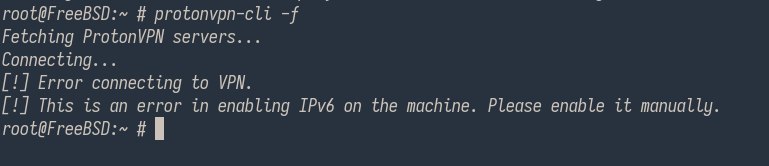
I installed again the protonvpn-cli and i ran the # protonvpn-cli c command and i chose a server, after a while i got Enable ipv6 manually error, and i enabled ipv6(some options in /etc/rc.conf file) and it did not work again.
And i downloaded the openvpn configs from my protonvpn profile, and i ran # openvpn file.ovpn but it did not work.
What should i do?
Andriy
i did nothing with ipv6
Pouria
 Neruq
Neruq
At present, which model of 8-core 3.20 HGz or higher processor will be compatible with FreeBSD and support all drivers?
Pouria
 Pouria
When i enable ipv6 i got this error again.
Pouria
login argument is invalid option.
Pouria
# protonvpn-cli login
[!] Invalid input: login
Pouria
Does not work.
Pouria
[!] Invalid input: login
Pouria
Which command did you run when installing the protonvpn-cli ?
Andriy
pkg install
Andriy
protonvpn-cli
Andriy
U can't use proton w/o login
Andriy
protonvpn-cli login <your registered proton username>
Pouria
protonvpn-cli login <your registered proton username>
:(
Does not any login option/argument in protonvpn-cli.
Pouria
And i give my OpenVPN/IkevVPN username and password.
Pouria
But does not work.
Andriy
And i give my OpenVPN/IkevVPN username and password.
For protonvpn you need your human proton username and password not special like in openvpn and ikev2
Pouria
For protonvpn you need your human proton username and password not special like in openvpn and ikev2
I give my OpenVPN/IkevVPN username and password in Arch Linux and it works.
Pouria
In the input prompt it wants OpenVPN/IkevVPN username and password.
Andriy
Ok, have you tried protonvpn-cli -m ?
Pouria
Yes.
I run it now and it does not work again.
Pouria
I got above error again.
Andriy
Was there server list, what did you select?
Pouria
Do you know any free vpn?
Pouria
I can not pay for VPN at the moment.
Andriy
afaik proton is the only you can trust from non-tor solutions.
Pouria
afaik proton is the only you can trust from non-tor solutions.
OH.
There is no solution for my problem.
Pouria
I will switch to 13-STABLE release soon.
Pouria
And i will test it again.
Pouria
is FreeBSD-12.2-STABLE outdated?
Andriy
I have used proton on 12 w/o any problems 🤷🏻♂
Pouria
What did you do for installing protonvpn-cli ?
Could you say?
Andriy
Nothing special
Andriy
Really
Pouria
Nothing special
$ protonvpn-cli --init
Enter OpenVPN/IKev2VPN username: .......
Enter .... Password: ......
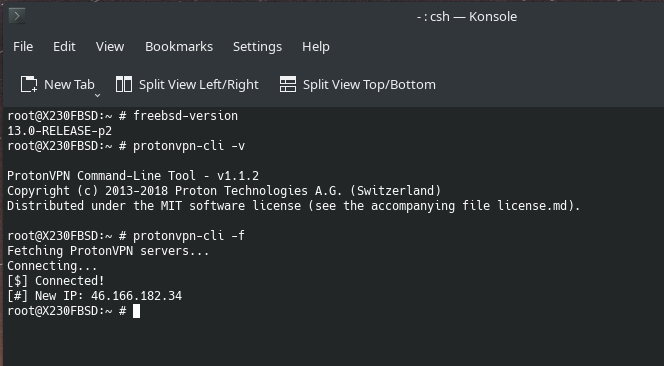
$ protonvpn-cli -f
And it works?
Andriy
Or you can use -m to choose preferred server and than protonvpn-cli -l to connect to the same server
 Mostafa
Help...
How to add agent freebsd to solarwinds?
 Kueppo
Perl Programming Language | An introduction tutorial
Perl is a highly capable, feature-rich programming language with over 30 years of development, present in most (if not all) *nix systems.
In this video, Derek Banas will teach you all the basics plus pragmas, scalars, arrays, hashes, printf, print, math functions, conditionals, boolean operators, if, elsif, else, unless, ternary operator, looping, for, foreach, while, do while, reading input, given, strings functions, s///, ranges, slice, sort, push, pop, join, subroutines, recursive subroutines, packages, object oriented Perl and so much more.
Perl main site:
https://www.perl.org/
Derek Banas channel:
https://www.youtube.com/channel/UCwRXb5dUK4cvsHbx-rGzSgw
I Like the fact that we all have an interest in perl, today people are more focus on slow and bloated languages like python.
Mostafa
🙏
 The Uncle
https://twitter.com/marciahofmann/status/1403077312598265857?s=09
The Uncle
Someone may find joy at this position, there are over qualified for that position
Guillermo
Does somebody has Brave Browser running?
Anonymous
Hello everybody. I have a problem with nomadbsd. Can't detect my laptop's touchpad and wifi chip.
 ɴꙩᴍᴀᴅ
ɴꙩᴍᴀᴅ
Hello and welcome @Anvar_Alimov
ɴꙩᴍᴀᴅ
NomadBSD is based on FreeBSD but they add in between steps.
Most accurate way to get a correct (and maybe faster) answer would be asking in their forums.
You can however, try the vanilla method.
First, open a terminal emulator and list your hardware with:
$ pciconf -lv
If you already know your hardware, load the driver(s) at
/boot/loader.conf
Once you have your touchpad and wifi drivers you can setup WiFi via wpa supplicant editing (or creating if it doesn't exist yet) the following file:
/etc/wpa_supplicant.conf
 Mitidzi
Hi! Does anyone know how this issue was resolved? https://forums.freebsd.org/threads/bhyve-guest-image-file-vs-usb-ssd.76293/
 Rberto
@n0madcoder
Anonymous
Hello
Anonymous
I want to connect to the internet in nomad bsd via USB, but I can't
Anonymous
nomad bsd is free bsd base
ɴꙩᴍᴀᴅ
Yes it is, with some custom flavored specs but FreeBSD base.
I'd suggest you to make a little log with:
-system specs
-internet usb specs
-what you've already tried
-what the OS tells back
ɴꙩᴍᴀᴅ
We have here a good NomadBSD user, @Finster_Fred and a dedicated NomadBSD group at Telegram https://t.me/NomadBSD_public
Where you might head to solutions quicker too.
Anonymous
I want to connect to the internet using Android and USB
Anonymous
Andriy
31.4. USB Tethering
https://people.freebsd.org/~rodrigc/doc/handbook/network-usb-tethering.html
Andriy
Looks like a simple task