 Anatoliy


You got like this
 Alexander
select is the function that creates SQL query. It has nothing to do with Json serialization.
Anatoliy
with db_session:
ps = select(p for p in PaymentSource)[:]
print(ps)
Anatoliy
i know
Alexander
So you fetch your results. Then use to_dict() and json.dumps(...) with providing JSONEncoder which you can get from that stackoverflow link.
Anatoliy
On Object?
Anatoliy
Can i put it on list objects?
Anatoliy
or i need get object then convert to_dict and then put new list in json_dump with function?
Alexander
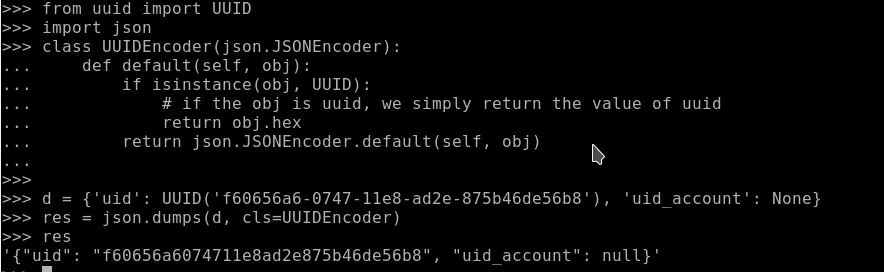 Anatoliy
Yes it worked but when i need json dump list i need convert to_dict all object and put in together in new list then use json dump?
Anatoliy
And how do it with child element in my query list?
Alexander
with db_session:
ps = select(p for p in PaymentSource)[:]
result = [p.to_dict() for p in ps]
Try replace last line with result = json.dumps([p.to_dict() for p in ps], cls=UUIDEncoder)
 Alexander
something like that:
def custom_encoder(value):
if isinstance(value, UUID):
return value.hex
raise TypeError(value)
with db_session:
ps = select(p for p in PaymentSource)[:]
raw_data = [p.to_dict() for p in ps]
s = json.dumps(raw_data, default=custom_encoder)
Anatoliy
Yep for this it worked. But if i add for example table via foreign key? It should work?
Alexander
if UUID serialization was the only issue - it should work.
Anatoliy
okay thanks
Alexander
In practice, for serializing complex JSON data you may need to write something like this
with db_session:
# retrieve objects
students = select(s for s in Student)[:]
# prepare raw dicts:
data = [
{
'id': s.id,
'uuid': s.uuid.hex,
'name': s.name,
'birth_data': s.birth_date.isoformat(),
'group': s.group.id,
'grades': [
{
'id:' grade.id,
'subject': grade.subject.name,
'value': grade.value,
}
for grade in s.grades
]
}
for s in students
]
# make JSON from raw dicts
json_data = json.dumps(data)
I think it is not pretty, and after we finish work on migrations I want to do something with JSON
Anatoliy
yes it really good thing
Anatoliy
In practice, for serializing complex JSON data you may need to write something like this
with db_session:
# retrieve objects
students = select(s for s in Student)[:]
# prepare raw dicts:
data = [
{
'id': s.id,
'uuid': s.uuid.hex,
'name': s.name,
'birth_data': s.birth_date.isoformat(),
'group': s.group.id,
'grades': [
{
'id:' grade.id,
'subject': grade.subject.name,
'value': grade.value,
}
for grade in s.grades
]
}
for s in students
]
# make JSON from raw dicts
json_data = json.dumps(data)
I think it is not pretty, and after we finish work on migrations I want to do something with JSON
Also may add new integration layer with marshmallow? Like this https://github.com/marshmallow-code/marshmallow-sqlalchemy
 Permalink Bot
Also may add new integration layer with marshmallow? Like this https://github.com/marshmallow-code/marshmallow-sqlalchemy
Permanent link to the marshmallow-code/marshmallow-sqlalchemy project you mentioned. (?)
Anatoliy
I try use marshmallow with Pony Orm it work out of box
 Alexey
I try use marshmallow with Pony Orm it work out of box
is there anything you cannot do with Marshmallow, but would like to?
Anatoliy
for sqlalchemy exist simple thin layer
Anatoliy
for example
Anatoliy
class Author(db.Model):
id = db.Column(db.Integer, primary_key=True)
name = db.Column(db.String(255))
Anatoliy
then with layer
Anatoliy
class AuthorSchema(ma.ModelSchema):
class Meta:
model = Author
Anatoliy
layer just get fields from model
Alexey
I mean do you need a more convenient or powerful tool for to/from JSON @norguhtar ?
Anatoliy
yep
Anatoliy
like java :D
Alexey
not sure I understand
Anatoliy
In java serializator really smart and powerfull. It just eating any object and return correct json
Alexey
Ah, I see
But it covers Java to Java serialization/deserislization
And in our case we usually serialize at the backend and deserialize at the frontend
Alexey
Python to JavaScript and back
Anatoliy
Yep i need current this case
Anatoliy
And now i think use marshmallow right way
Alexey
Do you encounter any situation when marshmallow is not enough or it is not that convenient?
Anatoliy
i think marshmallow enough for this case
Alexey
I see
Alexey
Thanks
 Christian
Three cheers for activity in the github repo! Keep it going! 🥳
Alexey
🔥
Alexander
There is actually a lot of activity behind the scenes
Christian
That's great to hear! Really excited for what you have in the pipeline.
 Anonymous
Hi Alexey , on Januar 18 there was a discussion about the online editor's Cascade delete setting still being broken, False becomes True in the python code export, or rather the value isn't stored in the online editor. Back then, you said it's fixed, but it seems to be broken again
Alexey
Hi Alexey , on Januar 18 there was a discussion about the online editor's Cascade delete setting still being broken, False becomes True in the python code export, or rather the value isn't stored in the online editor. Back then, you said it's fixed, but it seems to be broken again
Thanks for reporting, will check and fix that
Anonymous
☺️
Anonymous
 Alexey
Alexander
Roma
Alexey
Alexander
Roma
Hi! Where can i read about pony user and role groups and access rule concept?
Alexander
Hi! Role groups and access rules were an experiment which never been released officially. This concept turned out to be too complex to use
Roma
@metaprogrammer ok, thank you
Roma
Is it possible to return value from async def function/coroutine decorated by orm.db_session? I try but get None. This is my test code
models.py
from pony import orm
db = orm.Database()
class Data(db.Entity):
id = orm.PrimaryKey(int, auto=True, sql_type='serial')
def init(create_tables=False):
db.bind(...)
db.generate_mapping(create_tables=create_tables)
app.py
import logging
from fastapi import FastAPI
from starlette.responses import Response
from pony import orm
import models
app = FastAPI()
log = logging.getLogger()
log.setLevel('DEBUG')
models.init(create_tables=True)
models.orm.set_sql_debug(debug=True, show_values=True)
@orm.db_session
async def get_data():
models.Data()
models.db.flush()
data = models.Data.select()[:]
log.info('get_data: %s', data)
return data
@app.get('/test')
async def test(response: Response):
data = await get_data()
log.info('test: %s', data)
return data
console output
INFO: Uvicorn running on http://0.0.0.0:80 (Press CTRL+C to quit)
INFO: Started reloader process [1]
could not connect to server: Connection refused
Is the server running on host "db" (192.168.224.2) and accepting
TCP/IP connections on port 5432?
INFO: Started server process [7]
INFO: Waiting for application startup.
INFO: ('10.0.2.2', 58674) - "GET /docs HTTP/1.1" 200
INFO: ('10.0.2.2', 58674) - "GET /openapi.json HTTP/1.1" 200
INFO: GET NEW CONNECTION
INFO: INSERT INTO "data" DEFAULT VALUES RETURNING "id"
INFO: SELECT "d"."id"
FROM "data" "d"
INFO: get_data: [Data[1]]
INFO: COMMIT
INFO: RELEASE CONNECTION
INFO: test: None
INFO: ('10.0.2.2', 58674) - "GET /test HTTP/1.1" 200
Roma
contextmanager "with orm.db_session" works but documentation says do not use it with async coro
 Ghulam
hi, is there limitation of using nested db_session in entity instantiation..
i have about 3 nested object instantiation but always getting this error
pony.orm.core.ERDiagramError: Mapping is not generated for entity 'OAuth2AuthorizationCode'
any clue?
thank in advance
Ghulam
btw I tried to instantiate that object in python shell it run okay..
Anonymous
Hello. I believe I found a bug:
>>> from pony.orm import *
>>> db = Database()
>>> class Test(db.Entity):
... pass
...
>>> db.bind(provider='sqlite', filename=':memory:')
>>> db.generate_mapping(create_tables=True)
>>> test_entity = Test()
>>> Test.select()[:]
[Test[1]]
>>> Test.select().delete(bulk=True)
1
>>> Test.select()[:]
[Test[1]]
Anonymous
The second select()[:] should return empty list, since the only entity has been deleted, but instead it returns a result from the cache, which appears to not have been updated.
Alexander
Thanks
Anonymous
Should I create an issue on GitHub or is it enough here for such a minor thing?
Alexander
I think it is not necessary to create an issue, we should fix it today
Anonymous
Great, thanks!
Anonymous
Just out of curiosity: do you have any corporate sponsors of Pony right now? Because I don't see any on the front page.
Anonymous
Well, I don't even see any backers on GitHub repo, which is sad. Did you forget to put them or will I be the first?
Anonymous
that'd be so nice of you
Alexey
Well, I don't even see any backers on GitHub repo, which is sad. Did you forget to put them or will I be the first?
Hi Krysztof,
Here is the page with the Pony ORM respectful backers: https://github.com/ponyorm/pony/blob/orm/BACKERS.md
Permalink Bot
Hi Krysztof,
Here is the page with the Pony ORM respectful backers: https://github.com/ponyorm/pony/blob/orm/BACKERS.md
Permanent link to the file BACKERS.md mentioned. (?)
Alexey
Also, after the migrations release we are going to add Pony ORM Priority Support which provides 1 and 2 business days email support in case of any unforeseen issues
and Custom Development for Python/PonyORM/AWS/TypeScript/React stack
 Anzor
Anzor
> after the migrations release
I hope at least my son will meet that release :D
Valentin
+
Alexander
You also will
Anonymous
Is there a way to avoid the expensive iterrows() in writing to DB record by record from a pandas DataFrame like that:
for index, row in df.iterrows():
i = EntityX(attribute1=row.attr1col, attribute2=row.attr2col)
Alexander
probably you can use itertuples:
for val1, val2, val2 in df.itertuples():
obj = EntityX(attr1=val1, attr2=val2)
You can also avoid entity instance creation altohether by inserting row directly into database, it should be much faster:
table_name = EntityX._table_
for val1, val2, val2 in df.itertuples():
db.insert(table_name, column1=val1, column2=val2)
Anonymous
Thank you for your hints @metaprogrammer ! Inserting rows directly into the database works fine, yet got it only working with iterrows:
for index, row in df.iterrows():
db.insert(EntityX, column1=row.val1, column2=row.val2)
On the itertuples idea, I thought this should do it, but it doesn't:
for row in df.itertuples(index=False, name='Betriebszweig'):
i = row
The form of row is exactly what one would want, i.e. EntityX(col1=val1, col2=val2)
Yet to combine itertuples and db.insert, the form of row should be (EntityX/table_name, col1=val1, col2=val2), or could they also be handed over as positional arguments?
Alexander
db.insert doesn't know about table structure, so you need to pass column names to is as a keyword arguments. Or you can create a dict using zip function:
columns = ["col1", "col2", "col3"]
for row in df.itertuples():
db.insert(table_name, dict(zip(columns, row)))
Anatoliy
When i try select data
Anatoliy
pony.orm.sqltranslation.IncomparableTypesError: Incomparable types 'datetime' and 'NoneType' in expression: p.tsFrom <= tsTo
Anatoliy
i can't use None in compare?